


Scripting GUIs
Dynamic behavior is added to a GUIKit user interface by executing Wolfram Language code. This lets one part of the definition interact with another, for example, specifying the behavior when a button is clicked or a menu choice is made.
GUIKit definitions call the Wolfram Language with the Script[expr] expression; this can be placed in a definition as described in "Definition Building Blocks". Script defines an initially unevaluated block of Wolfram Language code. The Script symbol has the attribute HoldAllComplete. Script[expr] blocks in interface definitions are typically used either by themselves in the interface definitions to define common Wolfram Language functions used throughout the interface or as arguments to BindEvent["eventName",Script[expr]] to define Wolfram Language functions to execute when a particular interface event occurs. The use of Script[] in user interface definitions is in many ways identical to the techniques of supplementing HTML pages with JavaScript embedded code.
This example shows both of the common cases of Script[] usage. There is a standalone Script[] block that defines the Wolfram Language function printMessage[]and Script blocks attached to events of the button to execute the printMessage[] function whenever the events are triggered.
Here is a screen shot of what the user interface renders as on a typical platform.








You can create a working definition with just a button because the GUIKit framework has the convenient feature of automatically wrapping a definition with an appropriate window if the root widget of the definition is not already a window or frame, but is at least a widget that can be added to a window.
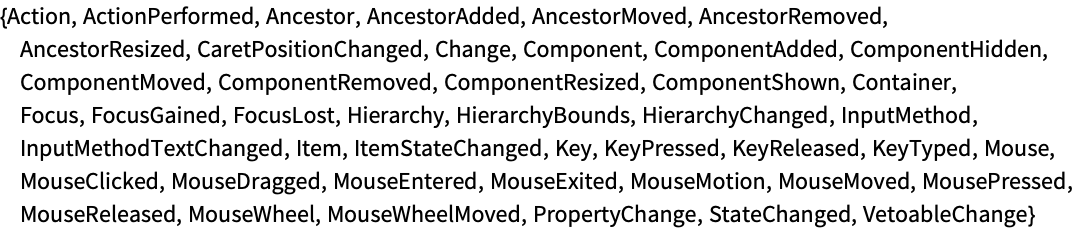
How can you learn the event names to use when attaching the scripts to the events of the button? If you have knowledge of the underlying Java event objects that are provided, you can determine the proper string name following Java naming conventions for the widget, or, if you interact with a running instance of the "Button" widget, you can query its list of valid names using the GUIInformation["widgetName"] function that works with GUIObject instances or within Script[] blocks.
This is just an alternate version that uses the fact that a no-argument GUIInformation[] or one dropping the first argument GUIObject can be called inside a Script[] block as well, since it inherits the contexted environment of the GUIObject it is running within.
If you have several different GUIs that all use the same script functionality, then you can place your code into a separate file and reference it from the Script definition with a ScriptSource option. This is discussed in the tutorials "Scoping" and "Deployment".