Getting Started with Web Services
| Loading the Package | Inspecting Web Service Functions |
| Installing a Web Service | Executing a Web Service Function |
| Naming a Web Service |
Loading the Package
Web Services Link is a Wolfram System add-on application. Before any functions from the package can be used, it must be loaded as follows.
Installing a Web Service
InstallService will install the web service operations defined by a supplied WSDL as Wolfram Language functions. The functions created are returned in a list.
Naming a Web Service
The functions created by InstallService are placed in a context based on the service name and port name specified by the WSDL. A user can change this context by supplying a valid Wolfram Language context to InstallService.
By default the context of a web service is added to the $ContextPath. This allows users to call the functions without having to specify the context. However, there is a danger that the functions installed by InstallService will collide with other functions already defined in the Wolfram Language on $ContextPath. If a user does not want the web service context added to $ContextPath, then the user should set AllowShortContext->False. If this option is set to False, then the entire context will need to be specified in order to call a function.
Inspecting Web Service Functions
$InstalledServices may be used to determine which web service functions are installed. This is a list of all the web service functions installed.
The usage message for each function may be inspected to discover how the function works. ?SymbolName may be used to get the usage message for a symbol. For instance, ?HelloWorld retrieves the usage message for HelloWorld. The usage message for a web service function is populated with the documentation provided by the WSDL.
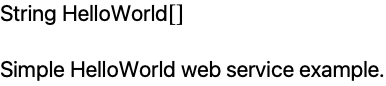
Each usage message contains a function signature that may be used to call the function. For instance, HelloWorld does not require any parameters and returns a string.
Executing a Web Service Function
The usage message should be a starting point for determining what to input as parameters and what to expect as a result. Once this is determined, the function may be executed. A web service function may be executed just like any other Wolfram Language function.