How to | Do an Integral
The Wolfram Language contains a very powerful system of integration. It can do almost any integral that can be done in terms of standard mathematical functions.
To compute the indefinite integral 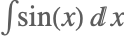 , use Integrate. The first argument is the function and the second argument is the variable:
For the definite integral 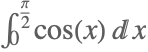 , the second argument is a list of the form {variable,lower limit,upper limit}:
To do the multiple integral 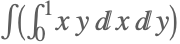 , use a mix of a variable and a range:
Alternatively, you can use Integrate twice:
Calculating the area of a circle is a classic calculus problem. An intuitive way to approach this is the integral 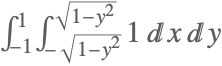 , which involves substitution:
Integrate gives exact answers to many improper integrals; for example, 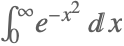 :
:
Suppose that there is no closed form for a definite integral; for example, 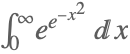 :
:
In that case, you can get an approximation with NIntegrate:
If you want a numerical result from the start, it is faster to use NIntegrate than to use Integrate and follow it with N.
This compares the time taken for the two methods:
Repeating the calculations is fast because of caching:
NIntegrate can also compute multiple integrals: