

Assert
Details
- Assertions are often placed in code to describe and check assumptions made by the programmer.
- By default, assertions are disabled in an ordinary Wolfram Language session, but are enabled in the Wolfram System debugger.
- On[Assert] enables assertions in a Wolfram Language session, and causes a message to be generated whenever an assertion fails.
- When Assert appears in a file, the name of the file and the line number at which it appears are by default automatically used as tags for the assertion.
- In the Wolfram Language debugger, the failure of an assertion by default generates a breakpoint.
- $AssertFunction gives a function to be applied to Assert[test,…] when test does not evaluate to True.
Examples
Basic Examples (3)
Define a function that contains an assertion depending on a temporary result as the computation runs:
This does not test the assertion since assertions are not enabled:
When assertions are enabled with On, a message is produced:

If you load a package that contains functions with assertions, the name of the package and line number is remembered:
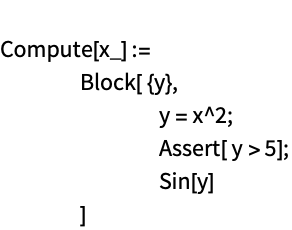
This shows how the line information and package name are stored in the Assert expression:


Now, if the assertion is triggered, the message tells you the name of the package and the line number where the assertion is located:

You can change the behavior when an assertion fails by assigning to $AssertFunction. This function throws an exception when an assertion fails:
Here the exception thrown by the assertion function is caught:
Text
Wolfram Research (2010), Assert, Wolfram Language function, https://reference.wolfram.com/language/ref/Assert.html.
CMS
Wolfram Language. 2010. "Assert." Wolfram Language & System Documentation Center. Wolfram Research. https://reference.wolfram.com/language/ref/Assert.html.
APA
Wolfram Language. (2010). Assert. Wolfram Language & System Documentation Center. Retrieved from https://reference.wolfram.com/language/ref/Assert.html