


BarChart
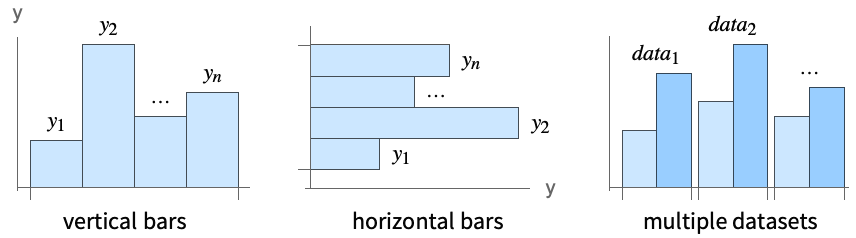
BarChart[{y1,y2,…,yn}]
makes a bar chart with bar lengths y1, y2, ….
BarChart[{…,wi[yi,…],…,wj[yj,…],…}]
makes a bar chart with bar features defined by the symbolic wrappers wk.
BarChart[{data1,data2,…}]
makes a bar chart from multiple datasets datai.
Details and Options
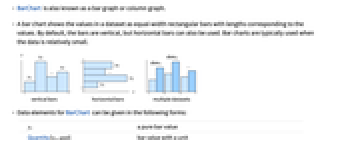
- BarChart is also known as a bar graph or column graph.
- A bar chart shows the values in a dataset as equal-width rectangular bars with lengths corresponding to the values. By default, the bars are vertical, but horizontal bars can also be used. Bar charts are typically used when the data is relatively small.
- Data elements for BarChart can be given in the following forms:
-
yi a pure bar value Quantity[yi,unit] bar value with a unit wi[yi,…] a bar with value yi and wrapper wi formi->mi a bar form with metadata mi Around[xi,ei] value xi with uncertainty ei - Data not given in these forms is taken to be missing, and typically yields a gap in the bar chart.
- Datasets for BarChart can be given in the following forms:
-
{e1,e2,…} list of elements with or without wrappers <k1e1,k2e2,…> association of keys and lengths TimeSeries[…],EventSeries[…],TemporalData[…] time series, event series, and temporal data WeightedData[…],EventData[…] augmented datasets w[{e1,e2,…},…] wrapper applied to a whole dataset w[{data1,data2,…},…] wrapper applied to all datasets - The following wrappers can be used for chart elements:
-
Annotation[e,label] provide an annotation Button[e,action] define an action to execute when the element is clicked Callout[e,label] display the element with a callout EventHandler[e,…] define a general event handler for the element Hyperlink[e,uri] make the element act as a hyperlink Labeled[e,…] display the element with labeling Legended[e,…] include features of the element in a chart legend Mouseover[e,over] make the element show a mouseover form PopupWindow[e,cont] attach a popup window to the element StatusArea[e,label] display in the status area when the element is moused over Style[e,opts] show the element using the specified styles Tooltip[e,label] attach an arbitrary tooltip to the element - In BarChart, Labeled, Callout and Placed allow the following positions:
-
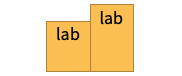
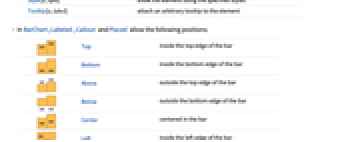
Top inside the top edge of the bar 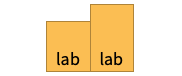
Bottom inside the bottom edge of the bar 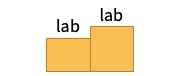
Above outside the top edge of the bar 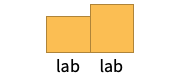
Below outside the bottom edge of the bar 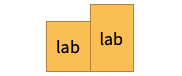
Center centered in the bar 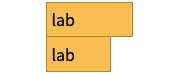
Left inside the left edge of the bar 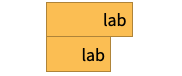
Right inside the right edge of the bar 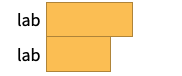
Before outside the left edge of the bar 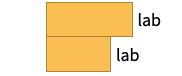
After outside the right edge of the bar 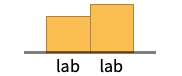
Axis on the axis 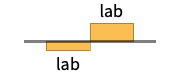
"Outside" outside the bar 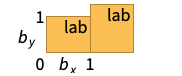
{{bx,by},{lx,ly}} scaled position {lx,ly} in the label at scaled position {bx,by} in the bar - BarChart has the same options as Graphics, with the following additions and changes: [List of all options]
-
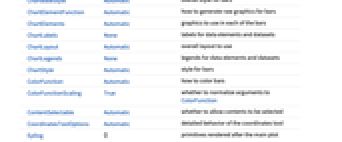
AspectRatio 1/GoldenRatio ratio of height to width Axes True whether to draw axes BarOrigin Bottom origin placement for bars BarSpacing Automatic fractional spacing between bars ChartBaseStyle Automatic overall style for bars ChartElementFunction Automatic how to generate raw graphics for bars ChartElements Automatic graphics to use in each of the bars ChartLabels None labels for data elements and datasets ChartLayout Automatic overall layout to use ChartLegends None legends for data elements and datasets ChartStyle Automatic style for bars ColorFunction Automatic how to color bars ColorFunctionScaling True whether to normalize arguments to ColorFunction IntervalMarkers Automatic how to render uncertainties IntervalMarkersStyle Automatic style for uncertainty elements Joined False whether to join bars LabelingFunction Automatic how to label bars LabelingSize Automatic maximum size of callouts and labels LegendAppearance Automatic overall appearance of legends PerformanceGoal $PerformanceGoal aspects of performance to try to optimize PlotTheme $PlotTheme overall theme for the chart ScalingFunctions None how to scale individual coordinates TargetUnits Automatic units to display in the chart - Possible settings for ChartLayout that show multiple datasets in a single display panel include:
-
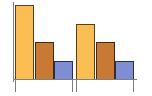
"Grouped" separate the data for each dataset 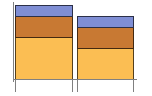
"Stacked" accumulate the data for each dataset 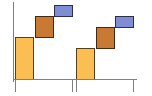
"Stepped" accumulate and separate the data for each dataset 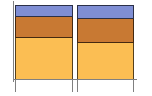
"Percentile" accumulate and normalize the data for each dataset 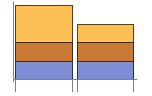
"Overlapped" overlap the data for each dataset - Possible settings for ChartLayout that show individual datasets in different panels include:
-
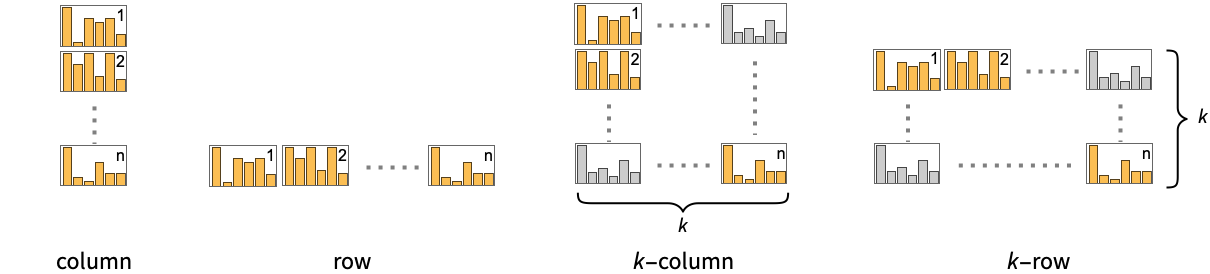
"Column" use separate charts in a column of panels "Row" use separate charts in a row of panels {"Column",k},{"Row",k} use k columns or rows {"Column",UpTo[k]},{"Row",UpTo[k]} use at most k columns or rows - The arguments supplied to ChartElementFunction are the bar region {{xmin,xmax},{ymin,ymax}}, the data value yi, and metadata {m1,m2,…} from each level in a nested list of datasets.
- A list of built-in settings for ChartElementFunction can be obtained from ChartElementData["BarChart"].
- The argument supplied to ColorFunction is yi.
- Style and other specifications from options and other constructs in BarChart are effectively applied in the order ChartStyle, ColorFunction, Style and other wrappers, ChartElements, and ChartElementFunction, with later specifications overriding earlier ones.
-
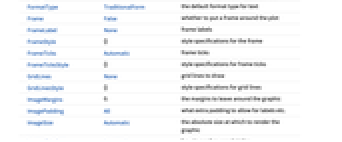
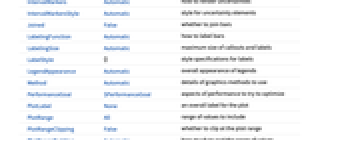
AlignmentPoint Center the default point in the graphic to align with AspectRatio 1/GoldenRatio ratio of height to width Axes True whether to draw axes AxesLabel None axes labels AxesOrigin Automatic where axes should cross AxesStyle {} style specifications for the axes Background None background color for the plot BarOrigin Bottom origin placement for bars BarSpacing Automatic fractional spacing between bars BaselinePosition Automatic how to align with a surrounding text baseline BaseStyle {} base style specifications for the graphic ChartBaseStyle Automatic overall style for bars ChartElementFunction Automatic how to generate raw graphics for bars ChartElements Automatic graphics to use in each of the bars ChartLabels None labels for data elements and datasets ChartLayout Automatic overall layout to use ChartLegends None legends for data elements and datasets ChartStyle Automatic style for bars ColorFunction Automatic how to color bars ColorFunctionScaling True whether to normalize arguments to ColorFunction ContentSelectable Automatic whether to allow contents to be selected CoordinatesToolOptions Automatic detailed behavior of the coordinates tool Epilog {} primitives rendered after the main plot FormatType TraditionalForm the default format type for text Frame False whether to put a frame around the plot FrameLabel None frame labels FrameStyle {} style specifications for the frame FrameTicks Automatic frame ticks FrameTicksStyle {} style specifications for frame ticks GridLines None grid lines to draw GridLinesStyle {} style specifications for grid lines ImageMargins 0. the margins to leave around the graphic ImagePadding All what extra padding to allow for labels etc. ImageSize Automatic the absolute size at which to render the graphic IntervalMarkers Automatic how to render uncertainties IntervalMarkersStyle Automatic style for uncertainty elements Joined False whether to join bars LabelingFunction Automatic how to label bars LabelingSize Automatic maximum size of callouts and labels LabelStyle {} style specifications for labels LegendAppearance Automatic overall appearance of legends Method Automatic details of graphics methods to use PerformanceGoal $PerformanceGoal aspects of performance to try to optimize PlotLabel None an overall label for the plot PlotRange All range of values to include PlotRangeClipping False whether to clip at the plot range PlotRangePadding Automatic how much to pad the range of values PlotRegion Automatic the final display region to be filled PlotTheme $PlotTheme overall theme for the chart PreserveImageOptions Automatic whether to preserve image options when displaying new versions of the same graphic Prolog {} primitives rendered before the main plot RotateLabel True whether to rotate y labels on the frame ScalingFunctions None how to scale individual coordinates TargetUnits Automatic units to display in the chart Ticks Automatic axes ticks TicksStyle {} style specifications for axes ticks
List of all options
Examples
open allclose allBasic Examples (4)
Scope (41)
Data and Layouts (15)
Items in a dataset are grouped together:
Datasets do not need to have the same number of items:
Nonreal data is taken to be missing and typically yields a gap in the bar chart:
The time stamps in TimeSeries, EventSeries, and TemporalData are ignored:
The values in associations are taken as the heights of the bars:
The weights in WeightedData are ignored:
The censoring and truncation information in EventData is ignored:
Use different layouts to display multiple datasets:
Stacked layouts are more compact in the horizontal direction:
Use Joined to indicate connections between data points:
Use a column of charts instead:
Wrappers (5)
Use wrappers on individual data, datasets, or collections of datasets:
Override the default tooltips:
Use any object in the tooltip:
Use PopupWindow to provide additional drilldown information:
Button can be used to trigger any action:
Styling and Appearance (8)
Use an explicit list of styles for the bars:
Use any gradient or indexed color schemes from ColorData:
Use color schemes designed for charting:
ChartBaseStyle can be used to set an initial style for all chart elements:
Style can be used to override styles:
Use any graphic for pictorial bars:
Use built-in programmatically generated bars:
For detailed settings use Palettes ▶ ChartElementSchemes:
Use a theme with detailed frame ticks and grid lines:
Use a theme with a high-contrast color scheme and edge-fading rectangles:
Labeling and Legending (13)
Use Labeled to add a label to a bar:
Use symbolic positions for label placement:
Provide categorical labels for the columns of data:
Use Placed to control the positioning of labels, using the same positions as for Labeled:
Use Callout to add a label to a bar:
Change the appearance of the callout:
Automatically position callouts:
Use callouts with stacked bars:
Provide value labels for bars by using LabelingFunction:
Use Placed to control placement and formatting:
Use Callout to create callouts:
Add categorical legend entries for the columns of data:
Use Legended to add additional legend entries:
Use Placed to affect the positioning of legends:
Options (133)
AspectRatio (3)
By default, BarChart uses a fixed ratio of height to width for the chart:
The ratio is not affected when the bars are horizontal:
Make the height the same as the width with AspectRatio1:
AspectRatioFull adjusts the height and width to tightly fit inside other constructs:
Axes (3)
Use AxesFalse to turn off axes:
Use AxesOrigin to specify where the axes intersect:
AxesLabel (4)

AxesOrigin (2)
AxesStyle (4)
BarSpacing (5)
ChartBaseStyle (5)
Use ChartBaseStyle to style bars:
ChartBaseStyle combines with ChartStyle:
ChartStyle may override settings for ChartBaseStyle:
ChartBaseStyle combines with Style:
Style may override settings for ChartBaseStyle:
ChartBaseStyle combines with ColorFunction:
ColorFunction may override settings for ChartBaseStyle:
ChartElementFunction (6)
Get a list of built-in settings for ChartElementFunction:
For detailed settings, use Palettes ▶ ChartElementSchemes:
This ChartElementFunction is appropriate to show the global scale:
Write a custom ChartElementFunction:
Use metadata passed on from the input, in this case charting the data:
Built-in element functions may have options; use Palettes ▶ ChartElementSchemes to set them:
ChartElements (9)
Create a pictorial chart based on any Graphics object:
Use a stretched version of the graphic:
Use explicit sizes for width and height:
Without AspectRatio->Full, the original aspect ratio is preserved:
Using All for width or height causes that direction to stretch to the full size of the bar:
Use a different graphic for each column of data:
Use a different graphic for each row of data:
Styles are inherited from styles set through ChartStyle etc.:
Explicit styles set in the graphic will override other style settings:
The orientation of the pictorial graphic is unaffected by BarOrigin:
ChartLabels (10)
By default, labels are placed in the axis:
Labeled wrappers in data will place additional labels:
Use Placed to control label placement:
Symbolic positions outside the bar:
Coordinate-based placement relative to a bar:
Place all labels at the upper-right corner and vary the coordinates within the label:
Use the third argument to Placed to control formatting:
By default, labels are associated with columns of data:
Associate labels with rows or datasets:
Use Placed to affect placements:
Use Callout to connect the labels to the bars:
ChartLayout (5)
ChartLayout is grouped by default:
The stacked layout can effectively display many datasets:
Show changes for different categories by setting Joined->True:
Place individual charts in a column:
ChartLegends (8)
Generate a legend based on chart style:
Use Legended to add additional legend entries:
Use Legended to specify individual legend entries:
Legended adds additional legend entries:
Generate a legend for datasets:
Unused legend labels are dropped:
Legends can be applied to several dimensions:
Use Placed to control the placement of legends:
ChartStyle (8)
Use ChartStyle to style bars:
Use the "Gradients" color scheme from ColorData:
Use the "Indexed" color scheme from ColorData:
Use indexed colors optimized for charting:
Style both rows and columns of data:
With both row and column styles, the last style may override earlier ones:
Style overrides settings for ChartStyle:
ColorFunction overrides settings for ChartStyle:
ChartElements may override settings for ChartStyle:
ColorFunction (3)
Use ColorFunctionScaling->False to get unscaled height values:
ColorFunction overrides styles in ChartStyle:
Use ColorFunction to combine different style effects:
ColorFunctionScaling (2)
By default, scaled height values are used:
Use ColorFunctionScaling->False to get unscaled height values:
Frame (4)
FrameLabel (3)
FrameTicks (8)
Frame ticks are placed automatically by default:
Use All to include tick labels on all edges:
Place tick marks at specified positions:
Draw frame tick marks at the specified positions with specific labels:
Specify the lengths for tick marks as a fraction of the graphics size:
Use different sizes in the positive and negative directions for each tick mark:
Specify a style for each frame tick:
Construct a function that places frame ticks at the midpoint and extremes of the frame edge:
FrameTicksStyle (3)
ImageSize (7)
Use named sizes such as Tiny, Small, Medium and Large:
Specify the width of the plot:
Specify the height of the plot:
Allow the width and height to be up to a certain size:
Specify the width and height for a graphic, padding with space if necessary:
Setting AspectRatioFull will fill the available space:
Use maximum sizes for the width and height:
Use ImageSizeFull to fill the available space in an object:
Specify the image size as a fraction of the available space:
IntervalMarkers (2)
IntervalMarkersStyle (2)
Joined (3)
LabelingFunction (8)
Use automatic labeling by values through Tooltip and StatusArea:
Use symbolic positions to control label placement:
Symbolic positions outside the bar:
Coordinate-based placement relative to a bar:
Use Callout to place labels automatically:
Use symbolic positions to place Callout labels:
Control the formatting of labels:
Use the given chart labels as arguments to the labeling function:
LabelingSize (4)
PerformanceGoal (3)
PlotTheme (2)

Applications (11)
Create a bar chart of the frequency of characters in the Declaration of Independence:
Apply labels at multiple levels:
Click the color selector and see the bar chart of updated color components:
Click the bars to hear the name of the country and its GDP per capita:
Create a progressive bar chart:
Create a progressive column graph:
Create a Gantt chart of employees' holidays in January:
Mouse over the bars and grid lines for the number of days:
Use images of textures from ExampleData as pictorial bars:
Create a bar chart with textured bars:
Acoustically compare the percentage price change of a list of companies:
Click a dataset in the bar chart to hear an acoustic representation of the values:
Compare price trends for a portfolio of companies:
Properties & Relations (6)
Use BarChart3D to get a 3D rendering of bar charts:
BarChart is a special case of RectangleChart:
Use PieChart and PieChart3D to visualize a list of data as sectors:
Use ListPlot and ListLinePlot to produce line graphs:
Use Histogram to automatically compute binning and draw histograms:
Use PairedBarChart to create bilateral bar charts:
Text
Wolfram Research (2008), BarChart, Wolfram Language function, https://reference.wolfram.com/language/ref/BarChart.html (updated 2021).
CMS
Wolfram Language. 2008. "BarChart." Wolfram Language & System Documentation Center. Wolfram Research. Last Modified 2021. https://reference.wolfram.com/language/ref/BarChart.html.
APA
Wolfram Language. (2008). BarChart. Wolfram Language & System Documentation Center. Retrieved from https://reference.wolfram.com/language/ref/BarChart.html