BoundaryStyle
is an option for plotting functions that specifies the style in which boundaries of regions should be drawn.
Details
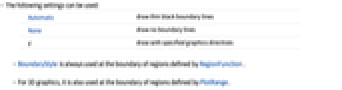
- The following settings can be used:
-
Automatic draw thin black boundary lines None draw no boundary lines g draw with specified graphics directives - BoundaryStyle is always used at the boundary of regions defined by RegionFunction.
- For 3D graphics, it is also used at the boundary of regions defined by PlotRange.
Examples
Basic Examples (3)
BoundaryStyle applies to intersections with the plot range:
BoundaryStyle applies to boundaries formed by the RegionFunction:
Wolfram Research (2007), BoundaryStyle, Wolfram Language function, https://reference.wolfram.com/language/ref/BoundaryStyle.html.
Text
Wolfram Research (2007), BoundaryStyle, Wolfram Language function, https://reference.wolfram.com/language/ref/BoundaryStyle.html.
CMS
Wolfram Language. 2007. "BoundaryStyle." Wolfram Language & System Documentation Center. Wolfram Research. https://reference.wolfram.com/language/ref/BoundaryStyle.html.
APA
Wolfram Language. (2007). BoundaryStyle. Wolfram Language & System Documentation Center. Retrieved from https://reference.wolfram.com/language/ref/BoundaryStyle.html