ColorSeparate
ColorSeparate[image]
gives a list of single-channel images corresponding to each of the color channels in image.
ColorSeparate[image,colorspace]
gives a list of images corresponding to the components of colorspace.
ColorSeparate[image,channel]
returns a single-channel image containing the specified channel.
Details
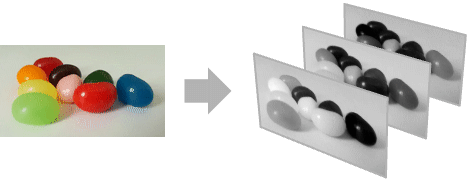
- ColorSeparate is typically used to separate a multichannel image into single-channel images or to extract a specific color channel such as the red channel or the alpha channel.
- ColorSeparate[image,{c1,c2,…}] extracts the specified color components.
- ColorSeparate works with arbitrary 2D and 3D images.
- The following colorspace specifications can be given:
-
"RGB" red, green, blue (RGBColor) "RGBA" red, green, blue, alpha (RGBColor) "CMYK" cyan, magenta, yellow, black (CMYKColor) "HSB" hue, saturation, brightness (Hue) "XYZ" CIE XYZ channels (XYZColor) "LAB" CIE Lab channels (LABColor) "LCH" CIE LCH channels (LCHColor) "LUV" CIE LUV channels (LUVColor) Automatic channels of the image color space - The channel specification for RGB color space can be any of the following:
-
"Red" or "R" red from RGB "Green" or "G" green from RGB "Blue" or "B" blue from RGB - CMYK channels:
-
"Cyan" or "C" cyan from CMYK "Magenta" or "M" magenta from CMYK "Yellow" or "Y" yellow from CMYK "Black" or "K" black from CMYK - HSB channels:
-
"Hue" or "H" hue from HSB "Saturation" or "S" saturation from HSB "Brightness" or "V" brightness from HSB - Other types of channels:
-
"Intensity", "Gray" or "I" gray-level (intensity) "Luminance" or "L" luminance channel of Lab "Alpha" or "A" alpha channel "Average" mean of all channels
Examples
open allclose allBasic Examples (2)
Scope (6)
Applications (6)
Extract red objects by subtracting the blue and green color planes from the red color plane:
Segment foreground from background by thresholding the saturation values:
Display an RGB image using eight colors only:
Convert a color image to grayscale by selecting the maximum channel value of each pixel:
Compute the gradient of a multichannel image using three different methods:
Properties & Relations (3)
Separating colors of an image in a space is equivalent to color separation after converting to that space:
The luminance of an image in RGB and Lab color spaces is the same:
The average pixel value of an RGB image and the luminance value are different:
Compare luminance-related channels in three different color spaces:
Text
Wolfram Research (2008), ColorSeparate, Wolfram Language function, https://reference.wolfram.com/language/ref/ColorSeparate.html (updated 2021).
CMS
Wolfram Language. 2008. "ColorSeparate." Wolfram Language & System Documentation Center. Wolfram Research. Last Modified 2021. https://reference.wolfram.com/language/ref/ColorSeparate.html.
APA
Wolfram Language. (2008). ColorSeparate. Wolfram Language & System Documentation Center. Retrieved from https://reference.wolfram.com/language/ref/ColorSeparate.html