

CornerFilter
CornerFilter[image]
computes a measure for the presence of a corner for each pixel in image and returns the result as an intensity image.
CornerFilter[image,r]
detects corners at a pixel range r.
Details and Options
- CornerFilter implements a variety of corner-detection methods based on gradient computations.
- CornerFilter works with arbitrary 2D and 3D images.
- When applied to multichannel images, CornerFilter finds corner signatures across channels.
- CornerFilter[image] is equivalent to CornerFilter[image,2].
- CornerFilter[image,{r1,r2}] specifies different radii in vertical and horizontal directions.
- CornerFilter takes a Method option that specifies how to compute the corner metric. The default setting is "ShiTomasi". Available methods include:
-
"HarmonicMean" harmonic mean of eigenvalues method "HarrisStephens" Harris–Stephens corner detection {"HarrisStephens",k} Harris–Stephens method with sensitivity parameter k "ShiTomasi" minimum eigenvalue method - By default, the Harris–Stephens method uses a sensitivity parameter
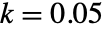 with Image objects and
 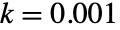 with Image3D objects.
 - The parameters of the Gaussian derivatives to be computed can be specified using Method->{method,"Gaussian"->{ρ,σ}}. The default setting is "Gaussian"->{r,r/2}.
Examples
open all close allBasic Examples (2)
Scope (5)
Data (2)
Parameters (3)
Detect corners at a small scale:
CornerFilter[[image], 1] // ImageAdjustCornerFilter[[image], 5] // ImageAdjustUse a rectangular pixel range:
CornerFilter[[image], {8, 4}]//ImageAdjustDetect corners in a 3D image at a low pixel range:
volume = ImageResize[ExampleData[{"TestImage3D", "CThead"}], {100, 100, 100}]CornerFilter[volume, 1]//ImageAdjustIncrease the range of the corner detector:
CornerFilter[volume, 5]//ImageAdjustOptions (2)
Method (2)
i = [image];Detect corners using the default method:
CornerFilter[i]//ImageAdjustUse the "HarmonicMean" method:
CornerFilter[i, Method -> "HarmonicMean"]//ImageAdjustDetect corners using the Harris–Stephens method, which gives a negative signature for edges:
CornerFilter[i, Method -> "HarrisStephens"]//ImageAdjustSpecify Gaussian derivative parameters:
ImageAdjust[CornerFilter[[image], 5, Method -> {"ShiTomasi", "Gaussian" -> {#, # / 2}}]]& /@ {1, 10}Applications (2)
i = [image];
c = CornerFilter[i] //ImageAdjust
Highlight the detected corners:
HighlightImage[i, Binarize[c, 0.6]]Use a CornerFilter to highlight small stars on an astronomical image:
i = [image];
ii = CornerFilter[i, .7]//ImageAdjust;
i + 1.5ii
Properties & Relations (1)
ImageCorners are peaks of the CornerFilter using non-max suppression:
i = [image];
cf = CornerFilter[i, 2];
cf//ImageAdjust
Apply non-max suppression and visualize detected corners:
nonmaxSuppression[img_] := Binarize[ImageSubtract[MaxFilter[img, 1], img], {0, 0}];corners = ImageMultiply[nonmaxSuppression[cf], Binarize[cf, .009]]HighlightImage[i, Dilation[corners, 1]]Compare with the result of ImageCorners:
HighlightImage[i, ImageCorners[i, 2, .009]]Use MaxDetect for finding the peaks:
md = MaxDetect[cf, .009]HighlightImage[i, ComponentMeasurements[md, "Centroid"][[All, 2]]]Text
Wolfram Research (2010), CornerFilter, Wolfram Language function, https://reference.wolfram.com/language/ref/CornerFilter.html (updated 2014).
CMS
Wolfram Language. 2010. "CornerFilter." Wolfram Language & System Documentation Center. Wolfram Research. Last Modified 2014. https://reference.wolfram.com/language/ref/CornerFilter.html.
APA
Wolfram Language. (2010). CornerFilter. Wolfram Language & System Documentation Center. Retrieved from https://reference.wolfram.com/language/ref/CornerFilter.html