

EndPackage
restores $Context and $ContextPath to their values before the preceding BeginPackage, and prepends the current context to the list $ContextPath.
Details
- Every call to EndPackage must be balanced by an earlier call to BeginPackage.
- EndPackage is typically used at the end of a Wolfram Language package.
- EndPackage returns Null.
- EndPackage resets the values of $Context, $ContextPath and $ContextAliases.
Examples
open all close allBasic Examples (1)
Commands to define a simple package:
originalcontext = Context[]originalcpath = $ContextPath;Modify the context and context path so that symbol creation and lookup use square`:
BeginPackage["square`"];Here are the commands defining the function in the package:
square::usage = "square[x] gives x^2";square[x_] := x ^ 2;Restore the context, but leave square` on the context path for symbol lookup:
EndPackage[]The context is now the same as the original:
Context[] === originalcontextThe context path is the same as the original, but with square` prepended:
Complement[$ContextPath, originalcpath]Scope (1)
Use BeginPackage and EndPackage to start and end a package in a file:
FilePrint["ExampleData/Collatz.m"]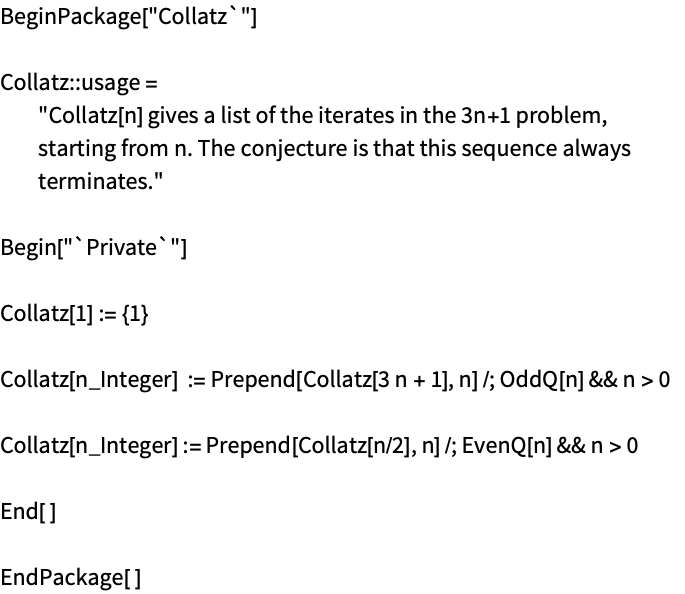
The package can be loaded with Get:
<<ExampleData/Collatz.mOnce loaded, the definitions work:
Collatz[47]Properties & Relations (3)
BeginPackage["cont`"] sets $Context to "cont`":
$Context = "Global`";
BeginPackage["Example`"];
$Context
EndPackage restores $Context to its value before the matching BeginPackage:
EndPackage[]
$ContextBeginPackage["cont`"] sets $ContextPath to {"cont`","System`"}:
$ContextPath = {"Global`", "System`"};
BeginPackage["Example`"];
$ContextPath
EndPackage restores $ContextPath to its value before BeginPackage with "cont`" prepended:
EndPackage[]
$ContextPath
BeginPackage does not alter the value of $ContextAliases:
$ContextAliases = <|"c`" -> "Context`"|>;
BeginPackage["MyPackage`"];
$ContextAliases
EndPackage restores $ContextAliases to its value before the matching BeginPackage:
Needs["Developer`" -> "d`"];
$ContextAliases["e`"] = "Experimental`";
EndPackage[];
$ContextAliasesText
Wolfram Research (1988), EndPackage, Wolfram Language function, https://reference.wolfram.com/language/ref/EndPackage.html (updated 2021).
CMS
Wolfram Language. 1988. "EndPackage." Wolfram Language & System Documentation Center. Wolfram Research. Last Modified 2021. https://reference.wolfram.com/language/ref/EndPackage.html.
APA
Wolfram Language. (1988). EndPackage. Wolfram Language & System Documentation Center. Retrieved from https://reference.wolfram.com/language/ref/EndPackage.html