


FileHash
FileHash[file]
gives an integer hash code for the contents of the specified file.
FileHash[file,"type"]
gives an integer hash of the specified type.
FileHash[file,"type","format"]
gives a hash code in the specified format.
FileHash[{file,range},…]
gives the hash code for the specified range of bytes.
FileHash[{filespec1,filespec2,…},…]
gives the hash codes for a list of files.
Details
- Values generated by FileHash are based on the raw bytes in a file.
- Files may be specified as "file", File["file"], CloudObject["url"] or InputStream[…]. Input streams must have been opened with BinaryFormatTrue.
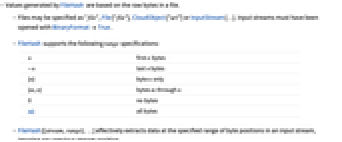
- FileHash supports the following range specifications:
-
n first n bytes -n last n bytes {n} byte n only {m,n} bytes m through n 0 no bytes All all bytes - FileHash[{stream,range},…] effectively extracts data at the specified range of byte positions in an input stream, ignoring any previous stream position.
- Each filespec can be either file or {file,range}.
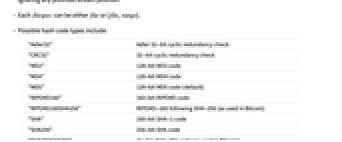
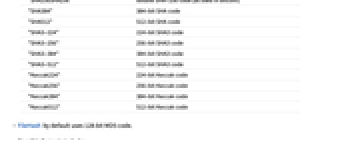
- Possible hash code types include:
-
"Adler32" Adler 32-bit cyclic redundancy check "CRC32" 32-bit cyclic redundancy check "MD2" 128-bit MD2 code "MD4" 128-bit MD4 code "MD5" 128-bit MD5 code (default) "RIPEMD160" 160-bit RIPEMD code "RIPEMD160SHA256" RIPEMD-160 following SHA-256 (as used in Bitcoin) "SHA" 160-bit SHA-1 code "SHA256" 256-bit SHA code "SHA256SHA256" double SHA-256 code (as used in Bitcoin) "SHA384" 384-bit SHA code "SHA512" 512-bit SHA code "SHA3-224" 224-bit SHA3 code "SHA3-256" 256-bit SHA3 code "SHA3-384" 384-bit SHA3 code "SHA3-512" 512-bit SHA3 code "Keccak224" 224-bit Keccak code "Keccak256" 256-bit Keccak code "Keccak384" 384-bit Keccak code "Keccak512" 512-bit Keccak code - FileHash by default uses 128-bit MD5 code.
- Possible formats include:
-
"Integer" integer (default) "DecimalString" decimal string "HexString" hexadecimal string "Base36String" base-36 alphanumeric string "Base64Encoding" Base64 encoding "ByteArray" hash code as an explicit byte array - For compatibility with earlier versions of the Wolfram Language, the syntaxes FileHash[file,"type",range] and FileHash[file,"type",range,"format"] are also supported.
Examples
open allclose allBasic Examples (5)
The "SHA512" hash code of a file:
The "SHA512" hash code of the first 100 bytes of a file:
The "MD5" hash code in hexadecimal form:
Hash of a CloudObject:
Scope (11)
File and Range Specifications (6)
Compute a hash for the first 100 bytes of a file:
Compute a hash for the last 100 bytes:
Compute a hash for bytes 100 through 200:
Compute a hash for all bytes except the first 100 or the last 100:
Compute the hash for byte 100 only:
Compute the hashes of several files:
Find the hash for a complete file as well as several subsets of it:
Create a CloudObject:
Find the hash of the data contained in the CloudObject:
By default, MD5 hash of the full range is calculated:
For hashing, the data from the CloudObject is represented as a string including the newline:
The same hash using the sequence of bytes:
The same result is given independently of the current stream position:
Create an empty file and cloud object:
Put the same content in the file and cloud object:
Also open a stream pointing at the file:
Hash Types and Formats (5)
512-bit SHA code given as an integer:
512-bit SHA code given as a decimal string, including leading zeros:
Compare the different string representations of a hash:
The double SHA code of the first 50 bytes of a file, given as a ByteArray:
Properties & Relations (10)
The default range specification is All:
Hashing zero bytes is equivalent to finding the hash of an empty file:
"Integer" is the default format:
"DecimalString" is the string version of "Integer", padded with zeros if necessary:
"HexString" is a base-16 representation, padded with zeros if necessary:
"Base36String" is a base-36 representation, padded with zeros if necessary:
"Base64Encoding" encodes bytes of the result using Base64 encoding:
FileHash[file,code] is effectively equivalent to Hash[ReadByteArray[file],code]:
FileHash[file,code] is effectively equivalent to Hash[ByteArray@Import[file,"Byte"]]:
Text
Wolfram Research (2007), FileHash, Wolfram Language function, https://reference.wolfram.com/language/ref/FileHash.html (updated 2020).
CMS
Wolfram Language. 2007. "FileHash." Wolfram Language & System Documentation Center. Wolfram Research. Last Modified 2020. https://reference.wolfram.com/language/ref/FileHash.html.
APA
Wolfram Language. (2007). FileHash. Wolfram Language & System Documentation Center. Retrieved from https://reference.wolfram.com/language/ref/FileHash.html