


ImageForwardTransformation
ImageForwardTransformation[image,f]
gives an image in which each pixel at position f[{x,y}] corresponds to the position {x,y} in image.
ImageForwardTransformation[image,f,size]
gives an image of the specified size.
ImageForwardTransformation[video,…]
transforms frames of a video.
Details and Options
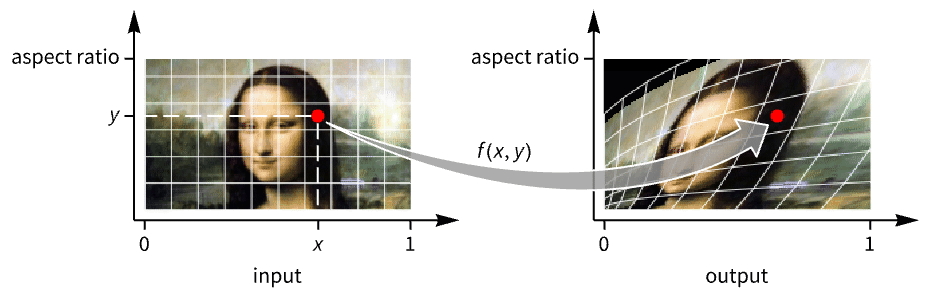
- In ImageForwardTransformation[image, f] every pixel at position {x,y} in image is placed at position f[{x,y}] in the output image. This is known as a forward transformation.
- ImageForwardTransformation[image,f] gives an image of the same size as the original.
- ImageForwardTransformation works with arbitrary 2D images.
- The pixel positions in the original image are assumed to run from 0 to 1 in the horizontal direction and from 0 to the aspect ratio in the vertical direction.
- Possible settings for size are:
-
Automatic automatic image size All same as input image size width explicit width, automatic height {width,height} explicit width and height {width,depth,height} explicit width, depth and height in 3D - For possible width, depth and height specifications, see the reference page for ImageResize.
- For possible size specifications, see the reference page for ImageResize.
- ImageForwardTransformation can take the following options:
-
Background Black background value DataRange Automatic assumed range of  and
and  values in the original image
Method Automatic interpolation method to use PlotRange Automatic range of coordinates to be included in the result of the transformation - Typical settings for DataRange include:
-
Automatic {{0,1},{0,h/w}} in 2D, {{0,1},{0,d/w},{0,h/w}} in 3D Full {{0,w},{0,h}} in 2D, {{0,1},{0,d},{0,h}} in 3D {{left,right},{bottom,top}} explicit coordinate ranges in 2D {{left,right},{front,back},{bottom,top}} explicit coordinate ranges in 3D - The coordinate system of the resulting image is specified by the PlotRange option. Typical settings include:
-
Automatic same as DataRange settings All try to include all of the transformed pixels Full same ranges as the input image {{left,right},…} explicit coordinate ranges - When PlotRange is not Automatic, size is chosen based on the size of the original image and the ratio of PlotRange and DataRange.
- By default, transformed points are interpolated using Method->"Interpolated". Use MethodNone to avoid interpolation.
Examples
open allclose allScope (8)
Transformation (4)


Size (1)
By default, the output image is of the same size as the input image:
Specify the size of the resulting image:
Specify width and height explicitly:
Use All to obtain an image of the same size as the original:
Options (4)
Background (1)
DataRange (1)

Method (1)
Applications (3)
Properties & Relations (3)
ImageTransformation does the opposite:
Reversing pixel coordinates is an operation that gives the same result for forward and reverse transforms:
Doing a transformation with a function and its inverse gives back the original image with some blurring due to interpolation:
Text
Wolfram Research (2010), ImageForwardTransformation, Wolfram Language function, https://reference.wolfram.com/language/ref/ImageForwardTransformation.html (updated 2021).
CMS
Wolfram Language. 2010. "ImageForwardTransformation." Wolfram Language & System Documentation Center. Wolfram Research. Last Modified 2021. https://reference.wolfram.com/language/ref/ImageForwardTransformation.html.
APA
Wolfram Language. (2010). ImageForwardTransformation. Wolfram Language & System Documentation Center. Retrieved from https://reference.wolfram.com/language/ref/ImageForwardTransformation.html