LineSpacing


LineSpacing
Details
- LineSpacing->{c,0} leaves space so that the total height of each line is c times the height of its contents.
- LineSpacing->{0,n} makes the total height of each line exactly n printer's points.
- LineSpacing->{c,n} makes the total height c times the height of the contents plus n printer's points.
- LineSpacing->{c,n,max} limits the amount of extra space to be max times the height of a single line of ordinary text in the current font.
- A typical default setting for text is LineSpacing->{1,1}, which leaves space for the contents of the line, plus 1 printer's point (approximately
 of an inch) of extra space.
 - LineSpacing->{2,0} makes text "double spaced".
- LineSpacing->{1,-n} tightens text by n printer's points.
- LineSpacing applies both to ordinary text and Wolfram Language expressions, including graphics.
- A typical default setting for general Wolfram Language expressions is LineSpacing->{1.25,0,2}.
- In ordinary text, LineSpacing determines the spacing between lines produced by automatic linebreaking. For lines produced by explicit newline characters, ParagraphSpacing is added.
- In Wolfram Language expressions, LineSpacing is used whether lines are produced by automatic linebreaking or by explicit newline characters.
- Extra space specified by LineSpacing is inserted equally above and below a line, except that no extra space is inserted before the first line or after the last line of an expression or cell.
Examples
open all close allBasic Examples (3)
![TemplateBox[{return}, Key0, BaseStyle -> {ExampleText, FontWeight -> Plain, FontFamily -> Source Sans Pro}]](Files/LineSpacing.en/3.png "TemplateBox[{return}, Key0, BaseStyle -> {ExampleText, FontWeight -> Plain, FontFamily -> Source Sans Pro}]") key, the Wolfram System leaves two times the height of each line:
key, the Wolfram System leaves two times the height of each line: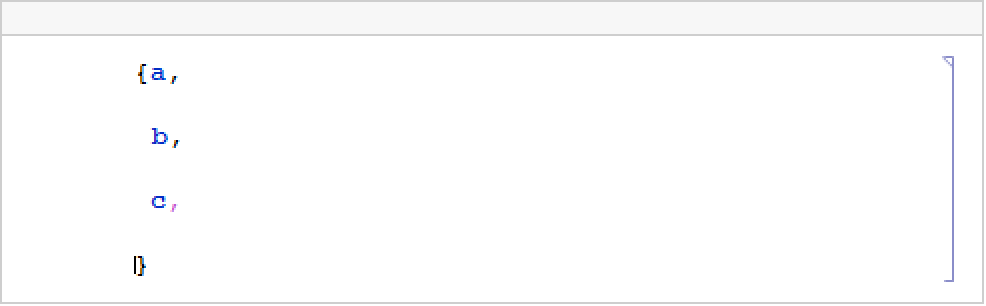
Wolfram Research (1996), LineSpacing, Wolfram Language function, https://reference.wolfram.com/language/ref/LineSpacing.html (updated 2007).
Text
Wolfram Research (1996), LineSpacing, Wolfram Language function, https://reference.wolfram.com/language/ref/LineSpacing.html (updated 2007).
CMS
Wolfram Language. 1996. "LineSpacing." Wolfram Language & System Documentation Center. Wolfram Research. Last Modified 2007. https://reference.wolfram.com/language/ref/LineSpacing.html.
APA
Wolfram Language. (1996). LineSpacing. Wolfram Language & System Documentation Center. Retrieved from https://reference.wolfram.com/language/ref/LineSpacing.html