

Scan
Details and Options
- Scan[f,expr] discards the results of applying f to the subexpressions in expr. Unlike Map, Scan does not build up a new expression to return.
- You can use Return to exit from Scan. Return[ret] causes the final value of Scan to be ret. If no explicit return values are specified, the final result from Scan is Null.
- You can also use Throw to exit from Scan. »
- Scan is useful in carrying out an operation on parts of expressions where the operation has a "side effect", such as making an assignment.
- Scan uses standard level specifications:
-
n levels 1 through n Infinity levels 1 through Infinity {n} level n only {n1,n2} levels n1 through n2 - The default value for levelspec in Scan is {1}.
- A positive level n consists of all parts of expr specified by n indices.
- A negative level -n consists of all parts of expr with depth n.
- Level -1 consists of numbers, symbols, and other objects that do not have subparts.
- Level 0 corresponds to the whole expression.
- With the option setting Heads->True, Scan includes heads of expressions and their parts. »
- Scan traverses the parts of expr in a depth-first order, with leaves visited before roots.
- If expr is an Association object, Scan[f,expr] applies f only to the values in the association.
- If expr is a SparseArray object, Scan[f,expr] applies f only to the values or subarrays that explicitly appear in expr.
- Scan[f][expr] is equivalent to Scan[f,expr].
- Parallelize[Scan[f,expr]] computes Scan[f,expr] in parallel on all subkernels. »
Examples
open all close allBasic Examples (6)
Scan[Print, {a, b, c}]


Scan[Print[# ^ 2]&, {2, 3, 4}]


Scan elements of an Association:
Scan[Print, <|1 -> a, 2 -> b, 3 -> c|>]


Scan elements up to the second level:
Scan[Print, <|1 -> {{a}}, 2 -> b|>, 2]


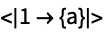
Scan elements including the 0 level:
Scan[Print, <|1 -> {a}|>, {0, Infinity}]

Use the operator form of Scan:
Scan[Print][{a, b, c}]


Scope (5)
Level Specifications (5)
Scan[Print, {{{{{a}}}}}]
Scan[Print, {{{{{a}}}}}, 2]

Scan[Print, {{{{{a}}}}}, {2}]
Scan[Print, {{{{{a}}}}}, {0, 2}]


Scan[Print, {{{{{a}}}}}, 3]


Scan all levels, starting at level 1:
Scan[Print, {{{a}}}, Infinity]


Scan[Print, {{{a}}}, {0, Infinity}]


Scan[Print, {{{{a}}}}, -1]


Scan[Print, {{{{a}}}}, -2]


Scan[Print, {{{{a}}}}, {-2}]
Positive and negative levels can be mixed:
Scan[Print, {{{{{a}}}}}, {2, -3}]

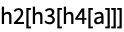
Different heads at each level:
Scan[Print, h0[h1[h2[h3[h4[a]]]]], {2, -3}]
Generalizations & Extensions (2)


Options (1)


Applications (2)
Properties & Relations (4)
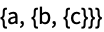
Leaves are visited before roots:
Scan[Print, {a, {b, {c}}}, {0, -1}];


Scan does the same as Map, but without returning a result:
Map[Print, {a, b, c}]


Scan[Print, {a, b, c}]


Use Sow and Reap to collect results:
Reap[Scan[If[# > 0, Sow[#]]&, {1, {-2, π}, -Sqrt[3]}, ∞]][[2, 1]]Compute Scan in parallel:
Parallelize[Scan[Print, Range[5]]]


Text
Wolfram Research (1988), Scan, Wolfram Language function, https://reference.wolfram.com/language/ref/Scan.html (updated 2014).
CMS
Wolfram Language. 1988. "Scan." Wolfram Language & System Documentation Center. Wolfram Research. Last Modified 2014. https://reference.wolfram.com/language/ref/Scan.html.
APA
Wolfram Language. (1988). Scan. Wolfram Language & System Documentation Center. Retrieved from https://reference.wolfram.com/language/ref/Scan.html