


Show
Show[graphics,options]
shows graphics with the specified options added.
Show[g1,g2,…]
shows several graphics combined.
Details
- Show can be used with Graphics and Graphics3D.
- Show allows any option that can be applied to graphics to be given.
- Options explicitly specified in Show override those included in the graphics expression.
- Show[g1,g2,…] or Show[{g1,g2,…}] concatenates the graphics primitives in the gi, effectively overlaying the graphics.
- The lists of non‐default options in the gi are concatenated.
- Show applies the function defined as the setting for DisplayFunction, and returns the result. For ordinary notebook operation, this function is just Identity.
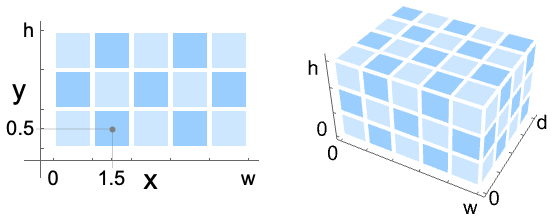
- Image and Image3D objects can also be combined with other graphics. Their pixel positions range from 0 to the dimensions of the image in the standard image coordinate system:
Examples
open allclose allBasic Examples (3)
Options (2)
DisplayFunction (2)
Applications (1)
Wolfram Research (1988), Show, Wolfram Language function, https://reference.wolfram.com/language/ref/Show.html (updated 2021).
Text
Wolfram Research (1988), Show, Wolfram Language function, https://reference.wolfram.com/language/ref/Show.html (updated 2021).
CMS
Wolfram Language. 1988. "Show." Wolfram Language & System Documentation Center. Wolfram Research. Last Modified 2021. https://reference.wolfram.com/language/ref/Show.html.
APA
Wolfram Language. (1988). Show. Wolfram Language & System Documentation Center. Retrieved from https://reference.wolfram.com/language/ref/Show.html