


SqrtBox
SqrtBox[x]
is a low-level box construct that represents the displayed object  in notebook expressions.
Details and Options
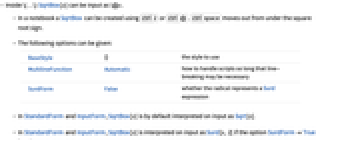
- Inside \(…\) SqrtBox[x] can be input as \@x.
- In a notebook a SqrtBox can be created using
 or
or  .
.  moves out from under the square root sign.
 - The following options can be given:
-
BaseStyle {} the style to use MultilineFunction Automatic how to handle scripts so long that line-breaking may be necessary SurdForm False whether the radical represents a Surd expression - In StandardForm and InputForm, SqrtBox[x] is by default interpreted on input as Sqrt[x].
- In StandardForm and InputForm, SqrtBox[x] is interpreted on input as Surd[x,2] if the option SurdFormTrue is set.
- The baseline of SqrtBox[x] is taken to be the baseline of x.
- If SqrtBox[x] does not fit on a single line, it is output as x^(1/2).
- In StandardForm, explicit SqrtBox objects are output literally. You can use DisplayForm to see the display form of such objects.
Examples
open allclose allBasic Examples (3)
Scope (1)
Wolfram Research (1996), SqrtBox, Wolfram Language function, https://reference.wolfram.com/language/ref/SqrtBox.html (updated 2012).
Text
Wolfram Research (1996), SqrtBox, Wolfram Language function, https://reference.wolfram.com/language/ref/SqrtBox.html (updated 2012).
CMS
Wolfram Language. 1996. "SqrtBox." Wolfram Language & System Documentation Center. Wolfram Research. Last Modified 2012. https://reference.wolfram.com/language/ref/SqrtBox.html.
APA
Wolfram Language. (1996). SqrtBox. Wolfram Language & System Documentation Center. Retrieved from https://reference.wolfram.com/language/ref/SqrtBox.html