



URLSaveAsynchronous
URLSaveAsynchronous["url","file",func]
performs a download to "file" in the background, calling func when an event is raised.
Details and Options
- Types of events that may be raised:
-
"data" returns an empty list; can be used to indicate the connection has completed "progress" returns information about the current connection of the form {dlnow,dltotal,ulnow,ultotal} "error" indicates that an error occurred while attempting to connect to the URL "headers" headers received from the web server "cookies" a list of all known cookies "statuscode" the status code returned by the server - The following options can be given:
-
Method "GET" method to use for request "Parameters" {} parameters to be sent for the request "Body" "" contents of message body to be sent "MultipartElements" {} list of multipart data elements to send "Username" "" username to use for the request "Password" "" password to use for the request "Headers" {} headers to be manually sent to the HTTP server "Cookies" Automatic cookies to pass to the server "StoreCookies" True whether to store received cookies "VerifyPeer" True verify authenticity using SSL certificates "UserAgent" Automatic user agent string to send "ReadTimeout" 0 time to allow for uploading or downloading data "ConnectTimeout" 0 time to allow for connecting to the server "Progress" False whether to raise a "progress" event "Transfer" Automatic if Automatic, the "data" event returns once and returns all the data downloaded; if "Chunks", the "data" event is raised multiple times with the data downloaded since the last event was raised "UserData" None any expression passed to this option will be stored for use of the AsynchronousTaskObject inside the event function; the data can be found by checking the options of AsynchronousTaskObject passed to the event function BinaryFormat True whether to avoid textual interpretation of newlines or other data "FollowRedirects" True whether to follow redirects - When an event is raised, the event function passed to URLSaveAsynchronous will be executed. The event functions will be passed three arguments, the AsynchronousTaskObject, the event name, and the data received from the event. Event functions are the only method for handling data received from URLSaveAsynchronous.
Examples
open all close allBasic Examples (1)
Monitor progress while downloading the contents of a URL to a file:
url = "http://exampledata.wolfram.com/10mb.dat";
progress = 0.;
progFunction[_, "progress", {dlnow_, dltotal_, _, _}] := Quiet[progress = dlnow / dltotal]Dynamic[ProgressIndicator[progress]]URLSaveAsynchronous[url, FileNameJoin[{$TemporaryDirectory, "10mb.dat"}], progFunction, "Progress" -> True]Options (15)
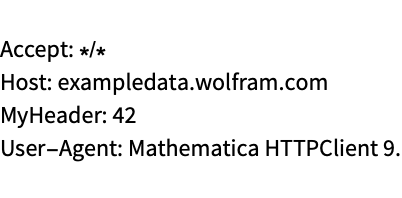
"Method" (1)
"Parameters" (1)
Specify the parameters that should be sent to the server:
tmpFile = FileNameJoin[{$TemporaryDirectory, "tmp.txt"}];
URLSaveAsynchronous["http://exampledata.wolfram.com/httpget.php", tmpFile, Null, "Parameters" -> {"name" -> "Joe", "age" -> "30"}]FilePrint[tmpFile]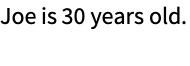
"VerifyPeer" (1)
Verify that the SSL certificate used by the server is valid:
statusData;
tmpFile = FileNameJoin[{$TemporaryDirectory, "tmp.txt"}];
eventFunction[_, "statuscode", status_] := statusData = status;
URLSaveAsynchronous["https://wolfram.com", tmpFile, eventFunction, "VerifyPeer" -> True]statusData"Username" (1)
Specify the username that should be sent to the server:
tmpFile = FileNameJoin[{$TemporaryDirectory, "tmp.txt"}];
URLSaveAsynchronous["http://exampledata.wolfram.com/authentication.php", tmpFile, Null, "Username" -> "Joe", "Password" -> ""]FilePrint[tmpFile]
"Password" (1)
Specify the password that should be sent to the server:
tmpFile = FileNameJoin[{$TemporaryDirectory, "tmp.txt"}];
URLSaveAsynchronous["http://exampledata.wolfram.com/authentication.php", tmpFile, Null, "Username" -> "Joe", "Password" -> "topsecret"]FilePrint[tmpFile]
"UserAgent" (1)

"Cookies" (1)
Manually control the cookies used by URLSaveAsynchronous:
tmpFile = FileNameJoin[{$TemporaryDirectory, "tmp.txt"}];
URLSaveAsynchronous["http://exampledata.wolfram.com/cookies.php", tmpFile, Null, "Cookies" -> {{"Domain" -> ".exampledata.wolfram.com", "Path" -> "/", "Secure" -> "FALSE", "Expires" -> DateString[{2020, 1, 1, 0, 0, 0}], "Name" -> "MyCookie", "Value" -> "CookieData"}}]FilePrint[tmpFile]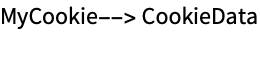
"StoreCookies" (1)
If False, "StoreCookies" will not place any new cookies found while connecting to the site in the global cookie share:
cookiesData;
tmpFile = FileNameJoin[{$TemporaryDirectory, "tmp.txt"}];
eventFunction[_, "cookies", cookies_] := cookiesData = cookies
URLSaveAsynchronous["http://wolfram.com/", tmpFile, eventFunction, "StoreCookies" -> False]cookiesData$HTTPCookies"Headers" (1)
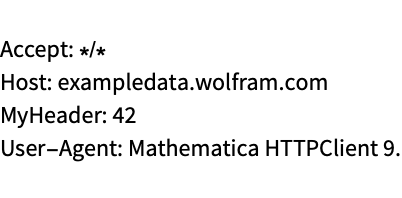
"BodyData" (1)
Specify the message body that should be sent when connecting to the server:
tmpFile = FileNameJoin[{$TemporaryDirectory, "tmp.txt"}];
URLSaveAsynchronous["http://exampledata.wolfram.com/bodydata.php", tmpFile, Null, "BodyData" -> "Message body data sent to server."]FilePrint[tmpFile]
"MultipartData" (1)
Specify the contents of a multipart message body:
tmpFile = FileNameJoin[{$TemporaryDirectory, "tmp.txt"}];
URLSaveAsynchronous["http://exampledata.wolfram.com/multipartdata.php", tmpFile, Null, "MultipartData" -> {{"partName", "mime/type", {1, 2, 3, 4, 5}}}];FilePrint[tmpFile]
"ReadTimeout" (1)
Specify the maximum allotted time in seconds to finish downloading data from the server:
errorString;
eventFunction[_, "error", error_] := errorString = error
tmpFile = FileNameJoin[{$TemporaryDirectory, "tmp.txt"}];
URLSaveAsynchronous["http://exampledata.wolfram.com/50mb.dat", tmpFile, eventFunction, "ReadTimeout" -> 1];errorString"ConnectTimeout" (1)
Specify the maximum allotted time in seconds to establish a connection to the server:
errorString;
eventFunction[_, "error", error_] := errorString = error
tmpFile = FileNameJoin[{$TemporaryDirectory, "tmp.txt"}];
URLSaveAsynchronous["http://127.0.0.1", tmpFile, eventFunction, "ConnectTimeout" -> 1];errorString"Progress" (1)
If True, the "progress" event will be raised, returning information downloaded and uploaded about in-progress downloads:
progressData = {};tmpFile = FileNameJoin[{$TemporaryDirectory, "tmp.txt"}];
progressFunction[_, "progress", progress_] := progressData = progress
URLSaveAsynchronous["http://exampledata.wolfram.com/5mb.dat", tmpFile, progressFunction, "Progress" -> True];
Dynamic[progressData]"UserData" (1)
"UserData" is any expression containing information to be made available when an event is called:
dataString;
tmpFile = FileNameJoin[{$TemporaryDirectory, "tmp.txt"}];
eventFunction[async_, "statuscode", data_] := dataString = "UserData" /. Options[async]
URLSaveAsynchronous["http://wolfram.com", tmpFile, eventFunction, "UserData" -> "stored data"];dataStringProperties & Relations (1)
Use URLFetchAsynchronous to load the content directly into the Wolfram Language:
constitution;
f[_, "data", document_] := constitution = FromCharacterCode[document]
URLFetchAsynchronous["http://exampledata.wolfram.com/USConstitution.txt", f];Short[constitution]Text
Wolfram Research (2012), URLSaveAsynchronous, Wolfram Language function, https://reference.wolfram.com/language/ref/URLSaveAsynchronous.html.
CMS
Wolfram Language. 2012. "URLSaveAsynchronous." Wolfram Language & System Documentation Center. Wolfram Research. https://reference.wolfram.com/language/ref/URLSaveAsynchronous.html.
APA
Wolfram Language. (2012). URLSaveAsynchronous. Wolfram Language & System Documentation Center. Retrieved from https://reference.wolfram.com/language/ref/URLSaveAsynchronous.html