


Graph6 (.g6)
Background & Context
-
- Graph6 graph data format.
- Used for storing undirected graphs.
- ASCII format.
- Stores connectivity information for multiple undirected graphs.
- Suitable for small graphs or large dense graphs with up to
 vertices.
 - Related to sparse6, which is optimized for large sparse graphs.
- Developed by Brendan McKay at the Australian National University.
Import & Export
- Import["file.g6"] imports the graphs stored in the specified file, given as a single Graph object or a list of graphs.
- Export["file.g6",expr] exports an adjacency matrix or edge information for one graph or for multiple graphs to the graph6 format.
- Import["file.g6",elem] imports the specified element from a graph6 file.
- Import["file.g6",{elem,suba,subb,…}] imports a subelement.
- Import["file.g6",{{elem1,elem2,…}}] imports multiple elements.
- The import format can be specified with Import["file","Graph6"] or Import["file",{"Graph6",elem,…}].
- Export["file.g6",expr,elem] creates a graph6 file by treating expr as specifying element elem.
- Export["file.g6",{expr1,expr2,…},{{elem1,elem2,…}}] treats each expri as specifying the corresponding elemi.
- Export["file.g6",expr,opt1->val1,…] exports expr with the specified option elements taken to have the specified values.
- Export["file.g6",{elem1->expr1,elem2->expr2,…},"Rules"] uses rules to specify the elements to be exported.
- See the following reference pages for full general information:
-
Import, Export import from or export to a file CloudImport, CloudExport import from or export to a cloud object ImportString, ExportString import from or export to a string ImportByteArray, ExportByteArray import from or export to a byte array
Import Elements
- General Import elements:
-
"Elements" list of elements and options available in this file "Summary" summary of the file "Rules" list of rules for all available elements - Data representation elements:
-
"AdjacencyMatrix" edge information for all graphs in this file, given as a list of matrices "EdgeRules" connectivity data for all graphs, given as an array of rules "Graph" first graph stored in the file, given as a Graph object "Graphics" first graph stored in this file, rendered as a graph plot "GraphicsList" all graphs, given as a list of graphics objects "GraphList" all graphs in the file, given as a list of Graph objects "VertexCount" number of vertices in each graph, given as a list of integers "VertexList" list of integers representing the vertices - Import by default uses "Graph" for simple graph6 files and "GraphList" for multigraph graph6 files.
- Element specifications for graph6 files containing multiple graphs:
-
elem,n data representation element elem for the n  graph in this file
elem,{n1,n2,…} element elem for graphs n1, n2, … elem,All element elem for all graphs, given as a list - Import["file.g6","GraphList"] gives a list of all graphs in the file, rendered as Graph objects.
- Import["file.g6",{"GraphList",n}] gives a rendering of the n
 graph in the file.
 - When importing a graph6 file using the "EdgeRules" element, no rules are returned for possible unconnected vertices.
- Graphs including unconnected vertices can be fully specified using the "AdjacencyMatrix" element or as a combination of "EdgeRules" and "VertexCount".
Options
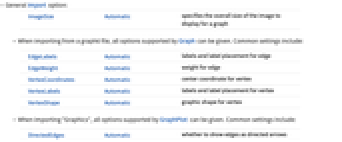
- General Import option:
-
ImageSize Automatic specifies the overall size of the image to display for a graph - When importing from a graph6 file, all options supported by Graph can be given. Common settings include:
-
EdgeLabels Automatic labels and label placement for edge EdgeWeight Automatic weight for edge VertexCoordinates Automatic center coordinate for vertex VertexLabels Automatic labels and label placement for vertex VertexShape Automatic graphic shape for vertex - When importing "Graphics", all options supported by GraphPlot can be given. Common settings include:
-
DirectedEdges Automatic whether to show edges as directed arrows EdgeLabels Automatic whether to include labels given for edges EdgeShapeFunction Automatic function to give explicit graphics for edges VertexLabels Automatic whether to show vertex names as labels VertexShapeFunction Automatic function to give explicit graphics for vertices
Examples
Basic Examples (7)
This imports a small graph6 sample file:
Show the edge rules representing the graph:
Import the corresponding adjacency matrix and render it as a MatrixPlot:
Convert a string representing graph6 data to a visual representation of a graph:
Export a Graph object to the graph6 format:
Export the adjacency matrix of a graph to the graph6 format: