


MMCIF (.cif)
- Import supports version 1.0 of the mmCIF format.
Background & Context
-
- MIME types: chemical/x-cif, chemical/x-mmcif
- 3D molecular model file.
- Used in cheminformatics applications and on the web for storing and exchanging molecule models.
- Commonly used as an alternative to the PDB format.
- mmCIF is an acronym derived from Macromolecular Crystallographic Information File.
- Derived from the CIF file format.
- Plain text format.
- Stores structure information for large biological molecules such as proteins and nucleic acids.
- Developed between 1990 and 1997 by the International Union of Crystallography.
Import
- Import["file.cif","MMCIF"] reads an mmCIF file and returns a stylized rendering of the molecule.
- The Wolfram Language provides a variety of 3D rendering styles for macromolecules.
- Import["file.cif","MMCIF"] returns a Graphics3D object.
- Import["file.cif",{"MMCIF",elem}] imports the specified element from an MMCIF file.
- Import["file.cif",{"MMCIF",elem,suba,subb,…}] imports a subelement.
- Import["file.cif",{"MMCIF"{elem1,elem2,…}}] imports multiple elements.
- See the following reference pages for full general information:
-
Import import from a file CloudImport import from a cloud object ImportString import from a string ImportByteArray import from a byte array
Import Elements
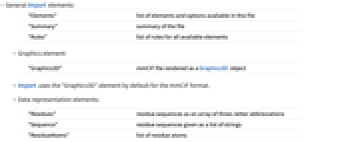
- General Import elements:
-
"Elements" list of elements and options available in this file "Summary" summary of the file "Rules" list of rules for all available elements - Graphics element:
-
"Graphics3D" mmCIF file rendered as a Graphics3D object - Import uses the "Graphics3D" element by default for the mmCIF format.
- Data representation elements:
-
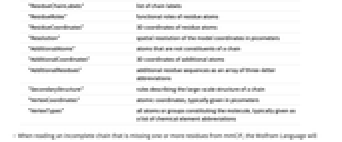
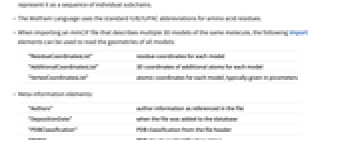
"Residues" residue sequences as an array of three-letter abbreviations "Sequence" residue sequences given as a list of strings "ResidueAtoms" list of residue atoms "ResidueChainLabels" list of chain labels "ResidueRoles" functional roles of residue atoms "ResidueCoordinates" 3D coordinates of residue atoms "Resolution" spatial resolution of the model coordinates in picometers "AdditionalAtoms" atoms that are not constituents of a chain "AdditionalCoordinates" 3D coordinates of additional atoms "AdditionalResidues" additional residue sequences as an array of three-letter abbreviations "SecondaryStructure" rules describing the large-scale structure of a chain "VertexCoordinates" atomic coordinates, typically given in picometers "VertexTypes" all atoms or groups constituting the molecule, typically given as a list of chemical element abbreviations - When reading an incomplete chain that is missing one or more residues from mmCIF, the Wolfram Language will represent it as a sequence of individual subchains.
- The Wolfram Language uses the standard IUB/IUPAC abbreviations for amino acid residues.
- When importing an mmCIF file that describes multiple 3D models of the same molecule, the following Import elements can be used to read the geometries of all models:
-
"ResidueCoordinatesList" residue coordinates for each model "AdditionalCoordinatesList" 3D coordinates of additional atoms for each model "VertexCoordinatesList" atomic coordinates for each model, typically given in picometers - Meta-information elements:
-
"Authors" author information as referenced in the file "DepositionDate" when the file was added to the database "PDBClassification" PDB classification from the file header "PDBID PDB structure identification string "References" bibliographic reference, given as a list of rules "Title" document title
Options
- General rendering options:
-
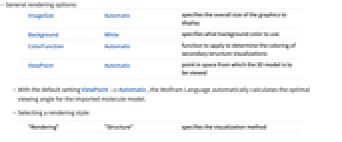
ImageSize Automatic specifies the overall size of the graphics to display Background White specifies what background color to use ColorFunction Automatic function to apply to determine the coloring of secondary structure visualizations ViewPoint Automatic point in space from which the 3D model is to be viewed - With the default setting ViewPoint->Automatic, the Wolfram Language automatically calculates the optimal viewing angle for the imported molecule model.
- Selecting a rendering style:
-
"Rendering" "Structure" specifies the visualization method - Possible settings for "Rendering" are:
-
"BallAndStick" displays atoms and bonds as a ball-and-stick model "Structure" stylized rendering of the protein backbone "Spacefilling" atoms shown as overlapping spheres "Wireframe" bonds rendered as lines