


XHTML (.html, .htm, .xhtml, .xht, .xml)
- Import fully supports XHTML versions 1.0 and 1.1.
- Export generates documents conforming to XHTML 1.1.
Background & Context
-
- Registered MIME type: application/xhtml+xml
- XHTML markup language and file format.
- XML-based reformulation of HTML.
- XHTML is an acronym derived from Extensible Hypertext Markup Language.
- Plain text XML format.
- Describes the structure and aspects of the appearance of web pages.
- Successor of HTML.
- Published as a W3C recommendation in 2001.
Import & Export
- Import["file.xhtml"] gives a plain text representation of an XHTML file.
- Import["file.xhtml","Data"] extracts tabular data from XHTML.
- Export["file.xhtml",expr] creates an XHTML version of expr.
- Export["dir",expr] translates expr to XHTML, saving the output in the specified directory.
- Import["file.xhtml"] returns a string, representing the textual content of the file as formatted plain text.
- Export["file.xhtml",expr] exports a notebook, a cell, a list of cells, or other notebook elements to XHTML.
- Export always creates a complete XHTML document, and not merely a fragment of XHTML.
- The output consists of one or more XHTML files and two directories, HTMLFiles and HTMLLinks.
- The Wolfram Language by default converts typeset expressions to GIF images when exporting to XHTML.
- The Wolfram Language can export Tooltip and Hyperlink expressions, creating HTML image maps if necessary.
- Import["file.xhtml",elem] imports the specified element from an XHTML file.
- Import["file.xhtml",{elem,suba,subb,…}] imports a subelement.
- Import["file.xhtml",{{elem1,elem2,…}}] imports multiple elements.
- The import format can be specified with Import["file","XHTML"] or Import["file",{"XHTML",elem,…}].
- Export["file.xhtml",expr, elem] creates an XHTML file by treating expr as specifying element elem.
- Export["file.xhtml",{expr1,expr2,…},{{elem1,elem2,…}}] treats each expri as specifying the corresponding elemi.
- Export["file.xhtml",expr,opt1->val1,…] exports expr with the specified option elements taken to have the specified values.
- Export["file.xhtml",{elem1->expr1,elem2->expr2,…},"Rules"] uses rules to specify the elements to be exported.
- See the following reference pages for full general information:
-
Import, Export import from or export to a file CloudImport, CloudExport import from or export to a cloud object ImportString, ExportString import from or export to a string ImportByteArray, ExportByteArray import from or export to a byte array

Import Elements
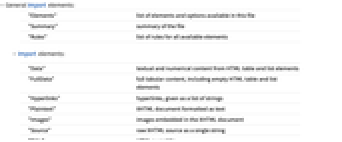
- General Import elements:
-
"Elements" list of elements and options available in this file "Summary" summary of the file "Rules" list of rules for all available elements - Import elements:
-
"Data" textual and numerical content from HTML table and list elements "FullData" full tabular content, including empty HTML table and list elements "Hyperlinks" hyperlinks, given as a list of strings "Plaintext" XHTML document formatted as text "Images" images embedded in the XHTML document "Source" raw XHTML source as a single string "Title" HTML page title "ImageLinks" URLs of embedded images "XMLObject" symbolic XML representation of the entire document - Import by default uses the "Plaintext" element.
- Export elements:
-
"Notebook" a Notebook expression "NotebookObject" a NotebookObject expression "Expression" an arbitrary Wolfram Language expression
Options
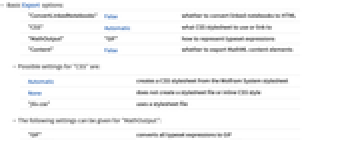
- Basic Export options:
-
"ConvertLinkedNotebooks" False whether to convert linked notebooks to HTML "CSS" Automatic what CSS stylesheet to use or link to "MathOutput" "GIF" how to represent typeset expressions "Content" False whether to export MathML content elements - Possible settings for "CSS" are:
-
Automatic creates a CSS stylesheet from the Wolfram System stylesheet None does not create a stylesheet file or inline CSS style "file.css" uses a stylesheet file - The following settings can be given for "MathOutput":
-
"GIF" converts all typeset expressions to GIF "MathML" converts all typeset expressions to MathML "DisplayForm" converts all typeset expressions to ASCII approximations of their appearance "InputForm" converts all typeset expressions to their InputForm - See the "HTML" format page for complete information about supported Import and Export options.
Examples
Basic Examples (2)
Read an XHTML file as plain text:
Show the Import elements available in this file:
Import the tabular content from this file:
This exports a mathematical expression to HTML:
Show the names of the files saved into the HTMLFiles directory: