 Cell ▶ Divide Cell
 Cell ▶ Divide Cell
Divide Cell
splits a cell at the insertion point.
Details
- Divide Cell splits the selected cell into multiple cells, depending on the current text selection.
- An insertion point divides the cell in two. A text selection divides the cell into three cells: everything before the selection, the selection itself, and everything after the selection.
- Selecting one or more cell brackets and invoking Divide Cell splits the selected cells at hard line breaks within the cell. Textual cells will be split at every hard line break, while cells with input and code will only be split at hard line breaks that separate complete expressions.
- Keyboard shortcuts:
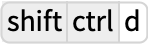 (Windows);
 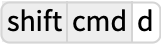 (Macintosh);
 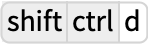 (Linux).