Activating Products in Wolfram
Activating Products in Wolfram
| Overview | Offline Activation |
| Online Activation through Sign In | Connect to a Network License Server |
| Online Activation with a Key |
Starting in Version 14.1, the unified Wolfram application was introduced as the new way for users to access Mathematica, Wolfram|Alpha Notebook Edition, Wolfram|One and Finance Platform. These products are still licensed the way they were previously but are now activated and accessed through Wolfram.
This guide will explain how to activate your products in Wolfram; if you have not yet installed it and need assistance, please see "Installing Wolfram".
Once the installation of Wolfram is complete, upon first launching it, you will be presented with the Wolfram Product Activation dialog. There are four methods to activate your Wolfram product: online activation through sign in, online activation with a key, manual activation and connecting to a license server running an appropriate version of MathLM.
The default method of activation is online activation through sign in. The other activation methods are accessed via the Other ways to activate button.
This is the easiest and recommended way to activate your Wolfram product for most users. The only requirement is that your computer be connected to the internet.
Start your desktop product. The activation window appears. Click Continue to activate your product through sign in.


Enter your WolframID and click Continue. Enter your associated Wolfram Account password and click Continue. Note that if you are already logged in online, this step will be skipped.
If you are accessing your Wolfram products through a site license, you will want to select the SSO option and continue through that.

A list of your available licenses appears. If there are no valid licenses available, see the end of this section for more information.

Select the desired license and click Activate. Your product is now being activated and a confirmation message appears.

Return to the Activation Dialog in your Wolfram product. The Wolfram License Agreement window appears.

Accept the terms and click OK to complete the setup process. Your Wolfram product is now ready for use.
No Valid Licenses
If there are no licenses or no valid licenses available to you and there should be, make sure that you are signing in the correct way/with the correct user. If you are signing in correctly, contact your site admin or contact Wolfram Support if it is a personal license.
In the example below, the user has Version 14.0 licenses available, but no licenses that are compatible with Version 14.1, so they cannot activate a product.

If your personal license does not let you activate this version, you will need to update your license to activate the new version.
If a site license does not let you update, it is possible that either the site has yet to update the license, or that the site administrators have chosen to not update their license at this time. In either case, you should contact your site admin to see what action you should take.
Another reason that a license may be ineligible is that you have already activated that license on the maximum number of machines available to it. In order to activate it on an additional machine, you must remove it from another machine using the System Transfer Form if it is a personal license or contact your site admin for a site license.
To activate your product with a key, select Other ways to activate from the "Activate Your Product through Sign In" window. Then select Activate online by entering an activation key ».

If you have your activation key, enter it and click the Activate button. Your Wolfram product will then automatically generate a MachineID and retrieve a password online through a web service.

Finding Your Activation Key
Online activation with a key and manual activation both require an activation key. When you purchase a Wolfram product, you are provided with this key via email.
Alternatively, you may access keys for registered products through your Wolfram Account. To access your activation key, begin by logging in with your Wolfram ID and password.


Select the Wolfram product you want to activate, and you will be directed to a page that contains your activation key for this product.

If the machine on which you are using your Wolfram product does not have an internet connection, or if you are experiencing problems with online activation, then you can activate the product manually.
To begin manual activation, click the button Other ways to activate. Then select Activate offline through an activation key and requested password ».

A MachineID number (previously called a MathID) is issued for manual activation and is displayed in the resulting dialog. There are two main steps to activate manually:

The recommended way is to use Wolfram Account to generate a password. This is accessed when you click the link "online password generator". Please note that you will need to sign in with your Wolfram account to access this form. If you do not have an account, you may create one on the Sign In page.
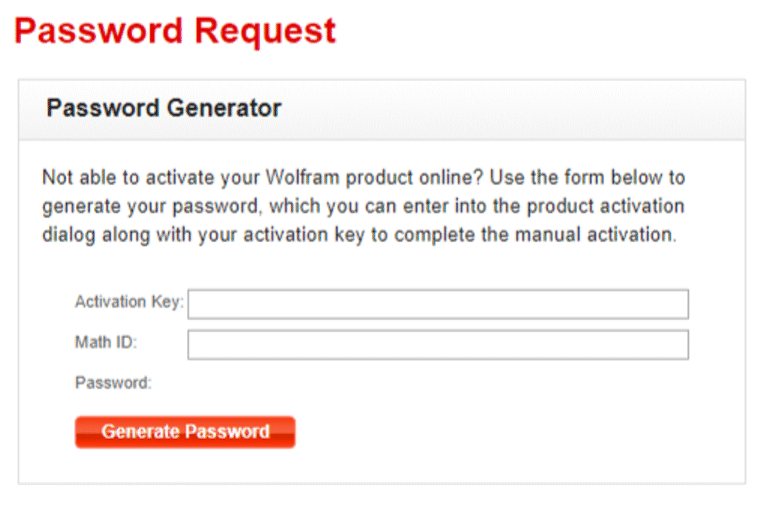
On the "Password Generator" form, enter your MachineID and Activation Key. Generate the password by clicking the button.
Once you have obtained your password, enter it along with your activation key into the Wolfram Product Activation dialog to activate your Wolfram product.

If you are unable to manually activate your Wolfram product, contact Wolfram Support with your activation key, MachineID and the password generated in the step above.
If your license is obtained from a Wolfram network license server, such as MathLM, use this method for activation. MathLM or a similar service must be installed on the license server and activated before client machines with Wolfram products can be activated. Please see "Installing MathLM" for more information.

