You can use the keyboard to move the cursor forward or backward one character or one word at a time. You can also delete the character or word to the right or the left of the cursor, and you can move the cursor to the beginning or end of a line.
Getting out of an Expression
Move to the end of the next-higher subexpression by pressing Ctrl and Space at the same time.
Press Ctrl+Space repeatedly:
Selecting the Next Placeholder
Select the next placeholder by pressing the Tab key.
Pressing the Tab key:
Press Tab repeatedly:
Select the previous placeholder by pressing Shift and Tab at the same time.
Press Shift and Tab at the same time:
Press Shift+Tab repeatedly:
Switching Positions
Move back and forth between complementary positions by pressing Ctrl+5 or Ctrl+%.
First, alternate between a radicand and an index:
Press Ctrl+%:
Press Ctrl+%.
Next, alternate between a superscript and a subscript:
Press Ctrl+%.
Press Ctrl+%.
Finally, alternate between an overscript and an underscript:
Press Ctrl+%:
Press Ctrl+%.
Selecting and Deleting Expressions
Selecting the Next-Higher Subexpression
Select the next-higher subexpression by pressing Ctrl+..
Press Ctrl+. repeatedly:
Deleting to Destructure an Expression
Get rid of the contents of an expression and destructure it by pressing Del (or Backspace).
Press Backspace repeatedly:
Another Example
Press Backspace repeatedly:
Typing Fractions
Typing
Start with the expression that will be the numerator.
Type x:
Create a built-up fraction by pressing the Control and / keys at the same time. The placeholder in the denominator is already selected.
Press Ctrl+/:
Fill in the denominator.
Type y:
Move the insertion point out of the fraction by pressing the Control key and the Space bar at the same time.
Press Ctrl+Space:
Typing
Start with the expression that will be the numerator.
Type x:
Create a built-up fraction by pressing the Control and / keys at the same time. The placeholder in the denominator is already selected.
Press Ctrl+/:
Fill in the denominator.
Type y:
Move the insertion point out of the fraction by pressing the Control key and the Space bar at the same time.
Press Ctrl+Space:
Once the insertion point is out of the fraction, you can continue typing.
Type +z:
Typing
Start with the expression that will be the numerator.
Type x:
Create a built-up fraction by pressing the Control and / keys at the same time. The placeholder in the denominator is already selected.
Press Ctrl+/:
Fill in the denominator.
Type y:
Continue typing in the denominator and then move out of the fraction.
Type +z:
Move the insertion point out of the fraction by pressing the Control key and the Space bar at the same time.
Press Ctrl+Space:
Typing
Create a built-up fraction with Ctrl+/. The numerator and denominator contain placeholders; the one in the numerator is selected.
Press Ctrl+/:
Type an expression in the numerator.
Type x+y:
Select the placeholder in the denominator by pressing the Tab key. (Alternatively, you can select the placeholder by clicking it or dragging.)
Press Tab:
Fill in the numerator.
Type z:
Get out of the fraction by pressing the Control key and the Space bar at the same time.
Press Ctrl+Space:
Another Way of Typing
Start with the expression that will be the numerator.
Type x+y:
Select the expression. (You can select by dragging, by pressing Ctrl+. repeatedly, or by clicking the expression repeatedly.)
Select it:
Create a built-up fraction by pressing Ctrl+/.
Press Ctrl+/:
Fill in the denominator.
Type z:
Get out of the fraction by pressing the Control key and the Space bar at the same time.
Press Ctrl+Space:
Typing Powers
Typing xm
Start with the expression that will be the base.
Type x:
Create a built-up power by pressing the Control key and the 6 key at the same time.
Press Ctrl+6 or Ctrl+^:
Type the exponent into the placeholder (which is already selected).
Type m:
Move the insertion point out of the exponent down to the baseline by pressing the Control key and the Space bar at the same time.
Press Ctrl+Space:
Typing xm+yn
Start with the expression that will be the base.
Type x:
Create a built-up power by pressing the Control key and the 6 key at the same time.
Press Ctrl+6 or Ctrl+^:
Type the exponent into the placeholder (which is already selected).
Type m:
Move the insertion point out of the exponent down to the baseline by pressing the Control key and the Space bar at the same time.
Press Ctrl+Space:
Type +:
Add the second power in a similar way.
Type y, press Ctrl+^, type n, and press Ctrl+Space:
Typing xm+n
Start with the expression that will be the base.
Type x:
Create a built-up power by pressing the Control key and the 6 key at the same time.
Press Ctrl+6 or Ctrl+^:
Type the exponent into the placeholder (which is already selected).
Type m+n:
Move the insertion point out of the exponent down to the baseline by pressing the Control key and the Space bar at the same time.
Press Ctrl+Space:
Typing
Start with the expression that will be the base.
Type x:
Create a built-up power by pressing the Control key and the 6 key at the same time.
Press Ctrl+6 or Ctrl+^:
Type the exponent into the placeholder (which is already selected).
Type m:
Construct a built-up fraction in the exponent.
Press Ctrl+/, type n:
Press the Control key and the Space bar twice to get down to the baseline.
Press Ctrl+Space twice:
Typing Square Roots
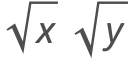
Typing
To get a square root sign, press the Control key and the 2 key at the same time.
Press Ctrl+2 or Ctrl+@:
Type inside the placeholder (which is already selected).
Type x:
Press the Control key and the Space bar at the same time to get out of the square root.
Press Ctrl+Space:
Typing
To get a square root sign, press the Control key and the 2 key at the same time.
Press Ctrl+2 or Ctrl+@:
Type inside the placeholder (which is already selected).
Type x:
Press the Control key and the Space bar at the same time to get out of the square root.
Press Ctrl+Space:
Type the second square root in the same way as the first.
Press Ctrl+@, type y, and press Ctrl+Space:
Typing
To get a square root sign, press the Control key and the 2 key at the same time.
Press Ctrl+2 or Ctrl+@:
Type inside the placeholder (which is already selected).
Type x y:
Press the Control key and the Space bar at the same time to get out of the square root.
Press Ctrl+Space:
Another Way of Typing
Start by typing the expression that will be inside the square root.
Type x y:
Select the expression. (You can select by dragging, by pressing Ctrl+. repeatedly, or by clicking the expression repeatedly.)
Select x y:
Press the Control key and the @ key at the same time to put a square root around the selection.
Press Ctrl+@:
Get out of the square root by pressing the Control key and the Space bar at the same time.
Press Ctrl+Space:
Typing Radicals
Typing
To get a radical, press the Control key and the 2 key at the same time.
Press Ctrl+2 or Ctrl+@:
Type the radicand inside the placeholder (which is already selected).
Type x:
Press the Control key and the 5 key at the same time.
Press Ctrl+5 or Ctrl+%:
Type the index.
Type n:
Get out of the radical and down to the baseline by pressing the Control key and the Space bar at the same time.
Press Ctrl+Space:
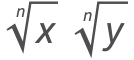
Typing
To get a radical, press the Control key and the 2 key at the same time.
Press Ctrl+2 or Ctrl+@:
Type the radicand inside the placeholder (which is already selected).
Type x:
Press the Control key and the 5 key at the same time.
Press Ctrl+5 or Ctrl+%:
Type the index.
Type n:
Get out of the radical and down to the baseline by pressing the Control key and the Space bar at the same time.
Press Ctrl+Space:
Type the second radical in the same way as the first.
Press Ctrl+@, type y, press Ctrl+%, type n, and press Ctrl+Space:
Typing
To get a radical, press the Control key and the 2 key at the same time.
Press Ctrl+2 or Ctrl+@:
Type the expression in the placeholder (which is already selected).
Type x y:
Press the Control key and the % key at the same time to create an index.
Press Ctrl+%:
Type the index in the placeholder (which is already selected).
Type n:
Get out of the radical and down to the baseline by pressing the Control key and the Space bar at the same time.
Press Ctrl+Space:
Typing Matrices
Creating a New Matrix
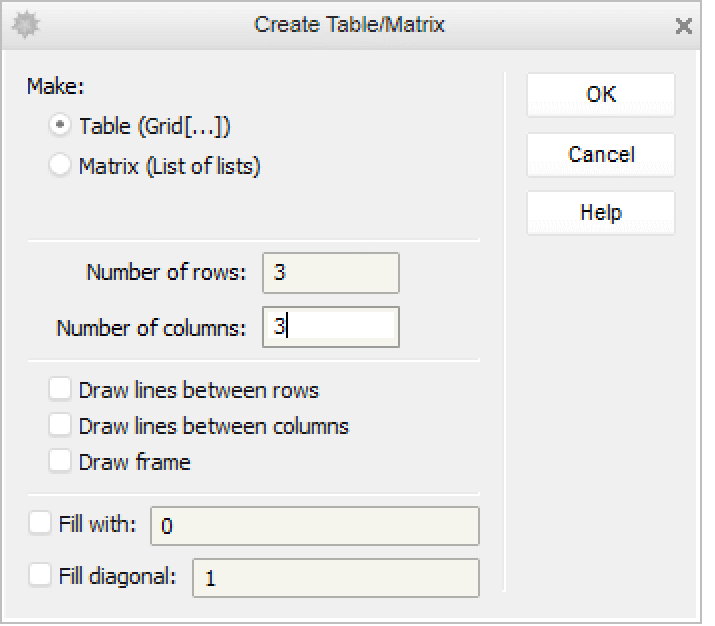
Choose Insert▶Table/Matrix▶New. Use the dialog box that pops up to create a matrix:
Filling in Placeholders in a Matrix
Suppose the entry in the top-left position is selected.
Type an entry and select the next placeholder with the Tab key; repeat. (Use Shift+Tab to go backward.)
Type a, press Tab:
Type b, press Tab:
Type c, press Tab:
Press the Control key and the Space bar at the same time to get out of the grid.
Type d, press Ctrl+Space:
Move the insertion point to get out of the matrix.
Press RightArrow:
Adding a New Column in a Matrix
Place the insertion point to the right of any entry; here the insertion point is to the right of the entry at the top left.
Place the insertion point:
Press the Control and Comma keys at the same time. A column of placeholders will appear, with the top one selected.
PressCtrl+Comma:
Adding a New Row in a Matrix
Place the insertion point to the right of any entry; here the insertion point is to the right of the entry at the top left.
Place the insertion point:
Press the Control and Enter keys at the same time. A row of placeholders will appear, with the first one selected.
Press Ctrl+Enter:
Typing Superscripts
Typing Superscript xi
Type the symbol that will have the superscript.
Type x:
Create a superscript by pressing the Control key and the 6 key at the same time.
Press Ctrl+6 or Ctrl+^:
Type the superscript into the placeholder (which is already selected).
Type i:
Move the insertion point out of the superscript position down to the baseline by pressing the Control key and the Space bar at the same time.
Press Ctrl+Space:
Typing Superscript xi j
Type the symbol that will have the superscript.
Type x:
Create a superscript by pressing the Control key and the 6 key at the same time.
Press Ctrl+6 or Ctrl+^:
To avoid multiplying the two superscripts, separate them with an invisible comma. To type the alias for an invisible comma, press the Escape key before and after typing a comma.
Type i, press Esc, type a comma, press Esc, and type j:
Get out of the superscript position down to the baseline by pressing the Control key and the Space bar at the same time.
Press Ctrl+Space:
Typing Superscript x23
Type the symbol that will have the superscript.
Type x:
Create a superscript by pressing the Control key and the 6 key at the same time.
Press Ctrl+6 or Ctrl+^:
To avoid multiplying the two superscripts, separate them with an invisible comma. To type the alias for an invisible comma, press the Escape key before and after typing a comma.
Type 2, press Esc, type a comma, press Esc, and type 3:
Get out of the superscript position down to the baseline by pressing the Control key and the Space bar at the same time.
Press Ctrl+Space:
Typing Superscript xni
Type the symbol that will have the superscript.
Type x:
Create a superscript by pressing the Control key and the 6 key (or the ^ key) at the same time.
Press Ctrl+6 or Ctrl+^:
Type the superscript into the placeholder (which is already selected).
Type n:
Create a subscript of a superscript by pressing the Control key and the _ key at the same time.
Press Ctrl+_:
Type i:
Press the Control key and the Space bar at the same time twice to get down to the baseline.
Press Ctrl+Space:
Press Ctrl+Space:
Typing Subscripts
Typing xi
Type the symbol that will have the subscript.
Type x:
Create a subscript by pressing the Control key and the - key at the same time.
Press Ctrl+- or Ctrl+_:
Type the subscript into the placeholder (which is already selected).
Type i:
Move the insertion point out of the subscript position up to the baseline by pressing the Control key and the Space bar at the same time.
Press Ctrl+Space:
Typing xi j
Type the symbol that will have the subscript.
Type x:
Create a subscript by pressing the Control key and the - key at the same time.
Press Ctrl+- or Ctrl+_:
Type the subscript into the placeholder (which is already selected).
Type i:
Press the Space bar and then type j.
Press Space and type j:
*To avoid multiplying the two subscripts, separate them with an invisible comma. To type the alias for an invisible comma, press the Escape key before and after typing a comma.
Press Esc, type a comma, press Esc, and type j:
Move the insertion point out of the subscript position up to the baseline by pressing the Control key and the Space bar at the same time.
Press Ctrl+Space:
Typing x23
Type the symbol that will have the subscript.
Type x:
Create a subscript by pressing the Control key and the - key at the same time.
Press Ctrl+- or Ctrl+_:
Type the subscript into the placeholder (which is already selected).
Type 2:
To avoid multiplying the two subscripts, separate them with an invisible comma. To type the alias for an invisible comma, press the Escape key before and after typing a comma.
Press Esc, type a comma, press Esc, and type 3:
Move the insertion point out of the subscript position up to the baseline by pressing the Control key and the Space bar at the same time.
Press Ctrl+Space:
Typing xni
The first three steps create and fill in the subscript and its subscript.
Type x, then press Ctrl+_:
Type n, then press Ctrl+_:
Type i:
Press the Control key and the Space bar at the same time twice to get up to the baseline.
Press Ctrl+Space twice:
Typing Overscripts
Typing
Type the expression that will have an overscript.
Type x:
Create an overscript by pressing the Control key and the 7 key at the same time.
Press Ctrl+7 or Ctrl+&:
Type an underscore into the placeholder (which is already selected).
Type _:
Move the insertion point out of the overscript position down to the baseline by pressing the Control key and the Space bar at the same time.
Press Ctrl+Space:
Typing
Press the Control key and the 7 key at the same time.
This creates a pair of placeholders, one on the baseline and another in the overscript position.
Press Ctrl+7 or Ctrl+&:
Type an underscore into the placeholder in the overscript (which is already selected).
Type _:
Press the Tab key to select the placeholder that is on the baseline.
Press Tab:
Type the expression under the overscript.
Type x+y:
Press the Control key and the Space bar to get out of the overscripted expression.
Press Ctrl+Space:
Typing Underscripts
Typing
Type the expression that will have an underscript.
Type x:
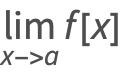
Create an underscript by pressing the Control and Shiftkeys and the , key at the same time.
Press Ctrl+Shift+,:
Type an underscore into the placeholder (which is already selected).
Type _:
Move the insertion point out of the underscript position up to the baseline by pressing the Control key and the Space bar at the same time.
Press Ctrl+Space:
Typing
Press the Control and Shiftkeys and the , key at the same time.
This creates a pair of placeholders, one on the baseline and another in the underscript position.
Press Ctrl+Shift+,:
Type the expression into the placeholder (which is already selected).
Type x+y:
Press the Tab key to select the placeholder that is under the baseline.
Press Tab:
Type an underscore.
Type _:
Press the Control key and the Space bar at the same time to get out of the underscripted expression.