Two-Dimensional Expression Input
Two-Dimensional Expression Input
Moving the Cursor by Typing
You can use the keyboard to move the cursor forward or backward one character or one word at a time. You can also delete the character or word to the right or the left of the cursor, and you can move the cursor to the beginning or end of a line.
Getting out of an Expression
Selecting the Next Placeholder
Switching Positions
Selecting the Next-Higher Subexpression
Deleting to Destructure an Expression
Another Example
Typing 
Create a built-up fraction by pressing the Control and / keys at the same time. The placeholder in the denominator is already selected.
Move the insertion point out of the fraction by pressing the Control key and the Space bar at the same time.
Typing 
Create a built-up fraction by pressing the Control and / keys at the same time. The placeholder in the denominator is already selected.
Move the insertion point out of the fraction by pressing the Control key and the Space bar at the same time.
Typing 
Create a built-up fraction by pressing the Control and / keys at the same time. The placeholder in the denominator is already selected.
Move the insertion point out of the fraction by pressing the Control key and the Space bar at the same time.
Typing 
Create a built-up fraction with Ctrl+/. The numerator and denominator contain placeholders; the one in the numerator is selected.
Select the placeholder in the denominator by pressing the Tab key. (Alternatively, you can select the placeholder by clicking it or dragging.)
Another Way of Typing 
Select the expression. (You can select by dragging, by pressing Ctrl+. repeatedly, or by clicking the expression repeatedly.)
Typing xm
Move the insertion point out of the exponent down to the baseline by pressing the Control key and the Space bar at the same time.
Typing xm+yn
Move the insertion point out of the exponent down to the baseline by pressing the Control key and the Space bar at the same time.
Typing xm+n
Move the insertion point out of the exponent down to the baseline by pressing the Control key and the Space bar at the same time.
Typing 
Typing 
Typing 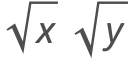
Typing 
Another Way of Typing 
Select the expression. (You can select by dragging, by pressing Ctrl+. repeatedly, or by clicking the expression repeatedly.)
Typing 
Get out of the radical and down to the baseline by pressing the Control key and the Space bar at the same time.
Typing 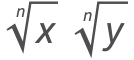
Get out of the radical and down to the baseline by pressing the Control key and the Space bar at the same time.
Typing 
Get out of the radical and down to the baseline by pressing the Control key and the Space bar at the same time.
Creating a New Matrix
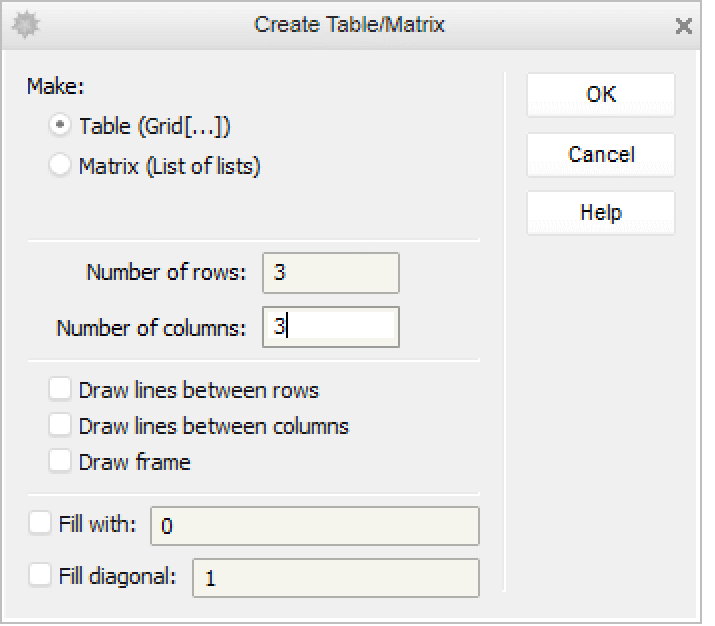
Filling in Placeholders in a Matrix
Type an entry and select the next placeholder with the Tab key; repeat. (Use Shift+Tab to go backward.)
Adding a New Column in a Matrix
Place the insertion point to the right of any entry; here the insertion point is to the right of the entry at the top left.
Press the Control and Comma keys at the same time. A column of placeholders will appear, with the top one selected.
Adding a New Row in a Matrix
Place the insertion point to the right of any entry; here the insertion point is to the right of the entry at the top left.
Press the Control and Enter keys at the same time. A row of placeholders will appear, with the first one selected.
Typing Superscript xi
Move the insertion point out of the superscript position down to the baseline by pressing the Control key and the Space bar at the same time.
Typing Superscript xi j
To avoid multiplying the two superscripts, separate them with an invisible comma . To type the alias for an invisible comma, press the Escape key before and after typing a comma.
Get out of the superscript position down to the baseline by pressing the Control key and the Space bar at the same time.
Typing Superscript x2 3
To avoid multiplying the two superscripts, separate them with an invisible comma . To type the alias for an invisible comma, press the Escape key before and after typing a comma.
Get out of the superscript position down to the baseline by pressing the Control key and the Space bar at the same time.
Typing Superscript xni
Typing xi
Move the insertion point out of the subscript position up to the baseline by pressing the Control key and the Space bar at the same time.
Typing xi j
*To avoid multiplying the two subscripts, separate them with an invisible comma . To type the alias for an invisible comma, press the Escape key before and after typing a comma.
Move the insertion point out of the subscript position up to the baseline by pressing the Control key and the Space bar at the same time.
Typing x2 3
To avoid multiplying the two subscripts, separate them with an invisible comma . To type the alias for an invisible comma, press the Escape key before and after typing a comma.
Move the insertion point out of the subscript position up to the baseline by pressing the Control key and the Space bar at the same time.
Typing xni
Typing 
Move the insertion point out of the overscript position down to the baseline by pressing the Control key and the Space bar at the same time.
Typing 
Typing 
Move the insertion point out of the underscript position up to the baseline by pressing the Control key and the Space bar at the same time.
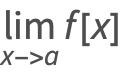
Typing 
Press the Control key and the Space bar at the same time to get out of the underscripted expression.