Working with MathML
| Introduction | Generating MathML |
| Syntax of MathML | Exporting MathML |
| Importing MathML | Symbols for MathML Elements |
Introduction
MathML is an XML-based markup language for representing mathematics. It was developed by the W3C to provide an effective way to display math in web pages and facilitate the transfer and reuse of mathematical content between applications. The great advantage is that it can encode information about both the meaning and appearance of mathematical notation. This makes it an ideal data format for storing and exchanging mathematical information. For example, a MathML equation can be copied out of a web page and directly pasted into an application like the Wolfram Language for evaluation.
As a common and widely accepted standard for representing mathematics, MathML provides the foundation for many interesting and useful applications. For example, you can use MathML to create dynamic mathematical websites featuring interactive equations, set up a database of technical documents whose contents can be easily searched, indexed, and archived, or develop speech synthesis software for audio rendering of mathematics.
MathML has grown rapidly in popularity since it was first released in 1998, gaining broad support in both industry and academia. It is currently possible to view MathML equations in the leading web browsers, either directly or using freely available plugins. As more tools for authoring, viewing, and processing MathML become available, its importance is only expected to grow.
Wolfram Research was a key participant in the development of MathML and is committed to supporting this important web technology. The Wolfram Language includes full support for MathML 2.0. You can import MathML equations into a Wolfram Language notebook and evaluate them, or export equations from a notebook as MathML and paste them into an HTML document. There are also several kernel commands for converting between MathML and the boxes and expressions used by the Wolfram Language to represent mathematics.
Syntax of MathML
Overview
Since it is an XML application, the syntax rules of MathML are defined by the XML specification. Each MathML expression consists of a series of elements, written in the angle bracket syntax similar to HTML. Each element can take several attributes. The allowed elements and attributes are determined by the MathML DTD.
All MathML elements fall into one of three categories: interface elements, presentation elements, and content elements.
Interface elements, such as the top-level math element, determine how a MathML expression is embedded in other XML documents.
Presentation elements encode information about the visual two-dimensional structure of a mathematical expression. For example, the mrow, mfrac, msqrt, and msub elements represent a row, a fraction, a square root, and a subscripted expression, respectively.
Content elements encode information about the logical meaning of a mathematical expression. For example, plus and sin represent addition and the trigonometric sine function, and apply represents the operation of applying a function.
A given equation can be represented in several different ways in MathML:
- Presentation MathML—presentation elements only. It is useful in situations where only the display of mathematics is important. For example, to include equations in a web page that are intended only for viewing.
- Content MathML—content elements only. It is useful in situations where it is important to encode mathematical meaning. For example, you can use it to post an equation on a web page that readers can copy and paste into the Wolfram Language for evaluation.
- Combined markup—combination of content and presentation elements. It is used when you want to encode both the appearance and meaning of equations. For example, you can use combined markup to specify a nonstandard notation for a common mathematical construct or to associate a specific mathematical meaning with a notation that usually has a different meaning.
Using the Wolfram Language, you can generate presentation, content, or combined markup for any equation.
Presentation MathML
Presentation MathML consists of about 30 elements and 50 attributes, which encode the visual two-dimensional structure of a mathematical expression. For example, the Wolfram Language typeset expression  would have the following MathML representation.

The entire expression is enclosed in a math element. This must be the root element for every instance of MathML markup. The other presentation elements are:
Identifiers, operators, and numbers are each represented by different elements because each has slightly different typesetting conventions for fonts, spacing, and so on. For example, variables are typically rendered in an italic font, numbers are displayed in a normal font, and operators are rendered with extra space around them, depending on whether they occur in a prefix, postfix, or infix position.
In addition to the mi, mn, and mo elements, there are presentation elements corresponding to common notational structures such as fractions, square roots, subscripts, superscripts, and matrices. Any given formula can be represented by decomposing it into its constituent parts and replacing each notational construct by the corresponding presentation elements. For example, the typeset expression  would have the following MathML representation.

Here, the mfrac, msqrt, and msup elements represent a fraction, a square root, and a superscripted expression, respectively. Each of these elements takes a fixed number of child elements, which have a specific meaning based on their position. These child elements are called arguments. For example, both the mfrac and msup elements take two arguments, with the following syntax.
<mfrac> numerator denominator </mfrac>
<msup> base superscript </msup>
The mrow element is used to enclose other elements that appear in a horizontal row. For example, the typeset expression  would have the following MathML representation.
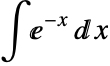
Here, the limits of the integral are shown using the presentation element msubsup, which takes three arguments, with the following syntax.
<msubsup> base subscript superscript </msubsup>
Another notable feature is that the symbols representing the integral sign, the exponential, and the differential d are represented using the character entities ∫, &exp;, and ⅆ. These are among approximately 2,000 special symbols defined by the MathML DTD. These can be included in a document using a named entity reference or a character entity reference, which uses the Unicode character code.
The mstyle element is used for applying styles to an equation. Any attributes specified in an mstyle element are inherited by all its child elements. You can use this element to specify properties like the font size and color for an equation. Note the use of the entity ⁢ to denote multiplication.
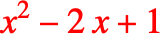
The examples are intended only to illustrate how presentation markup works through a sampling of some of its elements. To see a complete listing of all the presentation elements and attributes, see the MathML specification at http://www.w3.org/TR/MathML2.
Content MathML
Content MathML consists of about 140 elements and 12 attributes, which encode the logical meaning of a mathematical expression. The content elements ci and cn are used to represent identifiers and numbers, respectively. They are analogous to the mi and mn elements in presentation markup. For example, the typeset expression  would have the following content MathML representation.

The apply element is used to apply operators or functions to expressions. The first argument of the apply element is usually an empty element indicating an operator or function. The remaining arguments represent one or more expressions to which the first argument is applied. In this example, the first argument of the apply function is the empty element plus, which denotes addition.
The type attribute of cn describes the type of number encoded. It can take values real, integer, rational, complex-polar, complex-cartesian, and constant. The empty element sep is used to separate different parts of a number such as the numerator and denominator of a fraction or the real and imaginary parts of a complex number. For example:


The majority of content elements are empty elements representing specific operators or functions. The various elements are organized into groups named after the specific elementary subfields of mathematics.
There are elements corresponding to most operators and functions that are encountered in high school mathematics. For example, basic arithmetic operators are represented by plus, minus, times, divide, and power.

Integrals are specified using the int element. The variable of integration is represented using the element bvar. The upper and lower limits of integration are usually specified using the elements lowlimit and uplimit.

The interval element is used to specify closed and open intervals. It takes the attribute closure, which can take the values closed, open, closed-open, and open-closed corresponding to the four types of intervals possible. The default value for closure is closed.


You can also use the interval element to specify the limits of a definite integral as an alternative to using uplimit and lowlimit.

The matrix and matrixrow elements are used to represent a matrix and a row of a matrix, respectively. The eq element is used to express equality.
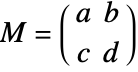
The examples are intended only to illustrate how content markup works through a representative sampling of some of its elements. To see a complete listing of all the content elements and attributes, see the MathML specification at http://www.w3.org/TR/MathML2.
Importing MathML
There are two ways to import MathML equations into the Wolfram Language:
- Copy and paste MathML equations from another application, such as a web browser, directly into a notebook. When you paste a valid MathML expression into a notebook, the Wolfram Language brings up a dialog box asking if you want to paste the literal markup or interpret it. If you choose to interpret the markup, it is automatically converted into a Wolfram Language expression.
MathML Import Options
The standard Import options can be used for greater control over the export process. The syntax for specifying a conversion option is as follows.
Import[file,expr,"MathML",option1->value1,option2->value2,…]
Generating MathML
The Wolfram Language includes several functions for generating MathML from the boxes and expressions used internally by the Wolfram Language to represent equations. You can enter an equation in a notebook using palettes, menus, or keyboard shortcuts and then convert it into MathML using one of these conversion functions. All the MathML conversion functions are located in the XML`MathML` context.
The annotation-xml element is used to provide additional information of the type specified by its encoding attribute. Here, the encoding attribute has the value "MathML-Content" indicating that the annotation-xml element contains content MathML.
ExportString evaluates its first argument before converting it to MathML. An expression that can be simplified on evaluation may give unexpected results.
Setting Options
Export and ExportString accept the options "Annotations", "Presentation", "Content", and "NamespacePrefixes".
Using these options, you can control various features of the generated MathML, such as including an XML or DTD declaration, generating presentation markup, content markup, or both, and using an explicit namespace declaration and prefix.
You can specify the options explicitly each time you evaluate one of the MathML functions. Or use the SetOptions command to change the default values of the options for a particular function. The option values you set are then used for all subsequent evaluations of that function.
Exporting MathML
Introduction
Use the Wolfram Language's sophisticated typesetting capabilities to create properly formatted equations and then convert them into MathML for display on the web. There are several ways to export mathematical expressions from a Wolfram Language notebook as MathML.
- Edit ▶ Copy As ▶ MathML copies the selected expression onto the clipboard in MathML format. This is a convenient way to copy a specific mathematical formula from a notebook and paste it into an HTML document.
- Use File ▶ Save As, choosing XML – XHTML+MathML (*.xml) from the Save as Type: submenu. This converts your entire notebook into XHTML with all equations in the notebook saved as MathML. The equations are embedded in the XHTML file in the form of MathML "data islands", which can be displayed by a web browser, either directly or using a special plugin.
- Use ExportString with "MathML" as the export format or .mml as the file extension.
The output contains both presentation and content markup enclosed in a semantics element. You can choose to generate only presentation or content markup by changing the value of "Presentation" and "Content". The xmlns attribute is added to the top-level math element to provide information about the namespace of the enclosed elements.
MathML Export Options
The standard options of the Export or ExportString functions can be used for greater control over the export process. The syntax for specifying a conversion option is:
Export[file,expr,"MathML",option1->value1,option2->value2,…]
ExportString[expr,"MathML",option1->value1,option2->value2,…].
Options can also be specified directly in any function that produces MathML as output:
XML`MathML`ExpressionToMathML[expr,"MathML",option1->value1,option1->value1,…].
When exporting as MathML, you can use any of the Export options available for exporting general XML documents.
- "IncludeMarkupAnnotations"—controls whether to include the Wolfram Language encoding of the expression as an annotation
- "MathAttributes"—provides a way to insert additional attributes into the root tag of a MathML expression
"Annotations"
This option controls which annotations are added to the output MathML. The value is a list whose elements can be "DocumentHeader", "XMLDeclaration", or "DOCTYPEDeclaration". The order of the elements in the list is not relevant.
XMLDeclaration
When "XMLDeclaration" is one of the annotations, an XML declaration, <?xml version="1.0"?>, is included in the header.
DOCTYPEDeclaration
When "DOCTYPEDeclaration" is one of the annotations, an XML document type declaration of the form <!DOCTYPE …> appears in the header. This statement specifies the DTD for the XML application in which the output is written.
DocumentHeader
"Annotations"->{"DocumentHeader", "XMLDeclaration", "DOCTYPEDeclaration"} automatically adds a header containing an XML declaration and a document type declaration for the MathML DTD to the output.
When "Annotations" does not contain "DocumentHeader", then the output MathML has no header. This is true even if "Annotations" contains other elements such as "XMLDeclaration" or "DOCTYPEDeclaration".
"Presentation" and "Content"
These options control which type of MathML markup is generated. The default settings are "Presentation"->True and "Content"->False.
"IncludeMarkupAnnotations"
This option determines whether an extra annotation should be added when exporting a formula containing constructs specific to the Wolfram Language that do not have a clear counterpart in MathML.
option | value | effect |
| "IncludeMarkupAnnotations" | True | Wolfram Language‐specific information is included in a separate annotation element (default) |
| False | an extra annotation element is not added |
Values for "IncludeMarkupAnnotations".
With "IncludeMarkupAnnotations"->True, the Wolfram Language annotation is enclosed in a semantics element. This allows lossless import back into the Wolfram Language.
"MathAttributes"
This option lets you add attributes to the root element of a MathML expression. The option has the syntax "MathAttributes"->{attribute1->value1,attribute2->value2,…}.
"UseUnicodePlane1Characters"
This option controls whether plane 1 Unicode characters should be replaced with similar plane 0 characters. This is useful because currently most browsers cannot properly display plane 1 characters.
option | value | effect |
| "UseUnicodePlane1Characters" | True | special characters belonging to plane 1 of Unicode are exported without being replaced (default) |
| False | special characters belonging to plane 1 of Unicode are replaced by plane 0 characters with an attached mathvariant attribute |
Values for "UseUnicodePlane1Characters".
Symbols for MathML Elements
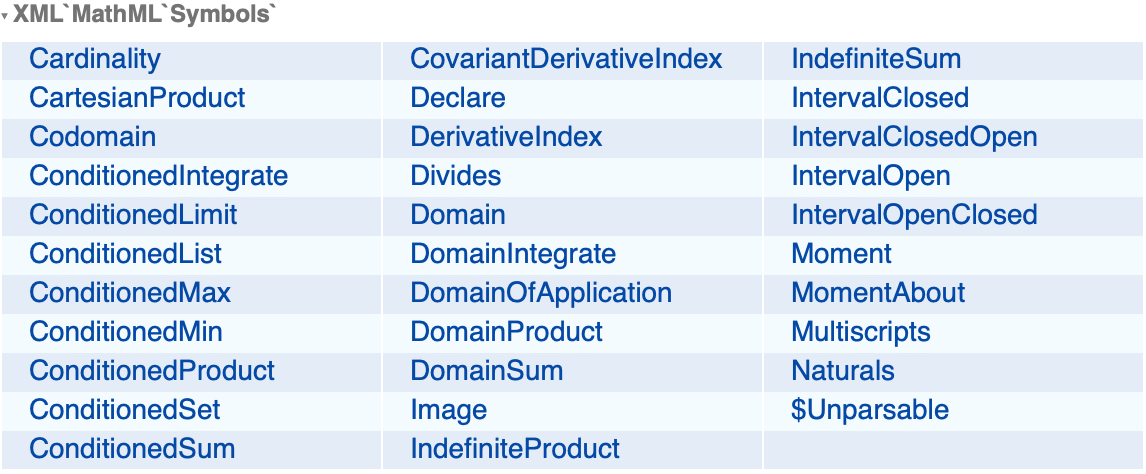
Since certain content elements in MathML do not have a direct analog in the Wolfram Language, a few symbols are specially defined in the XML`MathML` context.