


How to | Compute a Limit
Even simple-looking limits are sometimes quite complicated to compute. The Wolfram Language provides functionality to evaluate several kinds of limits.
Use Limit to calculate limits; the first argument is the function and the second has the form variable->value . You can expect that  :
:
You may want to calculate limits from the right or left. For example, although 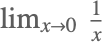 is not well defined, the Wolfram Language defaults to limits from the right:
To force the limit to be from the left, use Direction->1:
If you know something about a parameter in a limit, use the Assumptions option to include this information.
Suppose you want to calculate 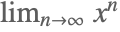 . Without knowing more, the limit cannot be calculated:
If, however, you know that 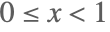 , then you can compute the answer: