


ButtonBoxOptions
is an option that specifies settings for ButtonBox.
Details
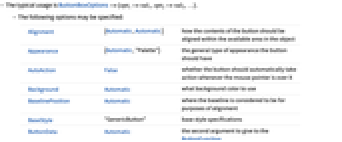
- The typical usage is ButtonBoxOptions->{opt1->val1,opt2->val2,…}.
- The following options may be specified:
-
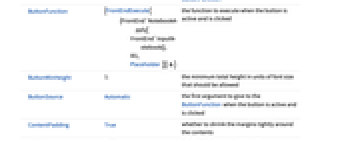
Alignment {Automatic,Automatic} how the contents of the button should be aligned within the available area in the object Appearance {Automatic,"Palette"} the general type of appearance the button should have AutoAction False whether the button should automatically take action whenever the mouse pointer is over it Background Automatic what background color to use BaselinePosition Automatic where the baseline is considered to be for purposes of alignment BaseStyle "GenericButton" base style specifications ButtonData Automatic the second argument to give to the ButtonFunction ButtonFunction (FrontEndExecute[{FrontEnd`NotebookApply[FrontEnd`InputNotebook[], #1,Placeholder ]}] & ) the function to execute when the button is active and is clicked ButtonMinHeight 1. the minimum total height in units of font size that should be allowed ButtonSource Automatic the first argument to give to the ButtonFunction when the button is active and is clicked ContentPadding True whether to shrink the margins tightly around the contents Enabled True whether a button should be active Evaluator None the name of the kernel to use FrameMargins Automatic the absolute margins in printer's points to leave inside the frame ImageMargins 0 the absolute margins to leave around the image displayed ImageSize Automatic the overall size of the image Method "Preemptive" what internal methods the button should use Tooltip None the tooltip for the button TooltipDelay 0.` how long to delay before displaying the tooltip TooltipStyle {} style specifications for the tooltip
Examples
Basic Examples (1)
Modify the default button options from an outer wrapper using ButtonBoxOptions:
Wolfram Research (1999), ButtonBoxOptions, Wolfram Language function, https://reference.wolfram.com/language/ref/ButtonBoxOptions.html (updated 2010).
Text
Wolfram Research (1999), ButtonBoxOptions, Wolfram Language function, https://reference.wolfram.com/language/ref/ButtonBoxOptions.html (updated 2010).
CMS
Wolfram Language. 1999. "ButtonBoxOptions." Wolfram Language & System Documentation Center. Wolfram Research. Last Modified 2010. https://reference.wolfram.com/language/ref/ButtonBoxOptions.html.
APA
Wolfram Language. (1999). ButtonBoxOptions. Wolfram Language & System Documentation Center. Retrieved from https://reference.wolfram.com/language/ref/ButtonBoxOptions.html