


PolarTicks
is an option for sector charts and polar plots that specifies tick marks for polar axes.
Details
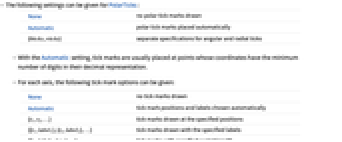
- The following settings can be given for PolarTicks:
-
None no polar tick marks drawn Automatic polar tick marks placed automatically {θticks,rticks} separate specifications for angular and radial ticks - With the Automatic setting, tick marks are usually placed at points whose coordinates have the minimum number of digits in their decimal representation.
- For each axis, the following tick mark options can be given:
-
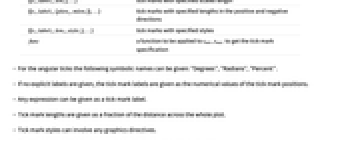
None no tick marks drawn Automatic tick mark positions and labels chosen automatically {t1,t2,…} tick marks drawn at the specified positions {{t1,label1},{t2,label2},…} tick marks drawn with the specified labels {{t1,label1,len1},…} tick marks with specified scaled length {{t1,label1,{plen1,mlen1}},…} tick marks with specified lengths in the positive and negative directions {{t1,label1,len1,style1},…} tick marks with specified styles func a function to be applied to tmin, tmax to get the tick mark specification - For the angular ticks the following symbolic names can be given: "Degrees", "Radians", "Percent".
- If no explicit labels are given, the tick mark labels are given as the numerical values of the tick mark positions.
- Any expression can be given as a tick mark label.
- Tick mark lengths are given as a fraction of the distance across the whole plot.
- Tick mark styles can involve any graphics directives.
- The tick mark function func[tmin,tmax] may return any other tick mark option.
Examples
open allclose allBasic Examples (3)
Place polar tick marks and labels automatically:
Place polar tick marks at the specified positions:
Specify overall polar ticks style, including polar tick labels, using TicksStyle:
Scope (10)
Ticks Positions and Labeling (5)
Place ticks on the angular axes only:
Place ticks on radial axes only:
Draw angular tick marks at the specified positions:
Draw radial tick marks at the specified positions:
Draw angular tick marks at the specified positions with the specified labels:
Draw radial tick marks at the specified positions with the specified labels:
Text
Wolfram Research (2008), PolarTicks, Wolfram Language function, https://reference.wolfram.com/language/ref/PolarTicks.html.
CMS
Wolfram Language. 2008. "PolarTicks." Wolfram Language & System Documentation Center. Wolfram Research. https://reference.wolfram.com/language/ref/PolarTicks.html.
APA
Wolfram Language. (2008). PolarTicks. Wolfram Language & System Documentation Center. Retrieved from https://reference.wolfram.com/language/ref/PolarTicks.html