Print


Print[expr]
prints expr as output.
Details
- In a notebook, Print generates a cell with style "Print".
- Print can print any expression, including graphics and dynamic objects.
- Print[expr1,expr2,…] prints expri concatenated together, effectively using Row. »
- With a text‐based interface, Print ends its output with a single newline (line feed).
- You can arrange to have expressions on several lines by using Column. »
- Print sends its output to the channel $Output.
- Print uses the format type of $Output as its default format type.
Examples
open all close allBasic Examples (2)


Scope (8)
Print[Graphics[Circle[]]]
Print[Graphics3D[Sphere[]]]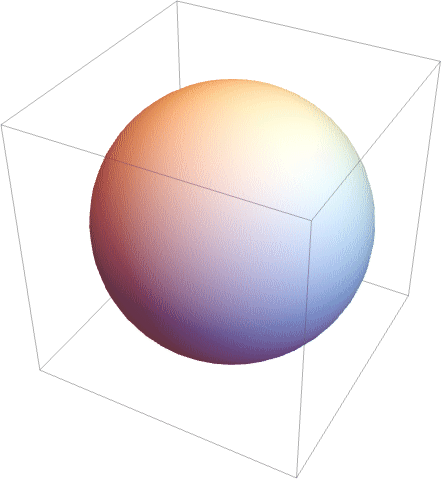
Print a column of expressions:
Print[Column[{x, aaa, z}]]
Print normally prints in StandardForm, so strings do not have quotes:
Print["this is a string"]
Print in InputForm:
Print[InputForm["this is a string"]]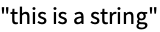
Print in TraditionalForm:
Print[TraditionalForm[Integrate[1 / (x ^ 3 - 1), x]]]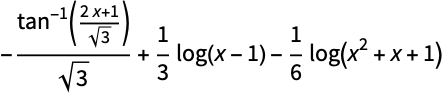
Print[Style[aaa, 18, Red]]
Print[Slider[]];Print[InputField[]]

Print[PasteButton["xyz"]]
Print several expressions concatenated together:
Print[x ^ 2, "=", 12434]
Applications (2)


Properties & Relations (2)


Wolfram Research (1988), Print, Wolfram Language function, https://reference.wolfram.com/language/ref/Print.html (updated 2007).
Text
Wolfram Research (1988), Print, Wolfram Language function, https://reference.wolfram.com/language/ref/Print.html (updated 2007).
CMS
Wolfram Language. 1988. "Print." Wolfram Language & System Documentation Center. Wolfram Research. Last Modified 2007. https://reference.wolfram.com/language/ref/Print.html.
APA
Wolfram Language. (1988). Print. Wolfram Language & System Documentation Center. Retrieved from https://reference.wolfram.com/language/ref/Print.html