

Run
Run["command"]
runs command as an external operating system command, returning the exit code obtained.
Details
- For any expression expr, Run[expr] runs the string corresponding to OutputForm[expr] as an external operating system command.
- Run returns an integer that corresponds, when possible, to the exit code for the command returned by the operating system.
- In a notebook interface, the command executed by Run cannot take interactive input, and its textual output will not be displayed.
- In a terminal interface, the command executed by Run can display text and take standard input from the terminal.
- In a terminal interface, the input line !command will execute an external command.
Examples
open all close allBasic Examples (1)

Scope (1)
Create a string template for the command to run:
template = StringTemplate["`wolfram` -noprompt -run \"DateString[] >>> `file`; Exit[0]\""]Create a temporary file for storing the output:
file = CreateFile[]Use TemplateApply to create the command string:
commandstring = TemplateApply[template, <|"wolfram" -> First[$CommandLine], "file" -> file|>]Run the command three times, pausing for three seconds each time:
Do[Run[commandstring];Pause[3], {3}]Show the contents of the file:
FilePrint[file]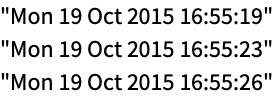
DeleteFile[file]Text
Wolfram Research (1988), Run, Wolfram Language function, https://reference.wolfram.com/language/ref/Run.html.
CMS
Wolfram Language. 1988. "Run." Wolfram Language & System Documentation Center. Wolfram Research. https://reference.wolfram.com/language/ref/Run.html.
APA
Wolfram Language. (1988). Run. Wolfram Language & System Documentation Center. Retrieved from https://reference.wolfram.com/language/ref/Run.html