StyleBoxAutoDelete


StyleBoxAutoDelete
This function has not been fully integrated into the long-term Wolfram Language, and is subject to change.
is an option for selections that specifies whether a StyleBox wrapped around them should be automatically removed when the expression is edited.
Details

- The default setting is StyleBoxAutoDelete->False.
- This option is useful for creating templates that require user input. For example, suppose you want to create a template for calculating integrals. You can highlight the part of the expression that the user needs to edit by displaying it in a different style, such as using a red color for the font:
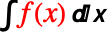 . If you set StyleBoxAutoDelete->True, the red color will disappear as soon as the user edits the expression.
Wolfram Research (1996), StyleBoxAutoDelete, Wolfram Language function, https://reference.wolfram.com/language/ref/StyleBoxAutoDelete.html.
Text
Wolfram Research (1996), StyleBoxAutoDelete, Wolfram Language function, https://reference.wolfram.com/language/ref/StyleBoxAutoDelete.html.
CMS
Wolfram Language. 1996. "StyleBoxAutoDelete." Wolfram Language & System Documentation Center. Wolfram Research. https://reference.wolfram.com/language/ref/StyleBoxAutoDelete.html.
APA
Wolfram Language. (1996). StyleBoxAutoDelete. Wolfram Language & System Documentation Center. Retrieved from https://reference.wolfram.com/language/ref/StyleBoxAutoDelete.html