Write


Write
Write[channel,expr1,expr2,…]
writes the expressions expri in sequence, followed by a newline, to the specified output channel.
Details
- The output channel used by Write can be a single file or pipe, or a list of them, each specified as a string "name", as File["name"], or as an OutputStream object.
- Write is a low-level Wolfram Language output function. Functions like Print and Message are defined in terms of it.
- If any of the specified files or pipes are not already open, Write calls OpenWrite to open them.
- Write does not close files and pipes after it finishes writing to them.
- By default, Write generates output in the form specified by the setting of the FormatType option for the output stream used.
Examples
open all close allBasic Examples (1)
str = OpenWrite[]Write to the stream:
Write[str, a ^ 2, 1 + b ^ 2]Close[str]FilePrint[%]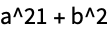
Scope (1)
Write an expression to the file specified by the File object:
file = File[CreateFile[]]Write[file, 1 + b ^ 2]Close[file];FilePrint[file]
DeleteFile[file];
Wolfram Research (1988), Write, Wolfram Language function, https://reference.wolfram.com/language/ref/Write.html (updated 2016).
Text
Wolfram Research (1988), Write, Wolfram Language function, https://reference.wolfram.com/language/ref/Write.html (updated 2016).
CMS
Wolfram Language. 1988. "Write." Wolfram Language & System Documentation Center. Wolfram Research. Last Modified 2016. https://reference.wolfram.com/language/ref/Write.html.
APA
Wolfram Language. (1988). Write. Wolfram Language & System Documentation Center. Retrieved from https://reference.wolfram.com/language/ref/Write.html