Data Formats in Wolfram|Alpha
Data Formats in Wolfram|Alpha
| Introduction | Obtaining Data Formats Programmatically |
| Exploring Data Formats Interactively | Examples of Exposed Data |
In addition to its graphical results, Wolfram|Alpha can provide alternative representations that contain additional information or are well suited to particular tasks. These alternative representations are collectively referred to as data formats. Not all results have all these formats; indeed, it is difficult to conceive of a single result that could have all these representations. Therefore, there exist both interactive and programmatic mechanisms to determine and request the various formats.
There is a subgroup of the data formats known as "exposed data formats". Their purpose is to make it possible to extract useful data from Wolfram|Alpha. For example, the data points used to make a plot may be returned, allowing custom visualizations to be created. Some or all formatting, comments, and other extraneous details are omitted to focus on the data. The names of current exposed data formats as they appear in interactive menus are listed in the table, along with descriptions of the elements extracted.
Menu Name | Description |
| Computable data | |
| Formatted data |
the data represented by the results, including numerical, textual, and mathematical elements; it attempts to preserve the appearance of the result as much as possible, including the use of the special head
WolframAlphaDate
|
| Formula data |
a list of mathematical and Wolfram Language expressions in the result, in held form
|
| Number data | a list of singleton numbers and the numeric portion of singleton quantities in the result |
| Quantity data |
a list of singleton quantities (numbers with units) in the result
|
| Sound data | a list of the sound objects appearing in the result |
| Time series data | a list of time series appearing in the result |
The other data formats are more specialized. Two formats appear in menus as Input and Output. These provide Wolfram Language input and output corresponding to the graphical result, and are in fact used by the free-form input mechanism (= at the beginning of a line). The final format provides a plaintext representation of non-graphical elements in the result.
Menu Name | Description |
| Input | a Wolfram Language expression for the computation that led to the result |
| Output | an ordinary Wolfram Language expression representing the result |
| Plaintext | a plaintext representation of the result |
Both Wolfram|Alpha query and free-form input provide mechanisms to request the various data formats where available. Since Wolfram|Alpha query shows all results by default, it is often a more convenient method for accessing these formats.
Wolfram|Alpha Query
Basic Workflow
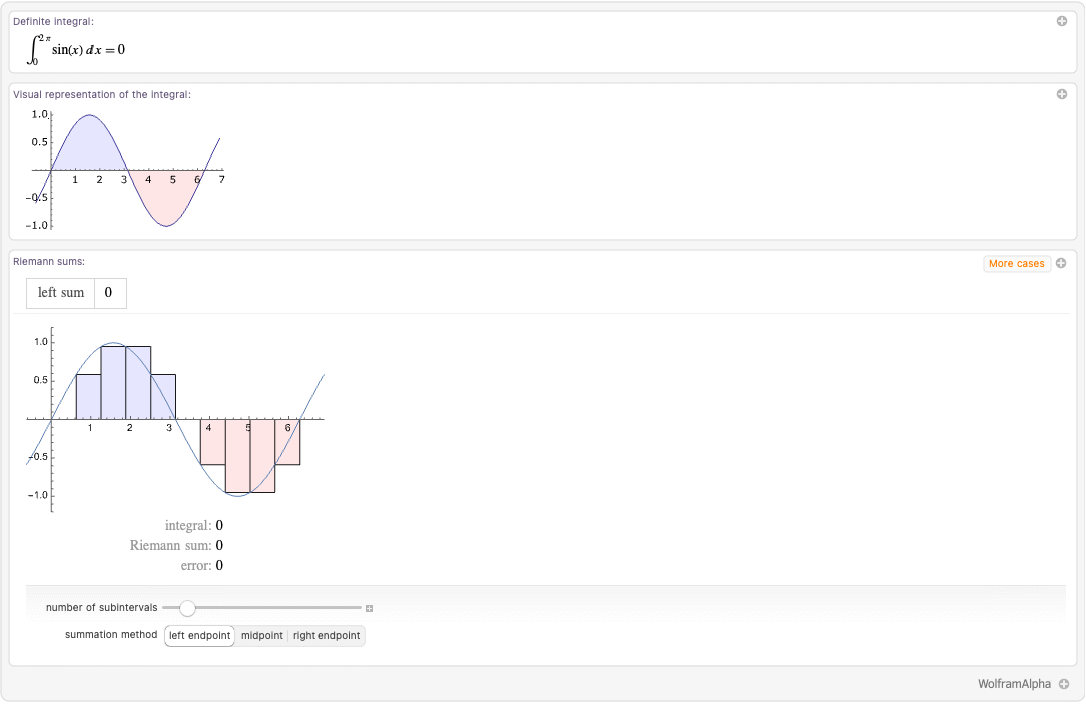
Three results are generated. Each white area with a rounded gray border is referred to as a pod. Clicking the plus sign in the upper-right corner of each pod provides a context menu for requesting that pod in various formats. For example, the "Definite integral" pod has a context menu that looks like this:
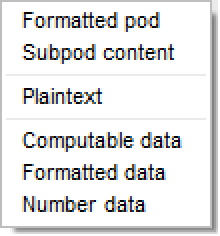
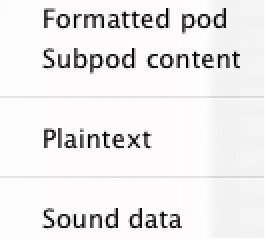
The first two items, Formatted pod and Subpod content, are always available. The items after the first divider indicate that the pod contains Plaintext, Input, and Output. Finally, after the second divider, the available exposed data formats are listed—in this case, Computable data, Formatted data, and Formula data.
If you select Input from the context menu, a cell will be created right below the results of the Wolfram|Alpha query just like the one following, which will automatically evaluate. This cell evaluates to the integral on the left-hand side of the equation in the pod, which is indeed the computation performed by the pod:
WolframAlpha["integrate sinx from 0 to 2pi", {{"Input", 1}, "Input"}]Repeating the process for Output produces the right-hand side of the equation or the Wolfram Language output from the computation:
WolframAlpha["integrate sinx from 0 to 2pi", {{"Input", 1}, "Output"}]WolframAlpha["integrate sinx from 0 to 2pi", {{"Input", 1}, "FormulaData"}]Clicking the plus sign for the "Visual representation of the integral" pod produces a much shorter menu. This pod has no available exposed data formats, and only Input of the other data formats.
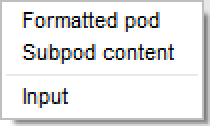
The Wolfram Language input for the pod is an ordinary Plot expression to produce the graph. Allowing the Plot expression to evaluate shows that there is no filling. It is often the case that the Wolfram Language input format is simplified relative to the result returned by Wolfram|Alpha, so you can apply your own styling:
WolframAlpha["integrate sinx from 0 to 2pi", {{"VisualRepresentationOfTheIntegral", 1}, "Input"}]
ReleaseHold[%]
Exposed Data Need Not Resemble the Graphical Result
In the previous example, the exposed data looks essentially the same as the result. This is not always the case. Consider the following query.
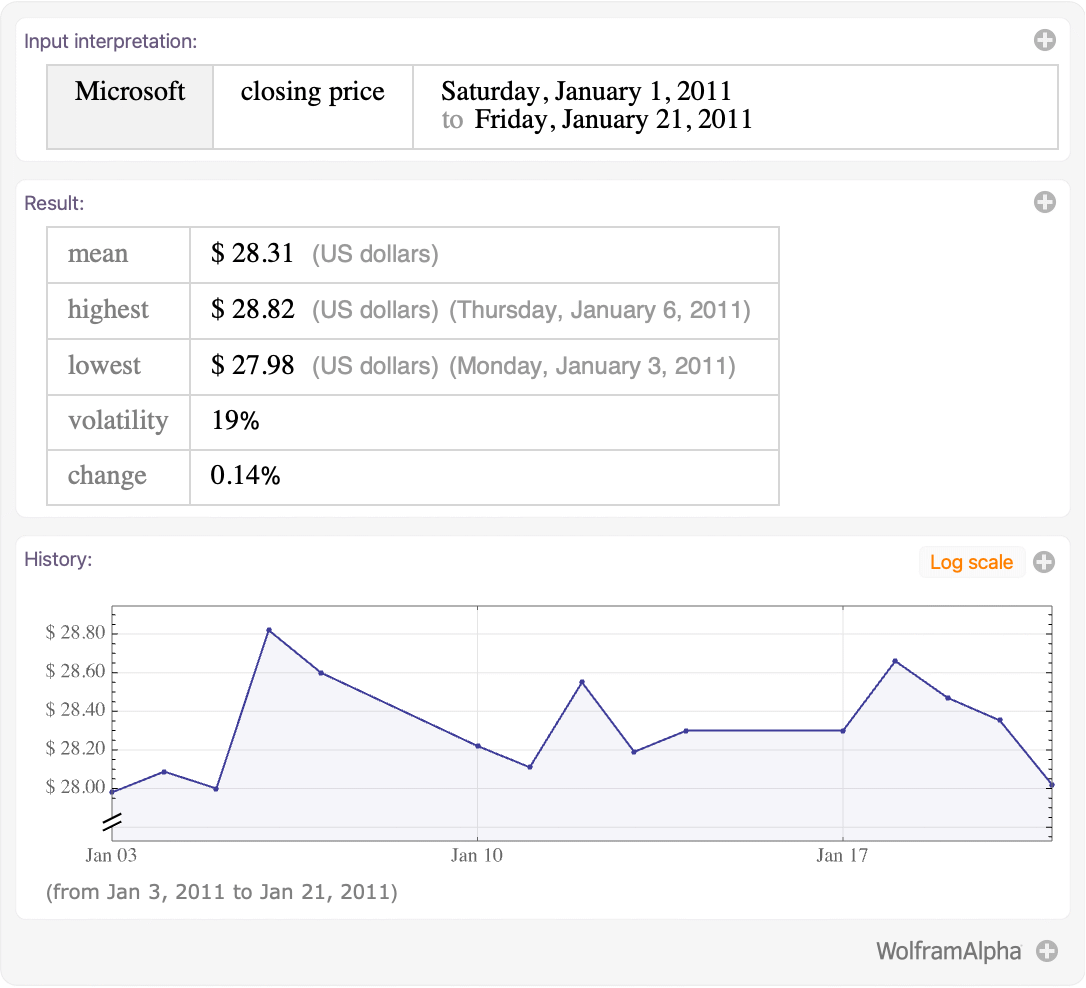
Clicking the plus sign in the "History" pod and selecting Formatted data produces the following. Instead of a plot, the actual data points used to create the plot are listed; the underlying data has been exposed.
WolframAlpha["msft close Jan 1, 2010 to Jan 21 2010", {{"DateRangeSpecified:Close:FinancialData", 1}, "FormattedData"}]The InputForm of the previous output contains the special formatting wrapper WolframAlphaDate. This head, as well as the type of output to expect from exposed data formats, is discussed further in the section "Examples of Exposed Data".
WolframAlpha["msft close Jan 1, 2010 to Jan 21 2010", {{"DateRangeSpecified:Close:FinancialData", 1}, "FormattedData"}]//InputFormThe Structure of the Second Argument
It is worth noting the structure of the second argument to the WolframAlpha function in the cells generated by clicking the context menu. In all cases it is {{"podid",subpodid},"property"}. The "podid" is a string created by Wolfram|Alpha to identify the pod, and "property" is the name of a property to extract. The subpodid is an integer indicating the position of a particular result within the pod. All of the previous examples had a single subpod within the pod, so the index was always one. Here is an example of a query that produces multiple subpods per pod.
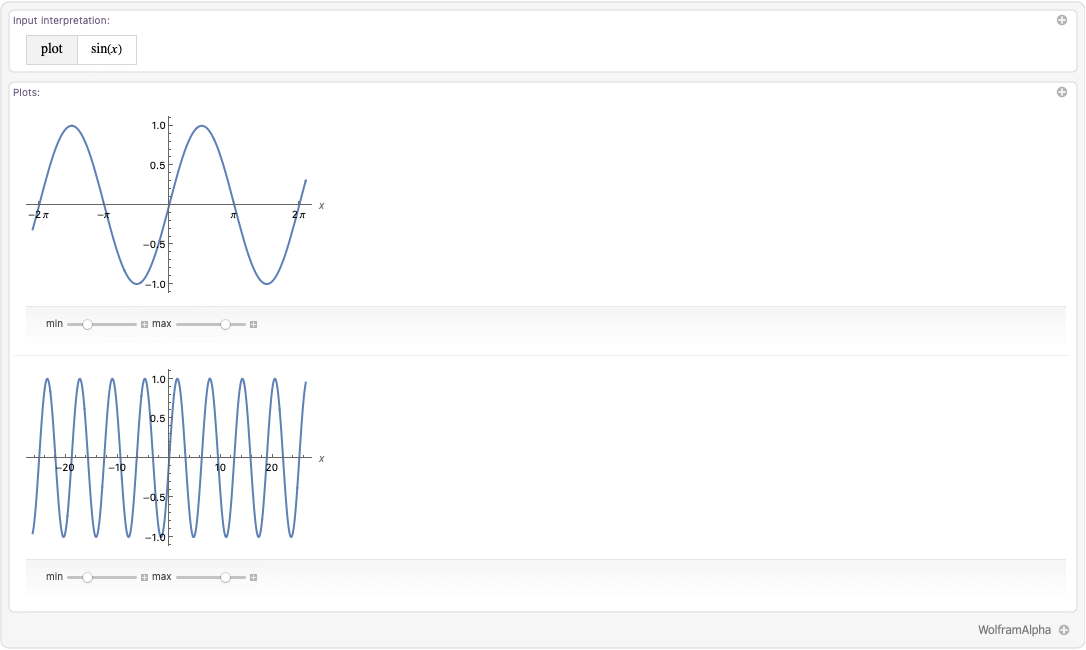
The thin gray line running horizontally between the two plots is the tell-tale sign of multiple subpods. In this case, selecting Input from the "Plots" pod context menu produces two calls to WolframAlpha, one for each subpod.
{WolframAlpha["plot sinx", {{"Plot", 1}, "Input"}], WolframAlpha["plot sinx", {{"Plot", 2}, "Input"}]}This syntax can be extended to extract multiple formats from multiple pods, as explained in the section "Obtaining Data Formats Programmatically".
Free-Form Input
The first thing to notice is that the Integrate expression generated directly below the free-form expression is nothing other than the Wolfram Language input expression seen in the first example. This is precisely how the free-form input mechanism works: it searches for Wolfram Language input and output expressions in the results from Wolfram|Alpha and evaluates those expressions locally.
Clicking the plus sign to the right of the free-form expression reveals all the results. The Wolfram Language input expressions, if any, for each result are displayed directly above the result in a gray box. This is done precisely because the Wolfram Language input format plays such a central role in the free-form input mechanism.
Although only the Wolfram Language input expression is shown next to the pod, all the other formats are available from a context menu. To access, for example, the computable data for the integral, right-click it and select Copy As ▶ Computable data.
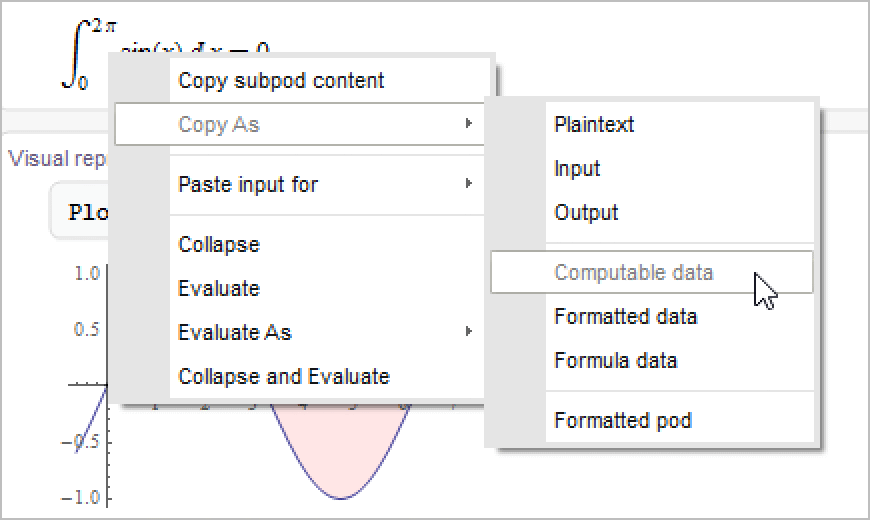
Hold[Subsuperscript[∫, 0, 2 π]Sin[x]ⅆx == 0]You can produce an input cell similarly to how the context menu for Wolfram|Alpha query works by selecting Paste input for ▶ Computable data instead.
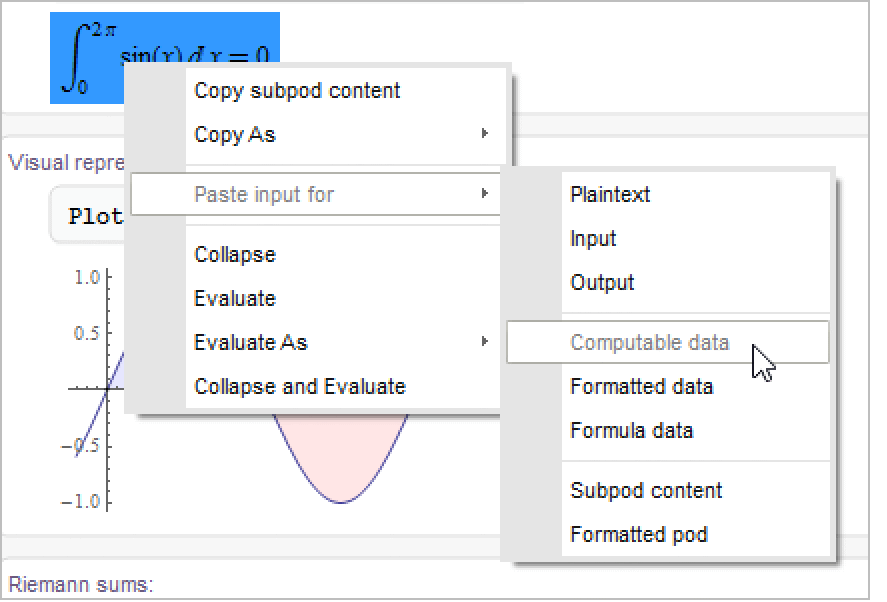
This will create, directly below the results, the following cell. However, unlike Wolfram|Alpha query, the cell will not automatically evaluate.
WolframAlpha["integrate sinx from 0 to 2pi", {{"Input", 1}, "ComputableData"}]Data Formats as Subpod Properties
The data formats are properties associated with particular subpods, as the previous examples have shown. They can therefore be requested using the standard {"podid","property"} and {{"podid",subpodid},"property"} syntaxes of the WolframAlpha function. The programmatic property names for the various formats are strings obtained from their respective menu names by combining the words in camel-case. Thus, Computable data becomes "ComputableData", Time series data becomes "TimeSeriesData", Input becomes "Input", and so forth.
Determining Available Formats
The data formats available for a particular subpod are contained in the "DataFormats" property of each subpod. This property can be computed in the same way as any other subpod property.
Each subpod here only has a single data format: a plaintext version for the "Input" pod and a Wolfram Language input for the two "Plot" subpods:
WolframAlpha["plot sinx", {All, "DataFormats"}]Each pod in this query has multiple data formats available, including multiple exposed data formats for the second and third pods:
WolframAlpha["msft close", {All, "DataFormats"}]The list of formats returned by the "DataFormats" property can then be used in place of the string "DataFormats" to request the actual data.
WolframAlpha["msft close", {{"Result", 1}, {"Plaintext", "ComputableData", "FormattedData", "NumberData", "QuantityData"}}]As is standard with the WolframAlpha function, if you select a single property of a single subpod, only the value will be returned.
WolframAlpha["msft close", {{"Result", 1}, "ComputableData"}]Requesting Data Directly
Rather than first determining which formats are available and then requesting them, you can also request the data formats directly. This is typically accomplished using the {"podid","property"} syntax of the WolframAlpha function.
If you ask for certain properties of all pods, only pods that actually contain those formats will appear:
WolframAlpha["2+2", "PodIDs"]WolframAlpha["2+2", {All, {"Output", "FormulaData"}}]You can also request all properties of a particular pod, then select particular results as desired. Again, only properties that are actually available will appear:
WolframAlpha["2+2", {{"Result", 1}, All}]Finally, you can request particular formats from a particular subpod. In this case (when there is no All in the specification), if a particular format is not available, you will still get a rule for it with the right-hand side Missing["NotAvailable"]:
WolframAlpha["2+2", {{"Result", 1}, {"Output", "FormulaData"}}]Note that if you give only a pod ID without a subpod, you have an implicit All requesting all subpods.
WolframAlpha["2+2", {"Result", {"Output", "FormulaData"}}]If you are interested in the exposed data, the "DataRules" argument to WolframAlpha will return all available exposed data in the normal {{"podid",subpodid},"property"}->data form. Using "DataRules" ensures that if new exposed data formats are added, they will be listed as well.
WolframAlpha["2+2", "DataRules"]The "PodPlaintext" and "WolframForms" arguments of WolframAlpha can be easily reproduced using the {{"podid",subpodid},"property"} syntax of WolframAlpha.
WolframAlpha["champaign, il population density", "PodPlaintext"]Last /@ WolframAlpha["champaign, il population density", {All, "Plaintext"}]"WolframForms" gives the right-hand side of the rules returned by {All,{"Input","Output"}}. The result may be in a different order, however, as the former groups the results by pod, and the latter groups the results by property:
WolframAlpha["x''+x=0", "WolframForms"]Last /@ WolframAlpha["x''+x=0", {All, {"Input", "Output"}}]Sort[%] == Sort[%%]General Notes
Not all Wolfram|Alpha results have data format representations, much less any exposed data, although Wolfram|Alpha results are being refined to provide data formats all the time. Also, when there are multiple exposed data formats available, there are cases where two or even three of the formats coincide. This is all dependent on the contents of the individual pods. Generally speaking, computable data and formatted data are the most general; they are typically present if any exposed data is present, and they may contain heterogeneous data. The other formats seek to drill down and provide specific types of data and are therefore much more predictable. The examples following are organized according to the types of data that they contain.
Quantities and Numbers
Like the Wolfram Language's Quantity object, quantities in Wolfram|Alpha consist of a number with a unit. It is possible to directly access either the whole quantity or just the numeric portion using exposed data. The first pod from the earlier financial example provides a nice illustration of how these are handled.
WolframAlpha["msft close Jan 1, 2011 to Jan 21 2011", IncludePods -> "Result"]The formatted data looks almost exactly like the output. The date annotations have been stripped, the grid dividers are gone, and the fonts are native to the Wolfram System, but otherwise the differences are minimal. As noted in the introduction, the stripping of formatting and extraneous details is quite deliberate:
WolframAlpha["msft close Jan 1, 2011 to Jan 21 2011", {{"Result", 1}, "FormattedData"}]By contrast, the computable data is significantly simplified. Instead of a Grid, it returns a plain matrix:
WolframAlpha["msft close Jan 1, 2011 to Jan 21 2011", {{"Result", 1}, "ComputableData"}]On the other hand, quantity data and number data return only the quantitative part of the result, ignoring the text.
WolframAlpha["msft close Jan 1, 2011 to Jan 21 2011", {{"Result", 1}, "NumberData"}]Quantity data returns only quantities in the form of Wolfram Language Quantity objects:
WolframAlpha["msft close Jan 1, 2011 to Jan 21 2011", {{"Result", 1}, "QuantityData"}]Time Series
History plots are the prototypical example of time series, which give a  value for each in a series of dates. The following is the history plot seen earlier.
value for each in a series of dates. The following is the history plot seen earlier.WolframAlpha["msft close Jan 1, 2011 to Jan 21 2011", IncludePods -> "DateRangeSpecified:Close:FinancialData"]The formatted data contains a table of values, complete with headings indicating the unit for the  values. The comment, as usual, has been removed. The dates in the first column use the WolframAlphaDate wrapper:
values. The comment, as usual, has been removed. The dates in the first column use the WolframAlphaDate wrapper:WolframAlpha["msft close Jan 1, 2011 to Jan 21 2011", {{"DateRangeSpecified:Close:FinancialData", 1}, "FormattedData"}]WolframAlphaDate is a lightweight wrapper to mimic Wolfram|Alpha-style dates. The InputForm shows that the contents of a WolframAlphaDate is an ordinary DateList:
WolframAlpha["msft close Jan 1, 2011 to Jan 21 2011", {{"DateRangeSpecified:Close:FinancialData", 1}, "FormattedData"}]//InputFormComputable data returns the time series in the standard Wolfram Language format for time series: a list of pairs whose first element is a DateList and whose second element is a computable value:
WolframAlpha["msft close Jan 1, 2011 to Jan 21 2011", {{"DateRangeSpecified:Close:FinancialData", 1}, "TimeSeriesData"}]In this case, the time series data is identical to the computable data because the entire result consisted of the plot. If there were additional elements in the result, the time series data might be a strict subset:
WolframAlpha["msft close Jan 1, 2011 to Jan 21 2011", {{"DateRangeSpecified:Close:FinancialData", 1}, "ComputableData"}]Notice that there is no number data in this pod. Even though many numbers appear in the data, there are no numbers that stand on their own as results. This is quite different from the table in the "Result" pod shown in "Quantities and Numbers", where, for example, 19.055 was the volatility in percent:
WolframAlpha["msft close Jan 1, 2011 to Jan 21 2011", {{"DateRangeSpecified:Close:FinancialData", 1}, "NumberData"}]Formulas
The introductory examples in "Exploring Data Formats Interactively" showed how formula data can return a single equation. It can, however, also return multiple equations, which the "Equation" pod of the following query does.
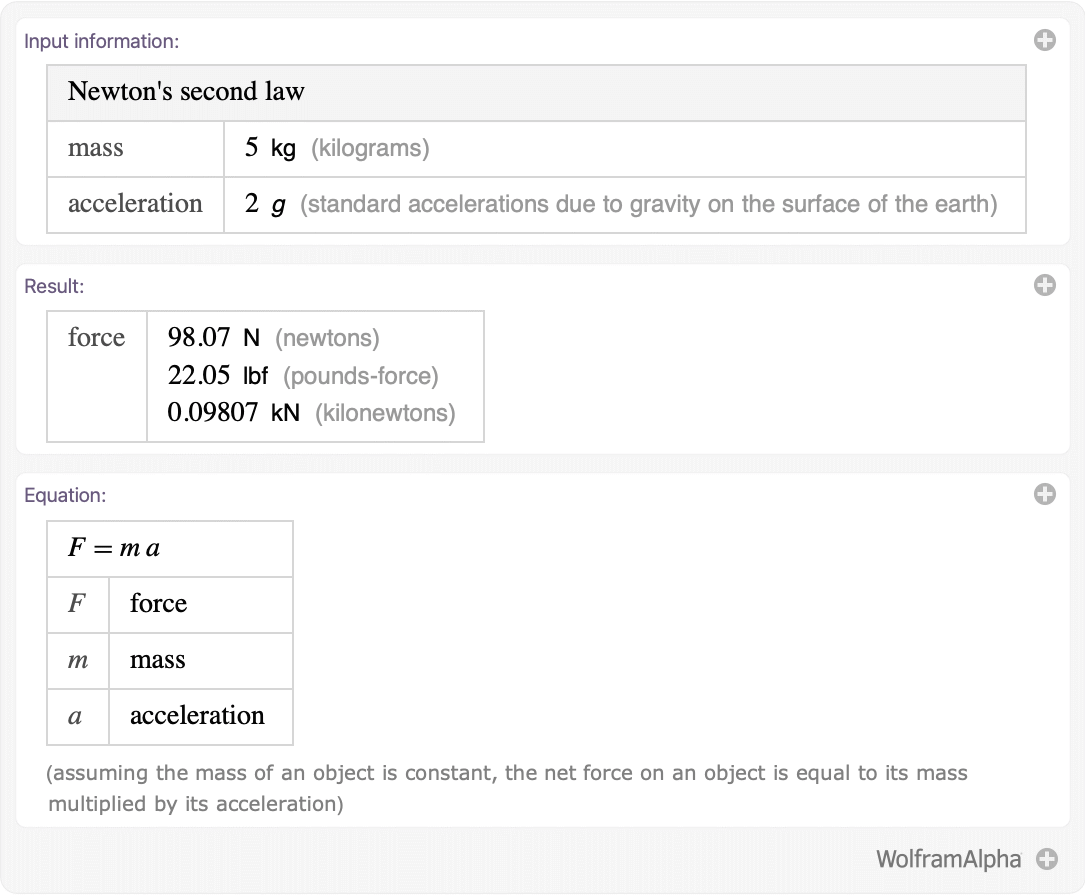
The formatted data in this case is, again, very similar to the result returned by Wolfram|Alpha. However, several formulas have been identified and wrapped in Hold:
WolframAlpha["Newton's second law 5 kg 2 gs", {{"Equation", 1}, "FormattedData"}]WolframAlpha["Newton's second law 5 kg 2 gs", {{"Equation", 1}, "FormulaData"}]Sounds
The pulsar LGM-1 has many interesting properties known to Wolfram|Alpha. One of these is an audio schematic of its pulsing.
WolframAlpha["lgm-1", IncludePods -> "PulsarSound:PulsarData"]For this particular pod, the only exposed data is sound data; this format is the one most likely to appear without corresponding formatted data or computable data.
Sound data produces a normal Sound object:
WolframAlpha["lgm-1", {{"PulsarSound:PulsarData", 1}, "SoundData"}]Particularly interesting in this case is the InputForm of the sound returned. The SampledSoundFunction produced by Wolfram|Alpha is transmitted losslessly into the Wolfram Language:
WolframAlpha["lgm-1", {{"PulsarSound:PulsarData", 1}, "SoundData"}]//InputFormWolframAlpha["c-major scale", IncludePods -> "MusicNotation"]WolframAlpha["c-major scale", {{"MusicNotation", 1}, "SoundData"}]WolframAlpha["c-major scale", {{"MusicNotation", 1}, "SoundData"}]//InputForm