

ElementMeshRegionProduct[mesh1,mesh2]
represents the Cartesian product of the ElementMesh mesh1 and mesh2.
ElementMeshRegionProduct
ElementMeshRegionProduct[mesh1,mesh2]
represents the Cartesian product of the ElementMesh mesh1 and mesh2.
更多信息和选项
- ElementMeshRegionProduct is also known as outer product region.
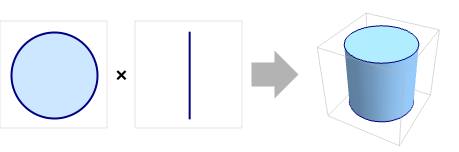
- ElementMeshRegionProduct[mesh1,mesh2] represents the region

. - The embedding dimension of the product region is the sum of embedding dimensions, and the geometric dimension is the sum of geometric dimensions.
- The highest product dimension supported is 3.
- ElementMeshRegionProduct has the following options:
-
"RegionMarkerFunction" None specify region markers
范例
打开所有单元 关闭所有单元基本范例 (2)
Needs["NDSolve`FEM`"]Create an ElementMesh:
mesh = ToElementMesh[Line[{{0}, {1}}]]Compute the ElementMesh region product:
productMesh = ElementMeshRegionProduct[mesh, mesh]Visualize the region product mesh:
productMesh["Wireframe"]Create three ElementMesh instances:
meshX = ToElementMesh[Line[{{0}, {2}}]];
meshY = ToElementMesh[Line[{{0}, {1}}]];
meshZ = ToElementMesh[Line[{{0}, {3}}]];Compute the ElementMesh region product:
productMesh = ElementMeshRegionProduct[meshX, meshY, meshZ]Visualize the region product mesh:
productMesh["Wireframe"]Scope (1)
Create two ElementMesh instances:
meshXY = ToElementMesh[Disk[], MaxCellMeasure -> 0.1];
meshZ = ToElementMesh[Line[{{0}, {3}}]];Compute the ElementMesh region product:
productMesh = ElementMeshRegionProduct[meshXY, meshZ]Visualize the region product mesh:
productMesh["Wireframe"]Options (2)
"RegionMarkerFunction" (2)
Create a marker association and a region member function:
regs = <|"solid" -> 10, "fluid" -> 20|>;
rmf = RegionMember[Rectangle[{1.2, 0}, {1.8, 3}]];Define a region marker function:
myRegionMarkerFunction = With[{rmf = rmf, rs = regs["solid"], rf = regs["fluid"]}, If[rmf[#], rs, rf]&];Create ElementMesh that is used in each direction:
mesh = ToElementMesh[Line[{{0.}, {3.}}]];Compute the ElementMesh region product:
mesh = ElementMeshRegionProduct[mesh, mesh, "RegionMarkerFunction" -> myRegionMarkerFunction]Inspect the "MeshElementMarkerUnion" of the generated mesh:
mesh["MeshElementMarkerUnion"]Visualize the region product mesh with the region markers:
Show[mesh["Wireframe"["MeshElementStyle" -> {Directive[FaceForm[Red]], Directive[FaceForm[Green]]}]], AspectRatio -> 1]Create a marker association and a region member function:
regs = <|"left" -> 1, "central" -> 3, "right" -> 2|>;
rLeft = RegionMember[Cuboid[{0, 0, 0}, {0.8, 2, 2}]];
rCentral = RegionMember[Cuboid[{0.8, 0, 0}, {1.2, 2, 2}]];
rRight = RegionMember[Cuboid[{1.2, 0, 0}, {2, 2, 2}]];Define a region marker function:
myRegionMarkerFunction = With[{rmf = rmf, rl = regs["left"], rc = regs["central"], rr = regs["right"]}, If[rLeft[#], rl, If[rCentral[#], rc, rr]]&];Create ElementMesh that is used in each direction:
mesh = ToElementMesh[Line[{{0.}, {2.}}]];Compute the ElementMesh region product:
mesh = ElementMeshRegionProduct[mesh, mesh, mesh, "RegionMarkerFunction" -> myRegionMarkerFunction]Inspect the "MeshElementMarkerUnion" of the generated mesh:
mesh["MeshElementMarkerUnion"]Visualize the region product mesh with the region markers:
Show[Map[mesh["Wireframe"[ElementMarker == #[[1]], "MeshElement" -> "MeshElements", "ElementMeshDirective" -> Directive[EdgeForm[], FaceForm[#[[2]]]]]]&, {{1, Green}, {2, Orange}, {3, Red}}]
, PlotRange -> {All, {1, 2}, All}]文本
Wolfram Research (2021),ElementMeshRegionProduct,Wolfram 语言函数,https://reference.wolfram.com/language/FEMDocumentation/ref/ElementMeshRegionProduct.html.
CMS
Wolfram 语言. 2021. "ElementMeshRegionProduct." Wolfram 语言与系统参考资料中心. Wolfram Research. https://reference.wolfram.com/language/FEMDocumentation/ref/ElementMeshRegionProduct.html.
APA
Wolfram 语言. (2021). ElementMeshRegionProduct. Wolfram 语言与系统参考资料中心. 追溯自 https://reference.wolfram.com/language/FEMDocumentation/ref/ElementMeshRegionProduct.html 年
BibTeX
@misc{reference.wolfram_2026_elementmeshregionproduct, author="Wolfram Research", title="{ElementMeshRegionProduct}", year="2021", howpublished="\url{https://reference.wolfram.com/language/FEMDocumentation/ref/ElementMeshRegionProduct.html}", note=[Accessed: 10-August-2026]}
BibLaTeX
@online{reference.wolfram_2026_elementmeshregionproduct, organization={Wolfram Research}, title={ElementMeshRegionProduct}, year={2021}, url={https://reference.wolfram.com/language/FEMDocumentation/ref/ElementMeshRegionProduct.html}, note=[Accessed: 10-August-2026]}