GUIKit の例題:ThreadedCounter
GUIKitで提供されていた機能は,組込みのWolfram言語にネイティブのインターフェース構造およびコントロール関数で利用できるようになった.
Needs["GUIKit`"]ThreadedCounter[] := GUIRun[
Widget["Panel", WidgetGroup[{
Widget["Button", {
"text" -> "Run",
BindEvent["action",
Script[
SetPropertyValue[{"button", "enabled"}, False, InvokeThread -> "Dispatch"];
Do[
SetPropertyValue[{"label", "text"}, "Current value is " <> ToString[i],
InvokeThread -> "Dispatch"],
{i, 300, 0, -1}];
SetPropertyValue[{"label", "text"}, "Press the button to count from 300 to 0.",
InvokeThread -> "Dispatch"];
SetPropertyValue[{"button", "enabled"}, True, InvokeThread -> "Dispatch"];
],
InvokeThread -> "New"]
}, Name -> "button"], Widget["Label", {"text" -> "Press the button to count from 300 to 0."}, Name -> "label"]
}, WidgetLayout -> Row] ]
]例題
この例題はユーザインターフェース関数のInvokeThreadオプションを使って,計算をスレッドしユーザインターフェースの更新要求がイベントの処理スレッドに起るようにして大規模なWolfram言語の計算を行うときにユーザインターフェースの更新状況をいかに可視化するかを示している.
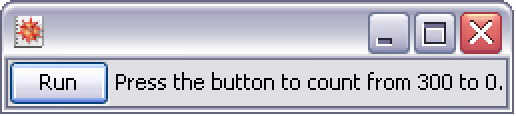
ThreadedCounter[]