

NotebookFind
NotebookFind[obj,data]
sets the current selection in the specified notebook object to be the next occurrence of data.
NotebookFind[obj,data,Previous]
sets the current selection to be the previous occurrence.
NotebookFind[obj,data,All]
sets the current selection to be all occurrences.
NotebookFind[obj,data,dir,elems]
sets the current selection to be the occurrence in the direction dir and searches the elements of cells specified by elems.
Details and Options
- NotebookFind returns $Failed if the search it performs finds no occurrence of data.
- obj may be a NotebookObject or a CellObject. If obj is a NotebookObject, then the find operation starts where the selection is in the notebook.
- data can be a string, box expression, or a complete cell.
- Possible values of dir include Next, Previous, and All.
- The possible elements are:
-
CellContents contents of each cell, represented as a string CellID setting for the CellID option of each cell CellLabel setting for the CellLabel option of each cell CellStyle name of style for each cell CellTags parts of the setting for the CellTags option for each cell {elem1,elem2,…} list of different types of elements - The default for elems is CellContents. Only the contents of boxes, not their styles or options, are included in the search.
- The following options can be given:
-
AutoScroll True whether to scroll the notebook to the found result automatically IgnoreCase False whether to treat lowercase and uppercase letters as equivalent WordSearch False whether to require that the text searched for appear as a word WrapAround False if no result is found in the given direction, whether to wrap around and keep searching - The front end will highlight the region corresponding to the result.
Examples
open all close allBasic Examples (1)


Scope (2)
nb = CreateWindow[DocumentNotebook[{TextCell["fat cat", "Text", CellTags -> {"L1"}], TextCell["on my hat", "Text", CellTags -> {"L2"}]}]];
Find an occurrence of the letters "at":
NotebookFind[nb, "at"];
NotebookFind[nb, "at"];
Select all cells that contain "at":
NotebookFind[nb, "at", All];
Find the last "at" in the document:
SelectionMove[nb, After, Notebook];NotebookFind[nb, "at", Previous];
Go back to find a cell with "L1" in its cell tags:
NotebookFind[nb, "L1", Previous, CellTags];
Find all Input-styled cells in this notebook:
NotebookFind[EvaluationNotebook[], "Input", All, CellStyle]Options (2)
AutoScroll (1)
Normally, the document scrolls so that the found data is visible in the notebook window:
nb = NotebookPut[Notebook[Table[Cell[ToString[i], "Text"], {i, 50}]]];
NotebookFind[nb, 30];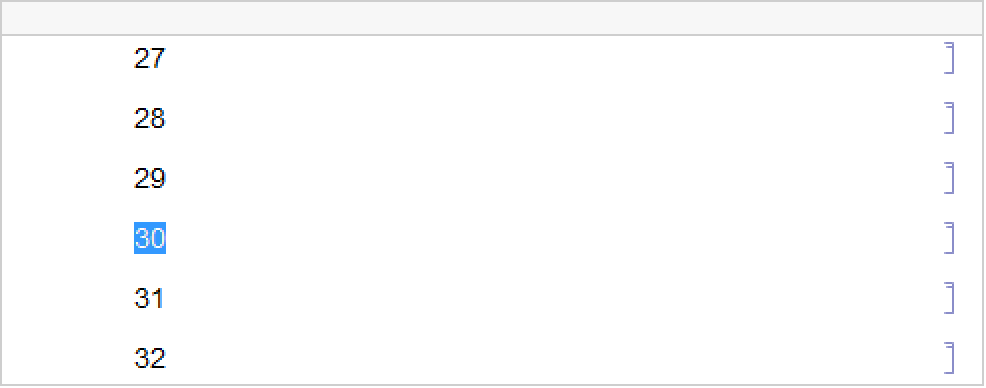
With AutoScroll set to False, the document does not scroll to the found data:
SelectionMove[nb, Before, Notebook];
NotebookFind[nb, 30, AutoScroll -> False];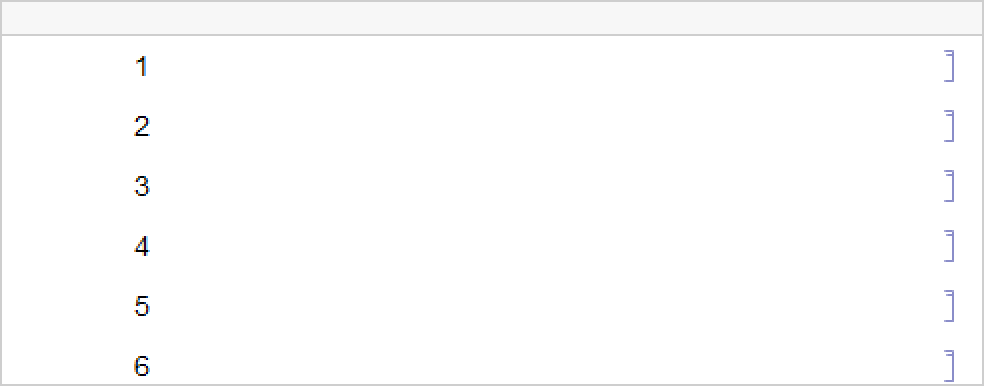
IgnoreCase (1)


Text
Wolfram Research (1996), NotebookFind, Wolfram Language function, https://reference.wolfram.com/language/ref/NotebookFind.html (updated 2014).
CMS
Wolfram Language. 1996. "NotebookFind." Wolfram Language & System Documentation Center. Wolfram Research. Last Modified 2014. https://reference.wolfram.com/language/ref/NotebookFind.html.
APA
Wolfram Language. (1996). NotebookFind. Wolfram Language & System Documentation Center. Retrieved from https://reference.wolfram.com/language/ref/NotebookFind.html