


Put
Details and Options
- Put starts writing output at the beginning of the file. It deletes whatever was previously in the file.
- Put inserts a newline (line feed) at the end of its output.
- expr>>filename is equivalent to expr>>"filename". The double quotes can be omitted if the file name is of the form specified in "Operator Input Forms".
- It is conventional to use names that end with .wl or .m for files containing Wolfram Language input.
- Put[…,OutputStream[…]] will append to the given stream.
- Put works with cloud and local objects.
- Put by default writes expressions in InputForm.
- Put[OutputForm[expr],"filename"] generates OutputForm.
- Put by default uses the character encoding "PrintableASCII" when creating a file. Add the option CharacterEncodingenc to specify a different encoding.
- When writing to an open file or an OutputStream object, the current encoding of the output stream will be used by default. Add the option CharacterEncodingenc to temporarily change the encoding of the stream for the duration of Put.
- Put[…,File["file"]] is also supported.
Examples
open all close allBasic Examples (1)
Compute a value to store in a temporary file:
a = 47!Set the current directory to one for temporary files:
SetDirectory[$TemporaryDirectory];Put the value of a into a file:
a>>"fortysevenfactorial"The file now contains the value:
FilePrint["fortysevenfactorial"]
ResetDirectory[];Scope (4)
Local objects can be used with Put and Get to store expressions persistently:
Put[10!, LocalObject["myval"]]Get[%]Cloud objects can be used with Put and Get to store expressions in the cloud:
Put[$GeoLocation, CloudObject["current-location"]]Get[%]Put expression in the file specified by the File object:
log = File[FileNameJoin[{$TemporaryDirectory, "logfile.txt"}]]Put["First line of log file.", log]FilePrint[First@log]
Create a file and open it for writing:
file = CreateFile[];
stream = OpenWrite[file, CharacterEncoding -> "ISO8859-1"]
Put an expression to the stream:
Put[{"a", "á", "à"}, stream]Close[stream]The file contents were written using the CharacterEncoding option of the stream:
FilePrint[file]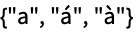
Options (1)
CharacterEncoding (1)
By default, the encoding "PrintableASCII" is used when writing to files:
file = CreateFile[];
Put[{a, à, ℵ}, file];
Special characters are written out as long names, which ensures they can be read on any system:
Import[file, "Text"]Specify the common encoding "UTF-8":
Put[{a, à, ℵ}, file, CharacterEncoding -> "UTF-8"];Special characters are written directly in the encoding, saving space at the cost of portability:
Import[file, "Text"]Properties & Relations (2)
Put overwrites any existing file contents:
file = CreateFile[];Put[1, file]
Put[2, file]Only the second expression is in the file:
FilePrint[file]
Use PutAppend to add to an existing file:
PutAppend[3, file]FilePrint[file]
When writing to a stream, Put behaves essentially like PutAppend:
file = CreateFile[];
stream = OpenWrite[file, CharacterEncoding -> "ISO8859-1"]Put[a, stream]
Put[b, stream]
Put[c, stream]Close[stream]The file has all three expressions, not just the last one:
FilePrint[file]
Possible Issues (1)
The form expr>>filename treats filename as a literal name, not an expression to be evaluated:
file = CreateUUID[] <> ".wl"SetDirectory[$TemporaryDirectory];
foo>>fileThe file that was written is called "file", not the name contained in the variable file:
FileExistsQ["file"]FileExistsQ[file]Use the form Put[expr,filename] to write to the file whose name is stored in file:
Put[foo, file]
FileExistsQ[file]
 An Elementary Introduction to the Wolfram Language
Text
Wolfram Research (1988), Put, Wolfram Language function, https://reference.wolfram.com/language/ref/Put.html (updated 2016).
CMS
Wolfram Language. 1988. "Put." Wolfram Language & System Documentation Center. Wolfram Research. Last Modified 2016. https://reference.wolfram.com/language/ref/Put.html.
APA
Wolfram Language. (1988). Put. Wolfram Language & System Documentation Center. Retrieved from https://reference.wolfram.com/language/ref/Put.html