


RadicalBox
RadicalBox[x,n]
is a low-level box construct that represents the displayed object  in notebook expressions.
Details and Options
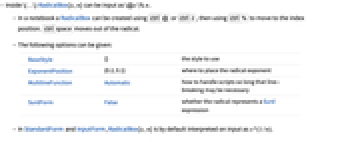
- Inside \(…\) RadicalBox[x,n] can be input as \@x\%n.
- In a notebook a RadicalBox can be created using
 or
or  , then using
  to move to the index position.
  moves out of the radical.
 - The following options can be given:
-
BaseStyle {} the style to use ExponentPosition {0.2,0.1} where to place the radical exponent MultilineFunction Automatic how to handle scripts so long that line-breaking may be necessary SurdForm False whether the radical represents a Surd expression - In StandardForm and InputForm, RadicalBox[x,n] is by default interpreted on input as x^(1/n).
- In StandardForm and InputForm, RadicalBox[x,n] is interpreted on input as Surd[x,n] if the option SurdFormTrue is set.
- The baseline of RadicalBox[x,n] is taken to be the baseline of x.
- If RadicalBox[x,n] does not fit on a single line, it is output as x^(1/n).
- In StandardForm, explicit RadicalBox objects are output literally. You can use DisplayForm to see the display form of such objects.
Examples
open allclose allBasic Examples (3)
Display a letter under a radical with a root index:
A RadicalBox form is typically interpreted as a fractional power:
The TraditionalForm formatting for an 
 root uses RadicalBox:
Scope (1)
Surd typesets in StandardForm and TraditionalForm with RadicalBox:
This radical box has the option SurdFormTrue set:
The presence of the option SurdForm ensures the boxes are interpreted in the same manner:
Text
Wolfram Research (1996), RadicalBox, Wolfram Language function, https://reference.wolfram.com/language/ref/RadicalBox.html (updated 2012).
CMS
Wolfram Language. 1996. "RadicalBox." Wolfram Language & System Documentation Center. Wolfram Research. Last Modified 2012. https://reference.wolfram.com/language/ref/RadicalBox.html.
APA
Wolfram Language. (1996). RadicalBox. Wolfram Language & System Documentation Center. Retrieved from https://reference.wolfram.com/language/ref/RadicalBox.html