


TemplateBox
TemplateBox[{box1,box2,…},tag]
is a low-level box structure that parameterizes the display and evaluation of the boxes boxi.
TemplateBox["key1"expr1,"key2"expr2,…,tag]
allows the use of arbitrary expressions that may or may not be boxes.
Details and Options
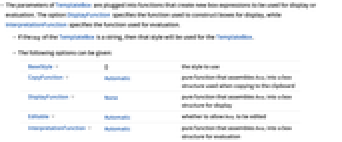
- The parameters of TemplateBox are plugged into functions that create new box expressions to be used for display or evaluation. The option DisplayFunction specifies the function used to construct boxes for display, while InterpretationFunction specifies the function used for evaluation.
- If the tag of the TemplateBox is a string, then that style will be used for the TemplateBox.
- The following options can be given:
-
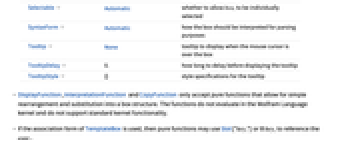
BaseStyle {} the style to use CopyFunction Automatic pure function that assembles boxi into a box structure used when copying to the clipboard DisplayFunction None pure function that assembles boxi into a box structure for display Editable Automatic whether to allow boxi to be edited InterpretationFunction Automatic pure function that assembles boxi into a box structure for evaluation Selectable Automatic whether to allow boxi to be individually selected SyntaxForm Automatic how the box should be interpreted for parsing purposes Tooltip None tooltip to display when the mouse cursor is over the box TooltipDelay 0. how long to delay before displaying the tooltip TooltipStyle {} style specifications for the tooltip - DisplayFunction, InterpretationFunction and CopyFunction only accept pure functions that allow for simple rearrangement and substitution into a box structure. The functions do not evaluate in the Wolfram Language kernel and do not support standard kernel functionality.
- If the association form of TemplateBox is used, then pure functions may use Slot["keyi"] or # keyi to reference the expri.
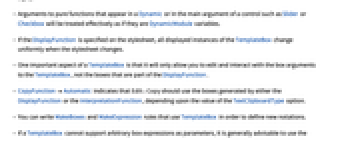
- Arguments to pure functions that appear in a Dynamic or in the main argument of a control such as Slider or Checkbox will be treated effectively as if they are DynamicModule variables.
- If the DisplayFunction is specified on the stylesheet, all displayed instances of the TemplateBox change uniformly when the stylesheet changes.
- One important aspect of a TemplateBox is that it will only allow you to edit and interact with the box arguments to the TemplateBox, not the boxes that are part of the DisplayFunction.
- CopyFunctionAutomatic indicates that Edit ▶ Copy should use the boxes generated by either the DisplayFunction or the InterpretationFunction, depending upon the value of the TextClipboardType option.
- You can write MakeBoxes and MakeExpression rules that use TemplateBox in order to define new notations.
- If a TemplateBox cannot support arbitrary box expressions as parameters, it is generally advisable to use the option Editable->False to prevent users from editing the parameters.
Examples
open allclose allBasic Examples (3)
Display a template that is stored in the style "Binomial" in a stylesheet:
Display a template with an explicit DisplayFunction:
Use a template argument as a dynamic value to a Slider:
Scope (1)
Use InterpretationFunction to control how a template evaluates:
Generalizations & Extensions (1)
A value that is not in a box form can be used as part of an interpretation with InterpretationBox:
Options (11)
CopyFunction (1)
DisplayFunction (1)
DisplayFunction overrides any DisplayFunction inherited from the stylesheet:
Editable (1)
The contents of a TemplateBox are editable by default:
SelectableFalse will make it impossible to edit any individual argument of the box:
InterpretationFunction (2)
The InterpretationFunction yields a box structure that will be used for evaluation:
This same structure used as input evaluates to LieBracket:
A value of Automatic causes tag to be used as the function head of the box structure:
Selectable (1)
The contents of a TemplateBox are selectable by default:
SelectableFalse will make it impossible to select any individual argument of the box:
SyntaxForm (1)
SyntaxForm can be used to set the precedence of a TemplateBox used as an operator:
Tooltip (1)
Possible Issues (2)
A DisplayFunction resulting in an invalid box structure can produce an error:
A template parameter cannot be used as both an editable field and a dynamic value:
While the preceding initially displays correctly, attempts to edit it do not update the dynamic values:
Use an InputFieldBox to create an editable field that is also a dynamic value:
Text
Wolfram Research (2008), TemplateBox, Wolfram Language function, https://reference.wolfram.com/language/ref/TemplateBox.html (updated 2020).
CMS
Wolfram Language. 2008. "TemplateBox." Wolfram Language & System Documentation Center. Wolfram Research. Last Modified 2020. https://reference.wolfram.com/language/ref/TemplateBox.html.
APA
Wolfram Language. (2008). TemplateBox. Wolfram Language & System Documentation Center. Retrieved from https://reference.wolfram.com/language/ref/TemplateBox.html