

TextCell
Details and Options
- Text cells are formatted like text, with appropriate spacing and line breaking.
- CellPrint[TextCell[expr]] inserts a text cell into your current notebook.
- Typical possible styles for text cells include "Title", "Section", "Text", etc.
- TextCell[Row[{expr1,expr2,…}]] generates a text cell containing a concatenation of the expri, which need not be only strings.
- TextCell can have any of the many options of Cell, including:
-
Background the color of the background for the cell CellBaseline alignment relative to surrounding text CellFrame whether to draw a frame around the cell CellTags tags for the cell Editable whether to allow the contents of the cell to be edited FontSize the default size of text in the cell TextAlignment how to align text in the cell
Examples
open all close allBasic Examples (2)
Scope (4)
Text cells can contain a mixture of simple text and Wolfram Language expressions:
CellPrint[TextCell[Row[{a + b, "aasa", Sqrt[2]}], "Text"]]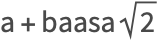
Text cells can contain styled text:
CellPrint[TextCell[Row[{Style["bold", FontWeight -> Bold], " text"}], "Text"]]
Table[TextCell["text", s], {s, {"Text", "Subsection", "Section", "Title"}}]TextCell["text", "Section", "TI"]Applications (1)
Here is a simple function that produces a document as an answer using expression and text cells:
documentSolve[ eqns_, vars_] :=
DocumentNotebook@TextCell[Row[{"The equation ", ExpressionCell[TraditionalForm[eqns]], " has the following solutions: ", ExpressionCell[Row[vars /. NSolve[eqns, vars], ", "]]}], "Text"]documentSolve[x^3 + x == 1, x]Properties & Relations (2)
TextCell and ExpressionCell format contents differently:
CellPrint[{TextCell["abcde", "Text"], ExpressionCell["abcde", "Text"]}]
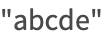
If the argument to TextCell is not a string or a Row, it will produce an expression cell:
CellPrint[{TextCell[Sqrt[x], "Output"], ExpressionCell[Sqrt[x], "Output"]}]Possible Issues (1)
Certain Cell options only affect standalone cells, such as cells produced by CellPrint, and do not affect cells that occur within an output cell:
TextCell["abcde", CellDingbat -> "◆", CellLabel -> "Example"]TextCell["abcde", CellDingbat -> "◆", CellLabel -> "Example"]//CellPrintText
Wolfram Research (2007), TextCell, Wolfram Language function, https://reference.wolfram.com/language/ref/TextCell.html (updated 2017).
CMS
Wolfram Language. 2007. "TextCell." Wolfram Language & System Documentation Center. Wolfram Research. Last Modified 2017. https://reference.wolfram.com/language/ref/TextCell.html.
APA
Wolfram Language. (2007). TextCell. Wolfram Language & System Documentation Center. Retrieved from https://reference.wolfram.com/language/ref/TextCell.html