

TimeZone

is an option for DateObject, DateString, and related functions that specifies the time zone to use for dates and times.
Details
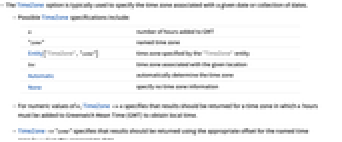
- The TimeZone option is typically used to specify the time zone associated with a given date or collection of dates.
- Possible TimeZone specifications include:
-
n number of hours added to GMT "zone" named time zone Entity["TimeZone", "zone"] time zone specified by the "TimeZone" entity loc time zone associated with the given location Automatic automatically determine the time zone None specify no time zone information - For numeric values of n, TimeZone->n specifies that results should be returned for a time zone in which n hours must be added to Greenwich Mean Time (GMT) to obtain local time.
- TimeZone->"zone" specifies that results should be returned using the appropriate offset for the named time zone "zone" on the appropriate date.
- Example time zone strings include "America/Chicago", "Europe/London", "Asia/Tokyo", "Zulu", "-04:00", "GMT+05:45", etc.
- A list of available time zone entities can be found using EntityList["TimeZone"].
- TimeZoneloc will use the time zone associated with the specified location Entity or GeoPosition loc.
- TimeZoneAutomatic indicates that the time zone value should be determined automatically, defaulting to $TimeZone if no time zone information is otherwise available.
- TimeZoneNone indicates that no explicit time zone information should be inserted, defaulting to $TimeZone in cases where time zone offset instantiation is necessary.
- The typical default setting is TimeZone:>$TimeZone.
Examples
open all close allBasic Examples (2)
Scope (4)
TimeZone values can be an Integer, Real, or time zone String:
Time zone strings will account for daylight saving time automatically:
EntityList["TimeZone"] can be used to find available "TimeZone" entities:
Text
Wolfram Research (1991), TimeZone, Wolfram Language function, https://reference.wolfram.com/language/ref/TimeZone.html (updated 2024).
CMS
Wolfram Language. 1991. "TimeZone." Wolfram Language & System Documentation Center. Wolfram Research. Last Modified 2024. https://reference.wolfram.com/language/ref/TimeZone.html.
APA
Wolfram Language. (1991). TimeZone. Wolfram Language & System Documentation Center. Retrieved from https://reference.wolfram.com/language/ref/TimeZone.html