Begin
Begin["context`"]
現行のコンテキストを設定する.

例題
すべて開く すべて閉じる例 (1)
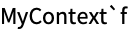
MyContext` Contextで関数fを定義する:

Begin["MyContext`"]f[x_] := x ^ 2 + 1End[]??f??MyContext`fMyContext`f[a + b]アプリケーション (1)
コンフリクトを避けるため,パッケージ関数の定義をプライベートにしてシンボルを作る:
BeginPackage["MyPackage`"]パッケージコンテキストでシンボルfを使用するとfは必ずそのコンテキストで作られる:
f::usage = "f[x] gives x^2 + 1";Beginに与えられたコンテキストが「`」で始まる場合は現行コンテキストから拡張される:
Begin["`Private`"]f[x_] := x ^ 2 + 1;End[]EndPackage[]シンボルfはパッケージコンテキストにあるので,関数はEndPackageの後でも作用する:

f[a + b]??f特性と関係 (3)
Begin["cont`"]は$Contextを"cont`"に設定する:
$Context = "Global`";
Begin["Example`"]
$ContextEndは$ContextをマッチするBeginの前の値に戻す:
End[];
$ContextBeginはBeginPackageとは違って$ContextPathに変更を加えない:
$ContextPath = {"Global`", "System`"};
Begin["Example`"];
$ContextPath同様に,Endもこれを変更しない:
End[];
$ContextPathBeginは$ContextAliasesの値を変更しない:
$ContextAliases = <|"c`" -> "Context`"|>;
Begin["Example`"];
$ContextAliasesEndは$ContextAliasesをマッチするBeginの前の値に戻す:
$ContextAliases["e`"] = "Experimental`";
End[];
$ContextAliasesテクニカルノート
-
▪
- Wolfram言語パッケージ ▪
- パッケージ
関連するワークフロー
- シンボル名のシャドーイングに対処する
履歴
1988 で導入 (1.0)
テキスト
Wolfram Research (1988), Begin, Wolfram言語関数, https://reference.wolfram.com/language/ref/Begin.html.
CMS
Wolfram Language. 1988. "Begin." Wolfram Language & System Documentation Center. Wolfram Research. https://reference.wolfram.com/language/ref/Begin.html.
APA
Wolfram Language. (1988). Begin. Wolfram Language & System Documentation Center. Retrieved from https://reference.wolfram.com/language/ref/Begin.html
BibTeX
@misc{reference.wolfram_2026_begin, author="Wolfram Research", title="{Begin}", year="1988", howpublished="\url{https://reference.wolfram.com/language/ref/Begin.html}", note=[Accessed: 15-August-2026]}
BibLaTeX
@online{reference.wolfram_2026_begin, organization={Wolfram Research}, title={Begin}, year={1988}, url={https://reference.wolfram.com/language/ref/Begin.html}, note=[Accessed: 15-August-2026]}