CastColumns[tab,{col1type1,…}]
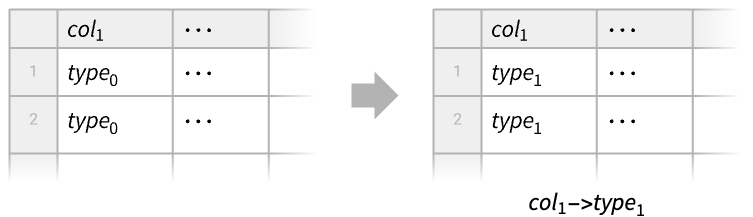
将 Tabular 对象 tab 中的 coli 的类型改为 typei.
CastColumns
CastColumns[tab,{col1type1,…}]
将 Tabular 对象 tab 中的 coli 的类型改为 typei.
更多信息
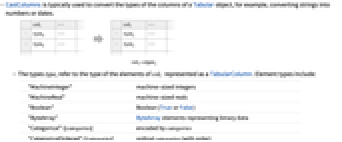
- CastColumns 通常用于转换 Tabular 对象列的类型,例如将字符串转换为数字或日期.
- 类型 typei 指的是表示为 TabularColumn 的 coli 的元素的类型. 元素的类型包括:
-
"MachineInteger" 机器整数 "MachineReal" 机器实数s "Around"::[…] 带有不确定性的数字 "Boolean" 布尔数(True 或 False) "ByteArray"::[…] 表示二进制数据的 ByteArray 元素 "Date"::[…] 任意粒度的日历日期(日、月、μs 等) "Entity"::[…] 给定域内的实体 "GeoPosition"::[…] 以任意基准面和任意地理投影形式给出的地理位置 "InertExpression" 在使用之前不会被计算的普通表达式 "ListVector"::[type] 给定 type 的元素组成的列表 "ListVector"::[type,n] 给定 type 的长度为 n 个元素的列表组成的列表 "ListTuple"::[type1,type2,…] 类型为 type1、type2、… 的元素组成的列表 "Null" Missing 表达式 "Quantity"::[type,unit] 量,大小的类型为 type,单位为 unit "String" 字符串 "Time"::[…] 一天中的时间,如 TimeObject 中那样 - 可以更具体地给出数值元素的类型,包括:
-
"Integer8" 有正负号的 8-bit 整数,从
到 127"UnsignedInteger8" 从 0 到 255 的整数 "Integer16" 有正负号的 16-bit 整数,从
到 
"UnsignedInteger16" 从 0 到 65535 的整数 "Integer32" 有正负号的 32-bit 整数,从
到 
"UnsignedInteger32" 从 0 到
的整数"Integer64" 有正负号的 64-bit 整数,从
到 
"UnsignedInteger64" 从 0 到
的整数"Real32" 单精度实数 (32-bit) "Real64" 双精度实数 (64-bit) "ComplexReal32" 单精度复数 "ComplexReal64" 双精度复数
范例
打开所有单元 关闭所有单元基本范例 (1)
tab = ToTabular[<|"a" -> {1, 2, 3}, "b" -> {1., 4., 8.}|>, "Columns"]ColumnTypes[tab]将 "Integer64" 改为 "Real64":
CastColumns[tab, "a" -> "Real64"]ColumnTypes[%]范围 (4)
tab = Tabular[{{"2024Nov12", 100}, {"2024Nov13", 102}, {"2024Nov14", 99}}, {"date", "blood sugar"}]ColumnTypes[tab]CastColumns[tab, "date" -> "Date"]ColumnTypes[%]将一个 Tabular 对象中的数字数据记录为字符串:
tab = Tabular[Association["RawSchema" -> Association["ColumnProperties" ->
Association["date" -> Association["ElementType" -> TypeSpecifier["Date"]["Integer64", "Day",
"Gregorian", -6.]], "val" -> Association["ElementType" -> "String"]],
"KeyColumns" -> None, "Backend" -> "WolframKernel"], "Options" -> {},
"BackendData" -> Association["ColumnData" -> DataStructure["ColumnTable",
{{TabularColumn[Association["Data" -> {6, {{{1230789600000, 1230876000000, 1230962400000,
1231048800000, 1231135200000, 1231221600000}, {}, None}}, None},
"ElementType" -> "Date"["Integer64", "Day", "Gregorian", -6.],
"CachedOriginalExpression" -> {DateObject[{2009, 1, 1}, "Day", "Gregorian", -6.],
DateObject[{2009, 1, 2}, "Day", "Gregorian", -6.], DateObject[{2009, 1, 3}, "Day",
"Gregorian", -6.], DateObject[{2009, 1, 4}, "Day", "Gregorian", -6.],
DateObject[{2009, 1, 5}, "Day", "Gregorian", -6.], DateObject[{2009, 1, 6}, "Day",
"Gregorian", -6.]}]], TabularColumn[Association[
"Data" -> {{3, {0, 5, 10, 15, 19, 24, 29}, "-6.06-2.83-4.221.28-7.17-4.83"}, {}, None},
"ElementType" -> "String"]]}}]]]];ColumnTypes[tab]CastColumns[tab, "val" -> "Real64"]ColumnTypes[%]更改 Tabular 对象中某一列的向量类型:
tab = ToTabular[<|"a" -> {1, 2, 3}, "b" -> {{4, 5}, Missing[], {6, 7}}, "c" -> {1., 4., 8.}|>, "Columns"]ColumnTypes[tab]CastColumns[tab, "b" -> "ListVector"::["Real64", 2]]ColumnTypes[%]Tabular[{{1, 2, 3}, {4, 5, 6}}, {"a", "b", "c"}]CastColumns[%, {"a", "c"} -> "Real64"]应用 (2)
销售数据 (2)
将零售数据从 "tsv" 格式转换为 Tabular 对象:
data = Import["ExampleData/RetailSales.tsv", "Tabular", "HeaderLines" -> 1]ColumnTypes[data]CastColumns[data, "Date" -> "Date"]Select[%, SameQ[#City, "Paris"]&]创建一个 TimeSeries 对象,将 "Date" 作为 "TimeColumn":
FromTabular[%, "TimeSeries", <|"TimeColumn" -> "Date"|>]DateListPlot[% -> "Sales"]data = ResourceData["Sample Tabular Data: US Covid"];Dimensions[data]data[[ ;; 5]]FIPS 代码是标识美国县的独有数字,但 "fips" 列是字符串类型:
ColumnTypes[data]["fips"]RepeatedTiming[newdata = CastColumns[data, "fips" -> "Integer"];]Take[newdata, 5]ColumnTypes[newdata]["fips"]属性和关系 (4)
使用 CastColumns[tab,typerules] 更改 Tabular 对象 tab 的列类型:
tab = Tabular[Association["RawSchema" -> Association["ColumnProperties" ->
Association["date" -> Association["ElementType" -> "String"],
"blood sugar" -> Association["ElementType" -> "Integer64"]], "KeyColumns" -> None,
"Backend" -> "WolframKernel"], "Options" -> {},
"BackendData" -> Association["ColumnData" -> DataStructure["ColumnTable",
{{TabularColumn[Association["Data" -> {{3, {0, 9, 18}, "2024Nov122024Nov13"}, {}, None},
"ElementType" -> "String"]], TabularColumn[Association["Data" -> {{100, 102}, {}, None},
"ElementType" -> "Integer64"]]}}]]]];CastColumns[tab, {"date" -> "Date", "blood sugar" -> "Real"}]用 Tabular[tab,<|"ElementType"typerules|>] 也能获得相同结果:
Tabular[tab, <|"ElementType" -> {"date" -> "Date", "blood sugar" -> "Real"}|>]或使用 ToTabular[tab,"Rows",<|"ElementType"typerules|>]:
ToTabular[tab, "Rows", <|"ElementType" -> {"date" -> "Date", "blood sugar" -> "Real"}|>]获取一个包含字符串列的 Tabular 对象:
tab = Tabular[Association["RawSchema" -> Association["ColumnProperties" ->
Association["date" -> Association["ElementType" -> "String"],
"blood sugar" -> Association["ElementType" -> "String"]], "KeyColumns" -> None,
"Backend" -> "WolframKernel"], "Options" -> {},
"BackendData" -> Association["ColumnData" -> DataStructure["ColumnTable",
{{TabularColumn[Association["Data" -> {{3, {0, 9, 18}, "2024Nov122024Nov13"}, {}, None},
"ElementType" -> "String"]], TabularColumn[Association[
"Data" -> {{3, {0, 3, 6}, "100102"}, {}, None}, "ElementType" -> "String"]]}}]]]];与其使用 CastColumns,不如使用新的列类型构建新的模式(schema):
schema = TabularSchema[<|"ColumnProperties" -> <|"date" -> <|"ElementType" -> "Date"|>, "blood sugar" -> <|"ElementType" -> "Real64"|>|>|>]将模式用于 Tabular 对象:
Tabular[tab, schema]CastColumns 的操作可以使用 TransformColumns 和适当的函数来重现:
tab = Tabular[Association["RawSchema" -> Association["ColumnProperties" ->
Association["date" -> Association["ElementType" -> "String"],
"blood sugar" -> Association["ElementType" -> "Integer64"]], "KeyColumns" -> None,
"Backend" -> "WolframKernel"], "Options" -> {},
"BackendData" -> Association["ColumnData" -> DataStructure["ColumnTable",
{{TabularColumn[Association["Data" -> {{3, {0, 9, 18}, "2024Nov122024Nov13"}, {}, None},
"ElementType" -> "String"]], TabularColumn[Association["Data" -> {{100, 102}, {}, None},
"ElementType" -> "Integer64"]]}}]]]];TransformColumns[tab, {"date" -> (Cast[#date, "Date"]&), "blood sugar" -> (N[#"blood sugar"]&)}]以 Tabular 对象为例,其中有一列实值血糖水平的数据:
tab = Tabular[Association["RawSchema" -> Association["ColumnProperties" ->
Association["date" -> Association["ElementType" -> "String"],
"blood sugar" -> Association["ElementType" -> "Real64"]], "KeyColumns" -> None,
"Backend" -> "WolframKernel"], "Options" -> {},
"BackendData" -> Association["ColumnData" -> DataStructure["ColumnTable",
{{TabularColumn[Association["Data" -> {{3, {0, 9, 18}, "2024Nov122024Nov13"}, {}, None},
"ElementType" -> "String"]], TabularColumn[Association[
"Data" -> {{100., 102.3}, {}, None}, "ElementType" -> "Real64"]]}}]]]];bsugar = tab[All, "blood sugar"]CastColumns 可有效地为每一列使用 Automatic 转换方法:
CastColumns[tab, "blood sugar" -> "Integer32"]在这种情况下,这种转换是失败的,因为实数不可能总是很好地投射到整数中:
TabularColumn[bsugar, "Integer32"]使用带有显式转换方法的 TabularColumn,该方法在转换为整数时包括对实数的四舍五入:
ibsugar = TabularColumn[bsugar, "Integer32", <|"ConversionMethod" -> "Round"|>]ibsugar//Normal使用 InsertColumns 重新插入新列:
InsertColumns[tab, "blood sugar" -> ibsugar]文本
Wolfram Research (2025),CastColumns,Wolfram 语言函数,https://reference.wolfram.com/language/ref/CastColumns.html (更新于 2026 年).
CMS
Wolfram 语言. 2025. "CastColumns." Wolfram 语言与系统参考资料中心. Wolfram Research. 最新版本 2026. https://reference.wolfram.com/language/ref/CastColumns.html.
APA
Wolfram 语言. (2025). CastColumns. Wolfram 语言与系统参考资料中心. 追溯自 https://reference.wolfram.com/language/ref/CastColumns.html 年
BibTeX
@misc{reference.wolfram_2026_castcolumns, author="Wolfram Research", title="{CastColumns}", year="2026", howpublished="\url{https://reference.wolfram.com/language/ref/CastColumns.html}", note=[Accessed: 08-August-2026]}
BibLaTeX
@online{reference.wolfram_2026_castcolumns, organization={Wolfram Research}, title={CastColumns}, year={2026}, url={https://reference.wolfram.com/language/ref/CastColumns.html}, note=[Accessed: 08-August-2026]}