

ConnesWindow[x]
x のコンヌ(Connes)窓関数を表す.
ConnesWindow[x,α]
パラメータ α を使う.
ConnesWindow
ConnesWindow[x]
x のコンヌ(Connes)窓関数を表す.
ConnesWindow[x,α]
パラメータ α を使う.
詳細
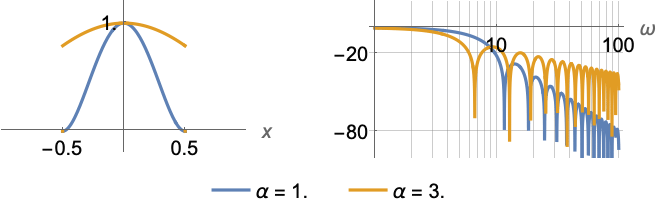
- ConnesWindowは,一般に,データを短いセグメントで処理する必要がある信号処理アプリケーションで使われる窓関数はである.
- 窓関数には,データ値を漸減して各セグメントの終りで0に近付ける平滑化効果がある.
- ConnesWindow[x,α]は
に等しい. - ConnesWindow[x]はConnesWindow[x,1]と等価である.
- ConnesWindowは自動的にリストに縫い込まれる.
例題
すべて開く すべて閉じる例 (3)
Plot[ConnesWindow[x], {x, -1, 1}]Plot3D[ConnesWindow[x]ConnesWindow[y], {x, -1, 1}, {y, -1, 1}, PlotRange -> All]FunctionExpand[ConnesWindow[x]]FunctionExpand[ConnesWindow[x, α]]スコープ (6)
ConnesWindow[0.1]Plot[ConnesWindow[x, 1.5], {x, -1, 1}, Exclusions -> None]Plot3D[ConnesWindow[x, α], {α, 1, 5}, {x, -1, 1}, Exclusions -> None]Plot[ConnesWindow[(x - 1) / 2], {x, -1, 3}]Plot3D[ConnesWindow[Sqrt[x ^ 2 + y ^ 2]], {x, -1, 1}, {y, -1, 1}, PlotRange -> All]ListPlot[Array[ConnesWindow, 15, {-1 / 2, 1 / 2}], Filling -> Axis]ListPointPlot3D[Array[ConnesWindow[#1] ConnesWindow[#2]&, {15, 10}, {{-1 / 2, 1 / 2}}], Filling -> Axis]アプリケーション (3)
h = ConstantArray[1 / 11., 11]w = Array[ConnesWindow, Length[h], {-1 / 2, 1 / 2}];
fir = h w;LogLinearPlot[Evaluate[20Log[10, Abs@ListFourierSequenceTransform[#, ω]]& /@ {h, fir}], {ω, 0.0314, Pi}, GridLines -> Automatic]窓指定を使ってサンプルPowerSpectralDensityを計算する:
proc = ARMAProcess[1, {.5}, {.3}, 1];
data = RandomFunction[proc, {50}];spec = PowerSpectralDensity[data, w, ConnesWindow];sd = PowerSpectralDensity[data, w];sd === specプロットは,窓がスペクトル密度を平坦化したことを示している:
Plot[{sd, spec}, {w, -π, π}, PlotRange -> All, PlotLegends -> {"no window", "with window"}]Plot[{spec, Evaluate@PowerSpectralDensity[proc, w]}, {w, -π, π}, PlotLegends -> {"data", "process"}]data = RandomFunction[ARMAProcess[1, {.3}, {.4}, 1], {300}];EstimatedProcess[data, ARMAProcess[1, 1], ProcessEstimator -> {"SpectralEstimator", "Window" -> ConnesWindow}]特性と関係 (2)
area = Integrate[ConnesWindow[x], {x, -∞, ∞}]Plot[{ConnesWindow[x], ConnesWindow[x] / area}, {x, -1, 1}]f = FourierTransform[ConnesWindow[x], x, w]LogLinearPlot[20 Log[10, Abs[f]], {w, .1, 80}]考えられる問題 (1)
Arrayに記号として渡す場合には,コンヌ窓の2Dサンプリングはサンプルの各行に異なるパラメータを用いる:
Array[ConnesWindow, {30, 30}, {{-1 / 2, 1 / 2}}]//ListPlot3DArray[ConnesWindow[#1] ConnesWindow[#2]&, {30, 30}, {{-1 / 2, 1 / 2}}]//ListPlot3D関連するガイド
テキスト
Wolfram Research (2012), ConnesWindow, Wolfram言語関数, https://reference.wolfram.com/language/ref/ConnesWindow.html.
CMS
Wolfram Language. 2012. "ConnesWindow." Wolfram Language & System Documentation Center. Wolfram Research. https://reference.wolfram.com/language/ref/ConnesWindow.html.
APA
Wolfram Language. (2012). ConnesWindow. Wolfram Language & System Documentation Center. Retrieved from https://reference.wolfram.com/language/ref/ConnesWindow.html
BibTeX
@misc{reference.wolfram_2026_conneswindow, author="Wolfram Research", title="{ConnesWindow}", year="2012", howpublished="\url{https://reference.wolfram.com/language/ref/ConnesWindow.html}", note=[Accessed: 08-September-2026]}
BibLaTeX
@online{reference.wolfram_2026_conneswindow, organization={Wolfram Research}, title={ConnesWindow}, year={2012}, url={https://reference.wolfram.com/language/ref/ConnesWindow.html}, note=[Accessed: 08-September-2026]}