

ConnesWindow[x]
表示关于 x 的 Connes 窗函数.
ConnesWindow[x,α]
使用参数 α.
ConnesWindow
ConnesWindow[x]
表示关于 x 的 Connes 窗函数.
ConnesWindow[x,α]
使用参数 α.
更多信息
- ConnesWindow 是一个窗函数,通常用于需要对数据进行短片段处理的信号处理应用中.
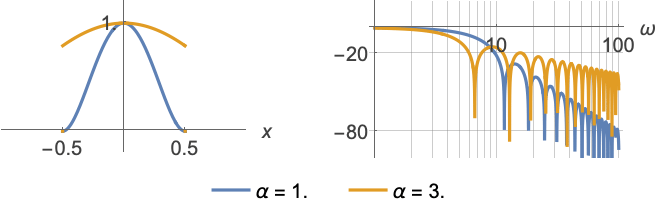
- 窗口函数通过在每个片段的末端将数据值逐渐减小到零的方法来产生平滑效果.
- ConnesWindow[x,α] 等于
. - ConnesWindow[x] 等价于 ConnesWindow[x,1].
- ConnesWindow 自动线性作用于列表.
范例
打开所有单元 关闭所有单元基本范例 (3)
Plot[ConnesWindow[x], {x, -1, 1}]Plot3D[ConnesWindow[x]ConnesWindow[y], {x, -1, 1}, {y, -1, 1}, PlotRange -> All]FunctionExpand[ConnesWindow[x]]FunctionExpand[ConnesWindow[x, α]]范围 (6)
ConnesWindow[0.1]Plot[ConnesWindow[x, 1.5], {x, -1, 1}]Plot3D[ConnesWindow[x, α], {α, 1, 5}, {x, -1, 1}]Plot[ConnesWindow[(x - 1) / 2], {x, -1, 3}]Plot3D[ConnesWindow[Sqrt[x ^ 2 + y ^ 2]], {x, -1, 1}, {y, -1, 1}, PlotRange -> All]ListPlot[Array[ConnesWindow, 15, {-1 / 2, 1 / 2}], Filling -> Axis]ListPointPlot3D[Array[ConnesWindow[#1] ConnesWindow[#2]&, {15, 10}, {{-1 / 2, 1 / 2}}], Filling -> Axis]应用 (3)
h = ConstantArray[1 / 11., 11]w = Array[ConnesWindow, Length[h], {-1 / 2, 1 / 2}];
fir = h w;LogLinearPlot[Evaluate[20Log[10, Abs@ListFourierSequenceTransform[#, ω]]& /@ {h, fir}], {ω, 0.0314, Pi}, GridLines -> Automatic]使用窗指定计算样本 PowerSpectralDensity:
proc = ARMAProcess[1, {.5}, {.3}, 1];
data = RandomFunction[proc, {50}];spec = PowerSpectralDensity[data, w, ConnesWindow];sd = PowerSpectralDensity[data, w];sd === specPlot[{sd, spec}, {w, -π, π}, PlotRange -> All, PlotLegends -> {"no window", "with window"}]Plot[{spec, Evaluate@PowerSpectralDensity[proc, w]}, {w, -π, π}, PlotLegends -> {"data", "process"}]data = RandomFunction[ARMAProcess[1, {.3}, {.4}, 1], {300}];EstimatedProcess[data, ARMAProcess[1, 1], ProcessEstimator -> {"SpectralEstimator", "Window" -> ConnesWindow}]属性和关系 (2)
area = Integrate[ConnesWindow[x], {x, -∞, ∞}]Plot[{ConnesWindow[x], ConnesWindow[x] / area}, {x, -1, 1}]f = FourierTransform[ConnesWindow[x], x, w]LogLinearPlot[20 Log[10, Abs[f]], {w, .1, 80}]可能存在的问题 (1)
当作为符号传递给 Array 时,Connes 窗的二维采样将对样本的每一行使用不同的参数:
Array[ConnesWindow, {30, 30}, {{-1 / 2, 1 / 2}}]//ListPlot3DArray[ConnesWindow[#1] ConnesWindow[#2]&, {30, 30}, {{-1 / 2, 1 / 2}}]//ListPlot3D相关指南
文本
Wolfram Research (2012),ConnesWindow,Wolfram 语言函数,https://reference.wolfram.com/language/ref/ConnesWindow.html.
CMS
Wolfram 语言. 2012. "ConnesWindow." Wolfram 语言与系统参考资料中心. Wolfram Research. https://reference.wolfram.com/language/ref/ConnesWindow.html.
APA
Wolfram 语言. (2012). ConnesWindow. Wolfram 语言与系统参考资料中心. 追溯自 https://reference.wolfram.com/language/ref/ConnesWindow.html 年
BibTeX
@misc{reference.wolfram_2026_conneswindow, author="Wolfram Research", title="{ConnesWindow}", year="2012", howpublished="\url{https://reference.wolfram.com/language/ref/ConnesWindow.html}", note=[Accessed: 04-September-2026]}
BibLaTeX
@online{reference.wolfram_2026_conneswindow, organization={Wolfram Research}, title={ConnesWindow}, year={2012}, url={https://reference.wolfram.com/language/ref/ConnesWindow.html}, note=[Accessed: 04-September-2026]}