TrainImageContentDetectorまたはTrainTextContentDetectorによって生成された,テキストあるいは画像の断片中のコンテンツを局所化して分類する関数を表す.
ContentDetectorFunction
TrainImageContentDetectorまたはTrainTextContentDetectorによって生成された,テキストあるいは画像の断片中のコンテンツを局所化して分類する関数を表す.
詳細
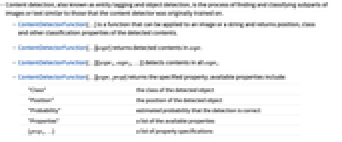
- コンテンツの検出は実体のタグ付けあるいはオブジェクト検出としても知られるもので,コンテンツ検出器の訓練に使われたコンテンツに類似した画像またはテキストの下位部分を見付けて分類する過程である.
- ContentDetectorFunction[…]は,画像または文字列に適用して検出されたコンテンツの位置,クラス等の分類特性を返す関数である.
- ContentDetectorFunction[…][expr]は expr 中で検出されたコンテンツを返す.
- ContentDetectorFunction[…][{expr1,expr2,…}]はすべての expriのコンテンツを検出する.
- ContentDetectorFunction[…][expr,prop]は指定された特性を返す.以下は使用可能な特性である.
-
"Class" 検出されたオブジェクトのクラス "Position" 検出されたオブジェクトの位置 "Probability" 検出の正しさの推定確率 "Properties" 使用可能な特性のリスト {prop1,…} 特性指定のリスト - 上記に加え,テキスト検出器は以下の特性を返すことができる.
-
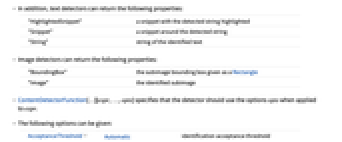
"HighlightedSnippet" 検出された文字列をハイライトしたスニペット "Snippet" 検出された文字列の周辺のスニペット "String" 識別されたテキスト文字列 - 画像検出器は次の特性を返すことができる.
-
"BoundingBox" Rectangleとして与えられる部分画像の境界ボックス "Image" 識別された部分画像 - ContentDetectorFunction[…][expr,…,opts]は検出器が expr に適用された際にオプション opts を使うように指定する.
- 次は,使用可能なオプションである.
-
AcceptanceThreshold Automatic 識別受容閾値 TargetDevice "CPU" そこで計算を行うターゲットデバイス - 検出器のタイプによっては他のオプションが使える場合もある.
-
MaxFeatures Automatic 返すコンテンツの最大数 MaxOverlapFraction Automatic 境界ボックスの最大の重なり合い
例題
すべて開く すべて閉じる例 (2)
detector = TrainTextContentDetector[{
"I like banana" -> {{8, 13} -> "Fruit"},
"I eat apples watching TV" -> {{7, 12} -> "Fruit"},
"I am enjoying raspberries" -> {{15, 25} -> "Fruit"},
"I play soccer" -> {{8, 13} -> "Sport"},
"I watch TV" -> {}
}]detector[{"I ate cranberries", "I like basketball"}]df = TrainImageContentDetector[
{[image] -> {Rectangle[{48, 25},
{160, 144}] -> "apple", Rectangle[{144, 24}, {279, 144}] -> "apple"}, [image] -> {Rectangle[{84, 43},
{227, 155}] -> "strawberry"}, [image] -> {Rectangle[{67, 60},
{140, 220}] -> "banana"},
[image] -> {Rectangle[{60, 70}, {180, 212}] -> "strawberry"}}, TimeGoal -> Quantity[15, "Minutes"]]testImage = [image];
df[testImage]HighlightImage[testImage, Legended[#BoundingBox, #Class]& /@ df[testImage, {"BoundingBox", "Class"}]]オプション (3)
AcceptanceThreshold (1)
デフォルトで,検出されたオブジェクトには確率閾値で自動的にフィルタがかけられる:
df = TrainImageContentDetector[{DynamicModule[«3»] -> {Rectangle[{89, 26}, {317, 217}] -> "heart"}, DynamicModule[«3»] -> {Rectangle[{228, 99}, {289, 158}] -> "heart"}, DynamicModule[«3»] -> {Rectangle[{86, 133}, {176, 207}] -> "heart", Rectangle[{170, 83}, {225, 130}] -> "heart"}, DynamicModule[«3»] -> {Rectangle[{147, 86}, {239, 186}] -> "heart"}}]i = [image];df[i]AcceptanceThresholdt を使って検出されたもののうち強度が t を上回るものだけを返す:
df[i, AcceptanceThreshold -> .5]df[i, "Image", AcceptanceThreshold -> 10 ^ -2]MaxFeatures (1)
デフォルトで,検出されたもので受容閾値を超えるすべてが返される:
df = TrainImageContentDetector[{DynamicModule[«3»] -> {Rectangle[{89, 26}, {317, 217}] -> "heart"}, DynamicModule[«3»] -> {Rectangle[{228, 99}, {289, 158}] -> "heart"}, DynamicModule[«3»] -> {Rectangle[{86, 133}, {176, 207}] -> "heart", Rectangle[{170, 83}, {225, 130}] -> "heart"}, DynamicModule[«3»] -> {Rectangle[{147, 86}, {239, 186}] -> "heart"}}]i = [image];df[i, AcceptanceThreshold -> 10 ^ -3]//LengthMaxFeaturesn とすると検出されたもののうち最も強い n 個だけが返される:
df[i, AcceptanceThreshold -> 10 ^ -3, MaxFeatures -> 4]MaxOverlapFraction (1)
df = TrainImageContentDetector[{DynamicModule[«3»] -> {Rectangle[{89, 26}, {317, 217}] -> "heart"}, DynamicModule[«3»] -> {Rectangle[{228, 99}, {289, 158}] -> "heart"}, DynamicModule[«3»] -> {Rectangle[{86, 133}, {176, 207}] -> "heart", Rectangle[{170, 83}, {225, 130}] -> "heart"}, DynamicModule[«3»] -> {Rectangle[{147, 86}, {239, 186}] -> "heart"}}]i = [image];HighlightImage[i, {Green, df[i, "BoundingBox"]}]HighlightImage[i, {Green, df[i, "BoundingBox", MaxOverlapFraction -> 0]}]HighlightImage[i, {Green, df[i, "BoundingBox", MaxOverlapFraction -> 0.1]}]関連するガイド
-
▪
- 教師あり機械学習
テキスト
Wolfram Research (2021), ContentDetectorFunction, Wolfram言語関数, https://reference.wolfram.com/language/ref/ContentDetectorFunction.html.
CMS
Wolfram Language. 2021. "ContentDetectorFunction." Wolfram Language & System Documentation Center. Wolfram Research. https://reference.wolfram.com/language/ref/ContentDetectorFunction.html.
APA
Wolfram Language. (2021). ContentDetectorFunction. Wolfram Language & System Documentation Center. Retrieved from https://reference.wolfram.com/language/ref/ContentDetectorFunction.html
BibTeX
@misc{reference.wolfram_2026_contentdetectorfunction, author="Wolfram Research", title="{ContentDetectorFunction}", year="2021", howpublished="\url{https://reference.wolfram.com/language/ref/ContentDetectorFunction.html}", note=[Accessed: 13-September-2026]}
BibLaTeX
@online{reference.wolfram_2026_contentdetectorfunction, organization={Wolfram Research}, title={ContentDetectorFunction}, year={2021}, url={https://reference.wolfram.com/language/ref/ContentDetectorFunction.html}, note=[Accessed: 13-September-2026]}