

FindThreshold[image]
求把 image 中的亮度值划分为两个区间的全局阈值.
FindThreshold
FindThreshold[image]
求把 image 中的亮度值划分为两个区间的全局阈值.
更多信息和选项
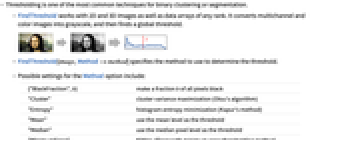
- 阈值是二元聚类或分割最常用的技术之一.
- FindThreshold 可用于二维和三维图像,以及任意阶数的数据数组. 它将多通道和彩色图像转化为灰度级图像,然后找到一个全局阈值.
- FindThreshold[image,Method->method] 指定用来决定阈值的方法.
- Method 选项的可能设置包括:
-
{"BlackFraction",b} 使得所有像素中的一定比例 b 变成黑色 "Cluster" 聚类方差最大化(Otsu 算法) "Entropy" 直方图熵最大化(Kapur 方法) "Mean" 将平均像素级作为阈值使用 "Median" 将中位数像素级作为阈值使用 "MinimumError" Kittler–Illingworth 最小误差阈值方法 - 默认设置为 Method->"Cluster".

范例
打开所有单元 关闭所有单元基本范例 (1)
范围 (3)
选项 (5)
Method (5)
默认情况下使用最大化两个簇之间的方差的 "Cluster" 方法:
r = RandomReal[MixtureDistribution[{3 / 5, 2 / 5}, {NormalDistribution[1, 1 / 2], NormalDistribution[2, 1 / 6]}], 10 ^ 6];
t = FindThreshold[r]Histogram[r, 50, Epilog -> {Blue, InfiniteLine[{t, 0}, {0, 1}]}]用 "MinimumError" 方法对从两个高斯分布抽取的数据进行分类:
r = RandomReal[MixtureDistribution[{3 / 5, 2 / 5}, {NormalDistribution[1, 1 / 2], NormalDistribution[2, 1 / 6]}], 10 ^ 6];
t = FindThreshold[r, Method -> "MinimumError"]Histogram[r, 50, Epilog -> {Blue, InfiniteLine[{t, 0}, {0, 1}]}]使用 "BlackFraction" 方法指定多少数据应该位于阈值以下:
r = RandomReal[NormalDistribution[1, 1 / 2], 10 ^ 6];Table[
t = FindThreshold[r, Method -> {"BlackFraction", f}];Histogram[r, 50, Epilog -> {Blue, InfiniteLine[{t, 0}, {0, 1}]}],
{f, {.2, .5, .8}}]r = RandomReal[MixtureDistribution[{3 / 5, 2 / 5}, {NormalDistribution[1, 1 / 2], NormalDistribution[2, 1 / 6]}], 10 ^ 6];Table[
t = FindThreshold[r, Method -> method];Histogram[r, 50, Epilog -> {Blue, InfiniteLine[{t, 0}, {0, 1}]}, PlotLabel -> method, Axes -> {True, False}],
{method, {"Cluster", {"BlackFraction", .5}, "Entropy", "Mean", "Median", "MinimumError"}}]methods = {{"BlackFraction", 0.6}, "Cluster", "Entropy", "Mean", "Median", "MinimumError"};i = [image];With[{t = FindThreshold[i, Method -> #]}, {#, t, Binarize[i, t]}]& /@ methods//TextGrid[#, Frame -> All]&应用 (1)
i = [image];
l = FindThreshold[(Differences /@ ComponentMeasurements[i, "BoundingBox"][[All, 2]])[[All, 1, 2]]]SelectComponents[i, Differences[#BoundingBox][[1, 2]] > l&]HighlightImage[i, %]技术笔记
-
▪
- 图像处理
文本
Wolfram Research (2010),FindThreshold,Wolfram 语言函数,https://reference.wolfram.com/language/ref/FindThreshold.html (更新于 2012 年).
CMS
Wolfram 语言. 2010. "FindThreshold." Wolfram 语言与系统参考资料中心. Wolfram Research. 最新版本 2012. https://reference.wolfram.com/language/ref/FindThreshold.html.
APA
Wolfram 语言. (2010). FindThreshold. Wolfram 语言与系统参考资料中心. 追溯自 https://reference.wolfram.com/language/ref/FindThreshold.html 年
BibTeX
@misc{reference.wolfram_2026_findthreshold, author="Wolfram Research", title="{FindThreshold}", year="2012", howpublished="\url{https://reference.wolfram.com/language/ref/FindThreshold.html}", note=[Accessed: 12-October-2026]}
BibLaTeX
@online{reference.wolfram_2026_findthreshold, organization={Wolfram Research}, title={FindThreshold}, year={2012}, url={https://reference.wolfram.com/language/ref/FindThreshold.html}, note=[Accessed: 12-October-2026]}