ColumnTypes[tab]
Tabularオブジェクト tab の列の要素型を与える.
ColumnTypes[tab,tsel]
tsel で選択された列の要素型を与える.
ColumnTypes
ColumnTypes[tab]
Tabularオブジェクト tab の列の要素型を与える.
ColumnTypes[tab,tsel]
tsel で選択された列の要素型を与える.
詳細
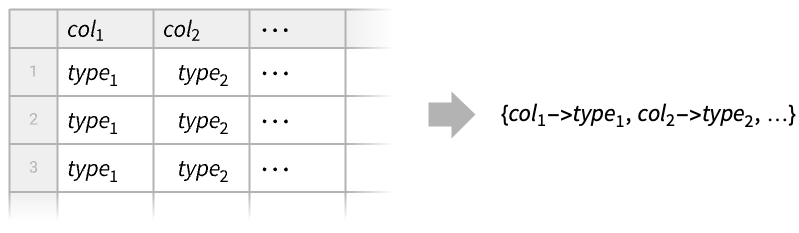
- ColumnTypesは,一般に,型変換あるいは使用可能な操作についての情報を得るために使われる.例えば,文字列に対して日付操作は行えない.
- ColumnTypes[tab,…]は,名前付きの列を持つTabularオブジェクト tab に対してペア coltype の連想を返す.
- ColumnTypes[tab,…]は,名前がない列を持つTabularオブジェクト tab に対しては型のリストを返す.
- 列型の選択器 tsel は以下の形式でよい.
-
tpatt 型のパターン tclass 型の名前付きのクラス - 使用可能な型のパターン tpatt には,"String","Integer*"や"Quantity"::["Real64",_]のようなケースが含まれる.
- 次は,使用可能な型のクラス tclass である.
-
"Numbers" 数の型 "MachineNumbers" 機械サイズの数の型 "Reals" 整数を含む実数値型 "MachineReals" 整数を含む機械サイズの実数値型 "Integers" 整数型 "MachineIntegers" 機械サイズの整数型 "FloatingPoint" 浮動小数点表現の数 "MachineFloatingPoint" 機械サイズの実数と複素数 "FloatingPointReals" 浮動小数点表現の実数 "MachineFloatingPointReals" 機械サイズの実数 "FloatingPointComplexes" 浮動小数表現の複素数 "Lists" 各要素はリストである "Strings" 各要素は文字列である - ColumnTypesは,TimeSeriesオブジェクトとEventSeriesオブジェクトの成分型も与えることができる.
例題
すべて開く すべて閉じる例 (3)
次のTabularオブジェクトに対して自動的に選択される型を求める:
Tabular[{{1, "dog", True}, {2, "cat", False}}, {"col1", "col2", "col3"}]ColumnTypes[%]Tabular[{{3.1, 4, False}, {2.5, -3, True}}, {"number", "symbol", "boolean"}]ColumnTypes[%, "Real*"]数値行列からキーがないTabularオブジェクトを構築する:
Tabular[{{1, 2.}, {3, 4.}, {5, 6.}}]ColumnTypes[%]スコープ (15)
数値型 (1)
data = ReplacePart[RandomInteger[{-100, 100}, 6], 4 -> Missing[]];ToTabular[<|"col" -> data|>, "Columns"]デフォルトで,このマシンでは整数は"Integer64"型を使って解釈される:
ColumnTypes[%]tab = ToTabular[<|"col8" -> data, "col16" -> data, "col32" -> data|>, "Columns", <|"ElementType" -> {"col8" -> "Integer8", "col16" -> "Integer16", "col32" -> "Integer32"}|>]ColumnTypes[tab]ブール型 (1)
文字列型 (1)
Quantity型 (2)
Quantity期間と欠落値の集合を取る:
data = {Quantity[3.2, "Minutes"], Quantity[90., "Seconds"], Missing[], Quantity[0., "Seconds"]}tab = ToTabular[<|"col" -> data|>, "Columns"]値は"Real64"の大きさと共通単位"Seconds"で保存される:
ColumnTypes[%]Tabularオブジェクトが十分に小さい場合は,デフォルトでもとの入力データがキャッシュされるので,Normalで回復できる:
Normal[tab]tab = CastColumns[tab, "col" -> "Quantity"::["Real32", "Minutes"]]ColumnTypes[%]Normal[tab]次元が異なる数量は"InertExpression"型を使って保存できる:
data = {Quantity[2, "Years"], Quantity[1, "LightYears"]}tab = ToTabular[<|"col" -> data|>, "Columns"]ColumnTypes[tab]特定の"Quantity"型を強制しようとすると欠落値になる:
CastColumns[tab, "col" -> "Quantity"::["Integer64", "Years"]]Normal[%]日付と時間の型 (3)
data = RandomDate[6]自動型検出を使ってTabularオブジェクトを作成する:
tab1 = ToTabular[<|"col" -> data|>, "Columns"]ColumnTypes[tab1]tab2 = ToTabular[<|"col" -> data|>, "Columns", <|"ElementType" -> {"Date"::["Integer64", "Day"]}|>]ColumnTypes[tab2]Normal[tab2]data = RandomTime[6]自動型検出を使ってTabularオブジェクトを作成する:
tab1 = ToTabular[<|"col" -> data|>, "Columns"]ColumnTypes[tab1]tab2 = ToTabular[<|"col" -> data|>, "Columns", <|"ElementType" -> {"Time"::["Integer64", "Hour"]}|>]ColumnTypes[tab2]Normal[tab2]data = RandomDate[6, CalendarType -> "Jewish"]tab = ToTabular[<|"col" -> data|>, "Columns"]ColumnTypes[tab]Normal[tab]GeoPosition型 (1)
EntityValue[EntityClass["Country", "SouthAmerica"], "Position"]ToTabularはデータを自動的に"GeoPosition"型の列として解釈する:
tab = ToTabular[<|"col" -> %|>, "Columns"]ColumnTypes[tab]GeoGraphics[{Red, PointSize[Large], Point[tab -> "col"]}, GeoBackground -> "Plain"]リストとタプル (2)
data = Tuples[{1, 2, 3}, 3]tab1 = ToTabular[data]ColumnTypes[%]tab2 = ToTabular[<|"col" -> data|>, "Columns", <|"ElementType" -> {"ListVector"["Integer8", 3]}|>]ColumnTypes[tab2]data = Tuples[{{"cat", "dog", "fox"}, {1, 2, 3}, {True, False}}]自動型検出を使ってTabularオブジェクトを作成する:
tab1 = ToTabular[<|"col1" -> data|>, "Columns"]ColumnTypes[tab1]tab2 = ToTabular[<|"col" -> data|>, "Columns", <|"ElementType" -> {"ListTuple"["String", "Integer8", "Boolean"]}|>]ColumnTypes[tab2]一般的な式 (1)
data = Region[RegularPolygon[#]]& /@ Range[3, 8]Tabularオブジェクトを作成すると,型"Expression"が一般的なWolfram言語式に割り当てられる:
ToTabular[<|"col" -> data|>, "Columns"]ColumnTypes[%]データ形式 (2)
TimeSeriesオブジェクトの成分型を抽出する:
TimeSeries[{{1, "dog"}, {4, "cat"}, {3, "fox"}}, {Today}, ComponentKeys -> {"number", "animal"}]ColumnTypes[%]連想は,対応するTabularオブジェクトの"Timestamp"列の型を含んでいる:
Tabular[%%]単純なTimeSeriesオブジェクトを取る:
TimeSeries[Quantity[{2.5, 3.2, 1.9}, "Volts"], {0}]タイムスタンプ成分は数値型または日付型を持つが,値成分は任意の型でよい:
ColumnTypes[%]列選択器 (1)
tab = Tabular[{{1, 2.3, "dog", True}, {2, 1.8, "cat", False}}, {"col1", "col2", "col3", "col4"}]ColumnTypes[tab]ColumnTypes[tab][[{"col1", "col3"}]]ColumnTypes[tab, "Boolean"]ColumnTypes[tab, "Integer*"]ColumnTypes[tab, "String" | "Boolean"]アプリケーション (1)
入力型を自動検出するTabularRowを作成する:
TabularRow[{1, "cat", Today}]ColumnTypes[%]TabularRow[{1, "cat", Today}, <|"ElementType" -> {"Integer8", "Categorical"[{"cat", "dog", "fox"}], Automatic}|>]ColumnTypes[%]関連するガイド
-
▪
- 表形式データのクリーニング ▪
- 表形式オブジェクト ▪
- 表形式処理の概要
テキスト
Wolfram Research (2025), ColumnTypes, Wolfram言語関数, https://reference.wolfram.com/language/ref/ColumnTypes.html (2026年に更新).
CMS
Wolfram Language. 2025. "ColumnTypes." Wolfram Language & System Documentation Center. Wolfram Research. Last Modified 2026. https://reference.wolfram.com/language/ref/ColumnTypes.html.
APA
Wolfram Language. (2025). ColumnTypes. Wolfram Language & System Documentation Center. Retrieved from https://reference.wolfram.com/language/ref/ColumnTypes.html
BibTeX
@misc{reference.wolfram_2026_columntypes, author="Wolfram Research", title="{ColumnTypes}", year="2026", howpublished="\url{https://reference.wolfram.com/language/ref/ColumnTypes.html}", note=[Accessed: 08-September-2026]}
BibLaTeX
@online{reference.wolfram_2026_columntypes, organization={Wolfram Research}, title={ColumnTypes}, year={2026}, url={https://reference.wolfram.com/language/ref/ColumnTypes.html}, note=[Accessed: 08-September-2026]}