ColumnTypes[tab]
给出 Tabular 对象 tab 的列的元素类型.
ColumnTypes[tab,tsel]
给出 tsel 选择的列的元素类型.
ColumnTypes
ColumnTypes[tab]
给出 Tabular 对象 tab 的列的元素类型.
ColumnTypes[tab,tsel]
给出 tsel 选择的列的元素类型.
更多信息
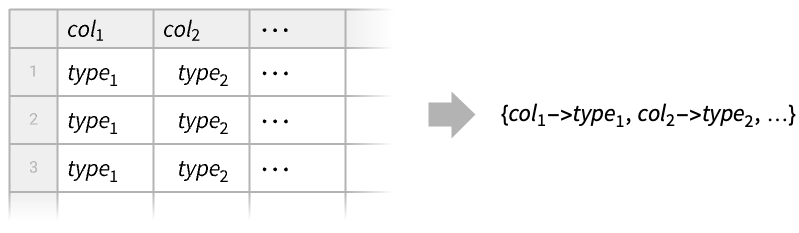
- ColumnTypes 通常用于获取类型信息,以便对类型进行转换或决定可以执行哪些操作. 例如,您不能对字符串进行日期运算.
- 对于具有命名列的 Tabular 对象 tab,ColumnTypes[tab,…] 返回 coltype 对的关联.
- 对于具有未命名列的 Tabular 对象 tab,ColumnTypes[tab,…] 返回类型列表.
- 列类型选择器 tsel 可以采用以下形式之一:
-
tpatt 类型模式 tclass 类型的命名类别 - 可能的类型模式 tpatt 包括 "String","Integer*" 或 "Quantity"::["Real64",_] 等情况.
- 可能的类型类 tclass 包括:
-
"Numbers" 数值类型 "MachineNumbers" 机器大小的数值类型 "Reals" 实值类型,包括整数 "MachineReals" 机器大小的实值类型,包括整数 "Integers" 整数类型 "MachineIntegers" 机器大小的整数类型 "FloatingPoint" 具有浮点表示的数值 "MachineFloatingPoint" 机器大小的实数和复数 "FloatingPointReals" 具有浮点表示的实数 "MachineFloatingPointReals" 机器大小的实数 "FloatingPointComplexes" 具有浮点表示的复数 "Lists" 各元素是一个列表 "Strings" 各元素是一个字符串 - ColumnTypes 还可以给出 TimeSeries 和 EventSeries 对象的分量类型.
范例
打开所有单元 关闭所有单元基本范例 (3)
查找为此 Tabular 对象自动选择的类型:
Tabular[{{1, "dog", True}, {2, "cat", False}}, {"col1", "col2", "col3"}]ColumnTypes[%]Tabular[{{3.1, 4, False}, {2.5, -3, True}}, {"number", "symbol", "boolean"}]ColumnTypes[%, "Real*"]从数值矩阵构建一个没有键的 Tabular 对象:
Tabular[{{1, 2.}, {3, 4.}, {5, 6.}}]ColumnTypes[%]范围 (15)
数值类型 (1)
data = ReplacePart[RandomInteger[{-100, 100}, 6], 4 -> Missing[]];ToTabular[<|"col" -> data|>, "Columns"]默认情况下,此机器将使用 "Integer64" 类型解释整数:
ColumnTypes[%]tab = ToTabular[<|"col8" -> data, "col16" -> data, "col32" -> data|>, "Columns", <|"ElementType" -> {"col8" -> "Integer8", "col16" -> "Integer16", "col32" -> "Integer32"}|>]ColumnTypes[tab]布尔类型 (1)
字符串类型 (1)
数量类型 (2)
取一组 Quantity 持续时间和缺失值:
data = {Quantity[3.2, "Minutes"], Quantity[90., "Seconds"], Missing[], Quantity[0., "Seconds"]}tab = ToTabular[<|"col" -> data|>, "Columns"]这些值使用 "Real64" 格式存储,单位统一为 "Seconds":
ColumnTypes[%]对于足够小的 Tabular 对象,原始输入数据会默认被缓存,而 Normal 可以恢复这些数据:
Normal[tab]tab = CastColumns[tab, "col" -> "Quantity"::["Real32", "Minutes"]]ColumnTypes[%]Normal[tab]不同维度的量可以使用 "InertExpression" 类型来存储:
data = {Quantity[2, "Years"], Quantity[1, "LightYears"]}tab = ToTabular[<|"col" -> data|>, "Columns"]ColumnTypes[tab]尝试强加特定的 "Quantity" 类型将导致缺失值:
CastColumns[tab, "col" -> "Quantity"::["Integer64", "Years"]]Normal[%]日期和时间类型 (3)
data = RandomDate[6]创建具有自动类型检测的 Tabular 对象:
tab1 = ToTabular[<|"col" -> data|>, "Columns"]ColumnTypes[tab1]tab2 = ToTabular[<|"col" -> data|>, "Columns", <|"ElementType" -> {"Date"::["Integer64", "Day"]}|>]ColumnTypes[tab2]Normal[tab2]data = RandomTime[6]创建具有自动类型检测的 Tabular 对象:
tab1 = ToTabular[<|"col" -> data|>, "Columns"]ColumnTypes[tab1]tab2 = ToTabular[<|"col" -> data|>, "Columns", <|"ElementType" -> {"Time"::["Integer64", "Hour"]}|>]ColumnTypes[tab2]Normal[tab2]data = RandomDate[6, CalendarType -> "Jewish"]tab = ToTabular[<|"col" -> data|>, "Columns"]ColumnTypes[tab]Normal[tab]GeoPosition 类型 (1)
EntityValue[EntityClass["Country", "SouthAmerica"], "Position"]ToTabular 自动将数据解释为 "GeoPosition" 类型的列:
tab = ToTabular[<|"col" -> %|>, "Columns"]ColumnTypes[tab]GeoGraphics[{Red, PointSize[Large], Point[tab -> "col"]}, GeoBackground -> "Plain"]列表和元组 (2)
data = Tuples[{1, 2, 3}, 3]tab1 = ToTabular[data]ColumnTypes[%]tab2 = ToTabular[<|"col" -> data|>, "Columns", <|"ElementType" -> {"ListVector"["Integer8", 3]}|>]ColumnTypes[tab2]data = Tuples[{{"cat", "dog", "fox"}, {1, 2, 3}, {True, False}}]创建具有自动类型检测的 Tabular 对象:
tab1 = ToTabular[<|"col1" -> data|>, "Columns"]ColumnTypes[tab1]tab2 = ToTabular[<|"col" -> data|>, "Columns", <|"ElementType" -> {"ListTuple"["String", "Integer8", "Boolean"]}|>]ColumnTypes[tab2]通用表达式 (1)
data = Region[RegularPolygon[#]]& /@ Range[3, 8]创建 Tabular 对象将类型"Expression" 分配给一般 Wolfram 语言表达式:
ToTabular[<|"col" -> data|>, "Columns"]ColumnTypes[%]数据的形式 (2)
提取 TimeSeries 对象的分量的类型:
TimeSeries[{{1, "dog"}, {4, "cat"}, {3, "fox"}}, {Today}, ComponentKeys -> {"number", "animal"}]ColumnTypes[%]关联包含了对应的 Tabular 对象中 "Timestamp" 列的类型:
Tabular[%%]下面是一个简单的 TimeSeries 对象:
TimeSeries[Quantity[{2.5, 3.2, 1.9}, "Volts"], {0}]时间戳分量的类型通常为数值或日期,而值分量则可以是任意类型:
ColumnTypes[%]列选择器 (1)
tab = Tabular[{{1, 2.3, "dog", True}, {2, 1.8, "cat", False}}, {"col1", "col2", "col3", "col4"}]ColumnTypes[tab]ColumnTypes[tab][[{"col1", "col3"}]]ColumnTypes[tab, "Boolean"]ColumnTypes[tab, "Integer*"]ColumnTypes[tab, "String" | "Boolean"]应用 (1)
创建具有自动输入类型检测的 TabularRow:
TabularRow[{1, "cat", Today}]ColumnTypes[%]TabularRow[{1, "cat", Today}, <|"ElementType" -> {"Integer8", "Categorical"[{"cat", "dog", "fox"}], Automatic}|>]ColumnTypes[%]文本
Wolfram Research (2025),ColumnTypes,Wolfram 语言函数,https://reference.wolfram.com/language/ref/ColumnTypes.html (更新于 2026 年).
CMS
Wolfram 语言. 2025. "ColumnTypes." Wolfram 语言与系统参考资料中心. Wolfram Research. 最新版本 2026. https://reference.wolfram.com/language/ref/ColumnTypes.html.
APA
Wolfram 语言. (2025). ColumnTypes. Wolfram 语言与系统参考资料中心. 追溯自 https://reference.wolfram.com/language/ref/ColumnTypes.html 年
BibTeX
@misc{reference.wolfram_2026_columntypes, author="Wolfram Research", title="{ColumnTypes}", year="2026", howpublished="\url{https://reference.wolfram.com/language/ref/ColumnTypes.html}", note=[Accessed: 06-September-2026]}
BibLaTeX
@online{reference.wolfram_2026_columntypes, organization={Wolfram Research}, title={ColumnTypes}, year={2026}, url={https://reference.wolfram.com/language/ref/ColumnTypes.html}, note=[Accessed: 06-September-2026]}