CompoundElement[{spec1,spec2,…}]
表示给出结果列表的字段或输入列表的形式或解释器规范.
CompoundElement[key1spec1,key2spec2,…]
表示给出结果关联的形式或解释器规范.
CompoundElement
CompoundElement[{spec1,spec2,…}]
表示给出结果列表的字段或输入列表的形式或解释器规范.
CompoundElement[key1spec1,key2spec2,…]
表示给出结果关联的形式或解释器规范.
更多信息
- 在 Interpreter 上下文中,speci 可以是任何用于 Interpreter 的规范,包括 CompoundElement 或 RepeatingElement.
- 在 FormObject 和 FormFunction 形式中,speci 可以是用于表单的任意规范,包括完整的关联,但只有简单的结构才可以显示为字段表格的形式.
- Interpreter[CompoundElement[{form1,form2,…}]][{input1,input2,…}] 有效等价于 {Interpreter[form1][input1],Interpreter[form2][input2],…}.
- 在 Interpreter[CompoundElement[{form1,form2,…}]][{input1,input2,…}] 中,inputi 列表必须与 formi 列表具有同样长度. 如果不是的话,会产生一个 Failure 对象.
- 来自于 Interpreter[CompoundElement[<|key1->spec1,…|>]][input] 的结果是一个包含每个 keyi 元素的关联. 如果 input 是一个列表,每个连续的 keyi 按序使用. 如果 input 是一个关联,任何丢失的 keyi 以丢失元素形式返回,任何与一个键相关联的值,如果不是 keyi 中的一个,会被删掉.
- 任何 speci 可以是 CompoundElement 或 RepeatingElement 对象.
范例
打开所有单元 关闭所有单元基本范例 (4)
使用 CompoundElement 合并任意类型的 Interpreter 调用:
Interpreter[CompoundElement[{"GivenName", {"home", "office", "mobile"}, "PhoneNumber"}]][{{"Alice", "home", "+44 020 1234 5678"}, {"Bob", "mobile", "+1 (202) 456-1111"}}]使用 CompoundElement 对要求连接 Wolfram Cloud 的调用编组,从而对 Interpreter 加速:
Interpreter[CompoundElement[{"City", "Country", "Integer"}]][{"rome", "italy", "4"}]对于不具有正确形状的数据,CompoundElement 将失效:
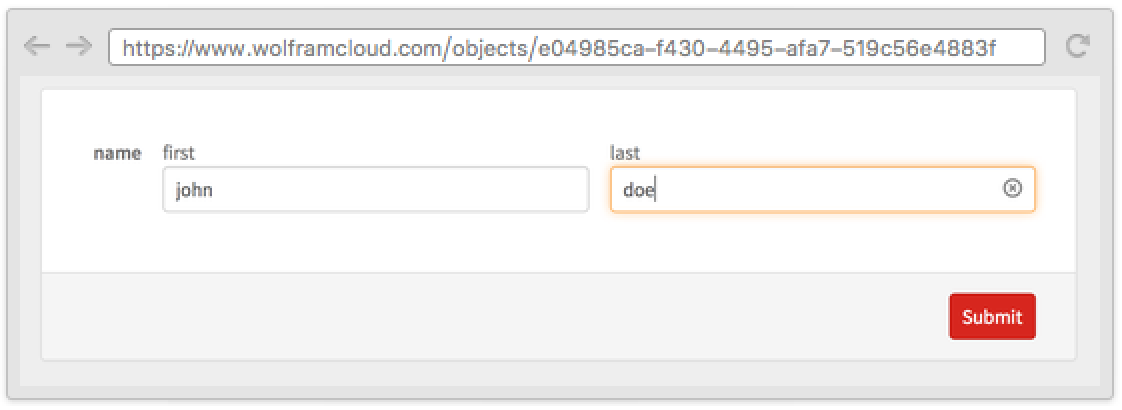
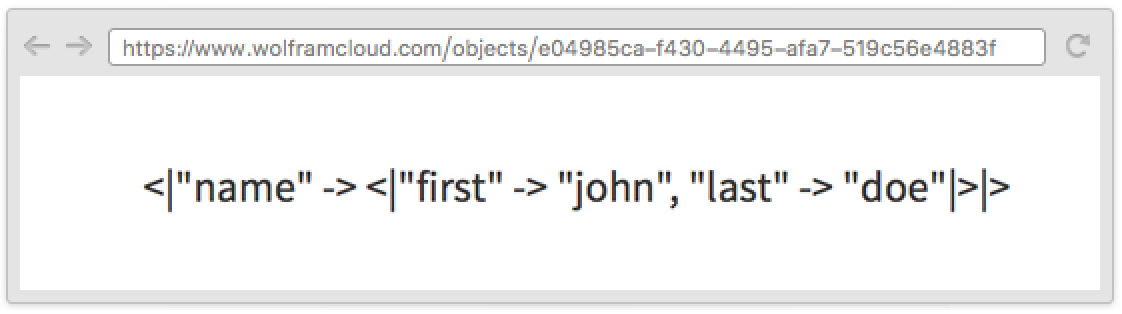
Interpreter[CompoundElement[{"Integer", "ComplexNumber"}]][{"2"}]CloudDeploy[FormFunction["name" -> CompoundElement[{"first" -> "String", "last" -> "String"}]]]应用 (2)
Interpreter[CompoundElement[<|"location" -> CompoundElement[{"City", "USState"}], "singer" -> "MusicAct", "song" -> "MusicWork"|>]][<|"location" -> {"memphis", "tennessee"}, "singer" -> "elvis", "song" -> "hound dog"|>]Interpreter[CompoundElement[<|"x" -> "Real", "y" -> "Real"|>]][{"12.4", "-5"}]Interpreter[CompoundElement[<|"x" -> "Real", "y" -> "Real"|>]][<|"y" -> "12.4", "x" -> "-5"|>]属性和关系 (3)
将 CompoundElement 与 RepeatingElement 组合使用,诠释更加复杂的结构:
Interpreter[CompoundElement[<|"numbers" -> RepeatingElement["Integer"], "fruit" -> RepeatingElement[{"apple" -> "pomme", "orange" -> "orange", "grapefruit" -> "pamplemousse"}]|>]][<|"numbers" -> {"1", "14", "-4"}, "fruit" -> {"apple", "pomme", "grapefruit"}|>]在 FormFunction 中与 RepeatingElement 一起使用生成字段表格:
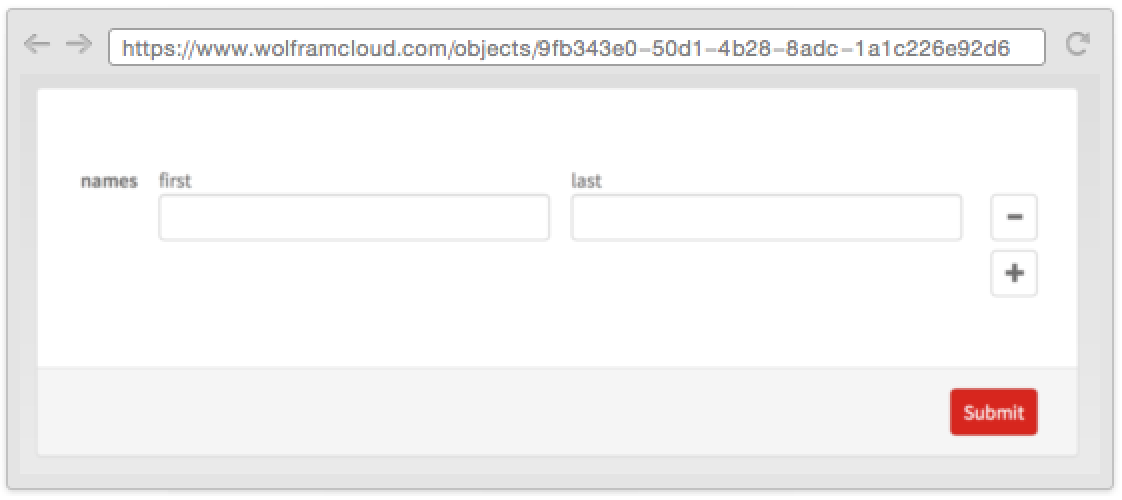
CloudDeploy[FormFunction["names" -> RepeatingElement[CompoundElement[<|"first" -> "String", "last" -> "String"|>]]]]将 CompoundElement 与 Alternatives 一起使用来解释不同形式的数据:
Interpreter[CompoundElement[{"City", "USState"}] | "City"]["bangkok"]Interpreter[CompoundElement[{"City", "USState"}]][{"trenton", "indonesia" | "NJ"}]相关指南
-
▪
- 设置输入解释器 ▪
- 表单结构与布局 ▪
- 自由格式和外部输入 ▪
- 创建表单界面和应用程序
文本
Wolfram Research (2015),CompoundElement,Wolfram 语言函数,https://reference.wolfram.com/language/ref/CompoundElement.html.
CMS
Wolfram 语言. 2015. "CompoundElement." Wolfram 语言与系统参考资料中心. Wolfram Research. https://reference.wolfram.com/language/ref/CompoundElement.html.
APA
Wolfram 语言. (2015). CompoundElement. Wolfram 语言与系统参考资料中心. 追溯自 https://reference.wolfram.com/language/ref/CompoundElement.html 年
BibTeX
@misc{reference.wolfram_2026_compoundelement, author="Wolfram Research", title="{CompoundElement}", year="2015", howpublished="\url{https://reference.wolfram.com/language/ref/CompoundElement.html}", note=[Accessed: 06-October-2026]}
BibLaTeX
@online{reference.wolfram_2026_compoundelement, organization={Wolfram Research}, title={CompoundElement}, year={2015}, url={https://reference.wolfram.com/language/ref/CompoundElement.html}, note=[Accessed: 06-October-2026]}