

グラフ g の連結成分を与える.
ConnectedGraphComponents[g,{v1,v2,…}]
頂点 v1, v2, …の少なくとも1つを含む連結成分を与える.
ConnectedGraphComponents[g,patt]
パターン patt にマッチする頂点を含む連結成分を与える.
ConnectedGraphComponents[{vw,…},…]
規則 vw を使ってグラフ g を指定する.
ConnectedGraphComponents
グラフ g の連結成分を与える.
ConnectedGraphComponents[g,{v1,v2,…}]
頂点 v1, v2, …の少なくとも1つを含む連結成分を与える.
ConnectedGraphComponents[g,patt]
パターン patt にマッチする頂点を含む連結成分を与える.
ConnectedGraphComponents[{vw,…},…]
規則 vw を使ってグラフ g を指定する.
詳細とオプション
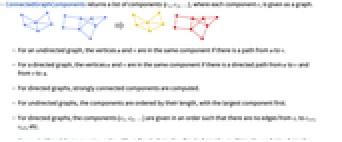
- ConnectedGraphComponentsは成分のリスト{c1,c2,…}を返す.各成分 ciはグラフとして与えられる.
- 無向グラフで頂点 u から頂点 v への経路がある場合は,u と v は同じ成分中にある.
- 有向グラフで頂点 u から頂点 v あるいは v から u への有向経路がある場合は,u と v は同じ成分中にある.
- 有向グラフについては強連結成分が計算される.
- 無向グラフについては成分は長さによって並べられる.最大のものが先頭に置かれる.
- 有向グラフについては,成分{c1,c2,…}は ciから ci+1, ci+2等への辺がないような順序で与えられる.
- ConnectedGraphComponentsは,無向グラフ,有向グラフ,多重グラフ,混合グラフに使うことができる.

例題
すべて開く すべて閉じる例 (1)
スコープ (8)
ConnectedGraphComponentsは無向グラフに使うことができる:
ConnectedGraphComponents[[image]]ConnectedGraphComponents[[image]]ConnectedGraphComponents[[image]]ConnectedGraphComponents[[image]]ConnectedGraphComponents[{3 -> 1, 1 -> 5, 2 -> 4, 2 -> 6, 3 -> 5, 4 -> 6}]ConnectedGraphComponents[[image], {1, 7}]ConnectedGraphComponents[[image], v_ ? EvenQ]ConnectedGraphComponentsは大きいグラフに使うことができる:
RandomGraph[{10000, 20000}];ConnectedGraphComponents[%]//Length//Timingアプリケーション (4)
g = DirectedGraph[GridGraph[{10, 30}], "Random", VertexSize -> 0.6, GraphHighlightStyle -> "DehighlightFade"];HighlightGraph[g, Select[ConnectedGraphComponents[g], VertexCount[#] > 1&]]蓮池のカエルは,25枚の蓮の浮葉から浮葉へ跳び移るために,1.5フィートジャンプすることができる.蓮の葉の密度とSpatialGraphDistributionを使って,カエルのジャンプのネットワークをモデル化する:
lilyDensity = MixtureDistribution[{1, 1, 1}, {BinormalDistribution[{0, 0}, {1, 1}, 0], BinormalDistribution[{-1, 4}, {1, 1}, -1 / 2], BinormalDistribution[{4, 4}, {1, 1}, 1 / 3]}];lilyPond = SpatialGraphDistribution[25, 1.5, lilyDensity];g = RandomGraph[lilyPond, VertexShape -> [image], VertexSize -> {"Scaled", 0.1}, EdgeStyle -> Opacity[0], Background -> Hue[0.6, 0.8, 0.4], ImageSize -> 150]VertexCount[First[ConnectedGraphComponents[g]]]すべての浮葉を訪れるためにカエルが泳がなければならない回数を求める:
Length[ConnectedGraphComponents[g]] - 1行列A〚p-1,p〛がブロック三角行列になるような順列pを求める:
A = (| | | | | |
| -- | -- | -- | -- | -- |
| 0 | 0 | a2 | 0 | 0 |
| 0 | 0 | 0 | 0 | a3 |
| a5 | 0 | 0 | 0 | 0 |
| 0 | 0 | 0 | a4 | 0 |
| 0 | a1 | 0 | 0 | 0 |);AdjacencyGraph[Map[Boole[!PossibleZeroQ[#]]&, A, {2}]]VertexList /@ ConnectedGraphComponents[%]p = Flatten[%]A[[InversePermutation[p], p]]//MatrixForm特性と関係 (4)
WeaklyConnectedGraphComponentsを使って有向グラフの弱連結成分を求める:
g = Graph[{12, 23, 31, 34, 45, 35, 67}]WeaklyConnectedGraphComponents[g]ConnectedGraphComponents[UndirectedGraph[g]]ConnectedGraphQを使ってグラフが連結かどうかを調べる:
RandomGraph[{10, 8}]ConnectedGraphQ[%]g = GridGraph[{2, 3}]ConnectedGraphQ[g]ConnectedGraphComponents[g]//Length
個の頂点と
本の辺があるグラフにはすべて,少なくとも
個の成分がある:
g = RandomGraph[{10, 8}]Length[ConnectedGraphComponents[g]] ≥ VertexCount[g] - EdgeCount[g]関連するガイド
テキスト
Wolfram Research (2016), ConnectedGraphComponents, Wolfram言語関数, https://reference.wolfram.com/language/ref/ConnectedGraphComponents.html.
CMS
Wolfram Language. 2016. "ConnectedGraphComponents." Wolfram Language & System Documentation Center. Wolfram Research. https://reference.wolfram.com/language/ref/ConnectedGraphComponents.html.
APA
Wolfram Language. (2016). ConnectedGraphComponents. Wolfram Language & System Documentation Center. Retrieved from https://reference.wolfram.com/language/ref/ConnectedGraphComponents.html
BibTeX
@misc{reference.wolfram_2026_connectedgraphcomponents, author="Wolfram Research", title="{ConnectedGraphComponents}", year="2016", howpublished="\url{https://reference.wolfram.com/language/ref/ConnectedGraphComponents.html}", note=[Accessed: 13-September-2026]}
BibLaTeX
@online{reference.wolfram_2026_connectedgraphcomponents, organization={Wolfram Research}, title={ConnectedGraphComponents}, year={2016}, url={https://reference.wolfram.com/language/ref/ConnectedGraphComponents.html}, note=[Accessed: 13-September-2026]}